





IT procurement is the process of buying and managing technology while controlling costs. For distributed teams, it means setting device standards, streamlining approvals, choosing the right suppliers, and tracking devices from delivery to recovery or retirement.
Need 50 laptops for your team? Buying them is the easy part. Making sure they meet your needs, fit your budget, and reach the right people takes a little more planning.
That’s what IT procurement is: how a business plans, sources, buys, and receives the technology it needs to run, from laptops and software to cloud services and IT support.
Now imagine those 50 laptops are for employees in 14 countries. Each person needs the right keyboard layout, a compatible power adapter, and a warranty that’s valid where they live, and the device has to arrive before their first day. Customs, import duties, and local purchasing rules add delays and costs on top.
That’s the real challenge: getting suppliers, budgets, and local requirements to line up so the right technology reaches the right people on time.
This guide walks you through the IT procurement process, from defining requirements and selecting suppliers to managing costs, coordinating deliveries, and tracking devices after purchase.
What is IT Procurement?
IT procurement is the process of identifying technology needs, evaluating suppliers, purchasing equipment or services, and managing those purchases throughout their lifecycle. Also called technology procurement or IT purchasing, it covers everything from the initial request to deployment, renewal, and eventual retirement.
The process varies by technology. Each category comes with different purchasing decisions, costs, and management requirements.
This guide focuses primarily on hardware procurement, where distributed teams face additional challenges coordinating purchases, deliveries, and device returns across countries. For a broader look at different approaches to managing these needs, explore IT procurement solutions.
IT Procurement vs General Purchasing
Both involve sourcing suppliers, comparing costs, and managing purchases. IT procurement requires additional technical and lifecycle considerations because technology must work with existing systems, meet security requirements, and remain manageable after purchase. Here’s a quick comparison:
These requirements affect total cost, delivery speed, security, and how reliably IT can track and retire each asset.
What is IT Hardware Procurement?
IT hardware procurement is the process of sourcing, buying, configuring and delivering physical devices, such as laptops, monitors and phones, then tracking them until they’re recovered or retired. It follows the same steps as any IT purchase, but physical devices add problems software never has: shipping, customs, local specifications and getting the device back.
For distributed teams, three things make hardware harder to buy than software, cloud or services:
- Lead times depend on the route. GroWrk’s State of Global IT Hardware Procurement 2026 found that buying in the US and shipping abroad takes 10–21 days on average, plus customs delays, compared with 3–5 days when devices are sourced locally through IT lifecycle services.
- The device has to fit the country. Keyboard layout, power plug and warranty coverage all change at the border.
- It has to come back. Unlike a SaaS licence, a laptop has to be physically collected, wiped and redeployed or retired when someone leaves.
The sections below cover each of these, from total cost and country-level details to timing purchases and recovering devices.
Why does IT Procurement Matter?
Poorly managed IT procurement creates four main problems:
- Cost. Without a central view of spending, two teams may buy the same tool without realising it. Untracked purchases also make it harder to see where budgets are going.
- Security. A laptop bought outside the approved process may miss device enrolment. Without MDM, IT may lack the controls to enforce encryption, manage updates, and remotely wipe it. Unapproved software subscriptions can also create shadow IT that falls outside normal oversight.
- Speed. Without a laptop on day one, a new hire may lose productive time or resort to a personal device, creating additional security risks.
- Audit and compliance. Auditors need to know which devices hold company data, who has them, and what happened when employees left. Incomplete asset records make those questions harder to answer reliably.
Avoiding these problems requires clear ownership, not just better purchasing decisions. That starts with defining who requests, approves, buys, and tracks technology across its lifecycle.
Who is Responsible for IT Procurement?
IT procurement is usually a shared responsibility. IT defines what the business needs, finance oversees spending, procurement manages supplier relationships, and HR provides hiring dates and employee locations. The exact split depends on the company’s size and approval policies.
Larger companies may have a dedicated IT procurement manager, while smaller teams often assign these responsibilities to the head of IT. Regardless of who owns the work, the process follows the same core steps.
What are the Steps in the IT Procurement Process?
The IT procurement process has nine steps that fall into three stages: plan and request, source and buy, then receive, deploy, and track.
In practice, these nine steps fall into three stages, and each has different risks to manage.
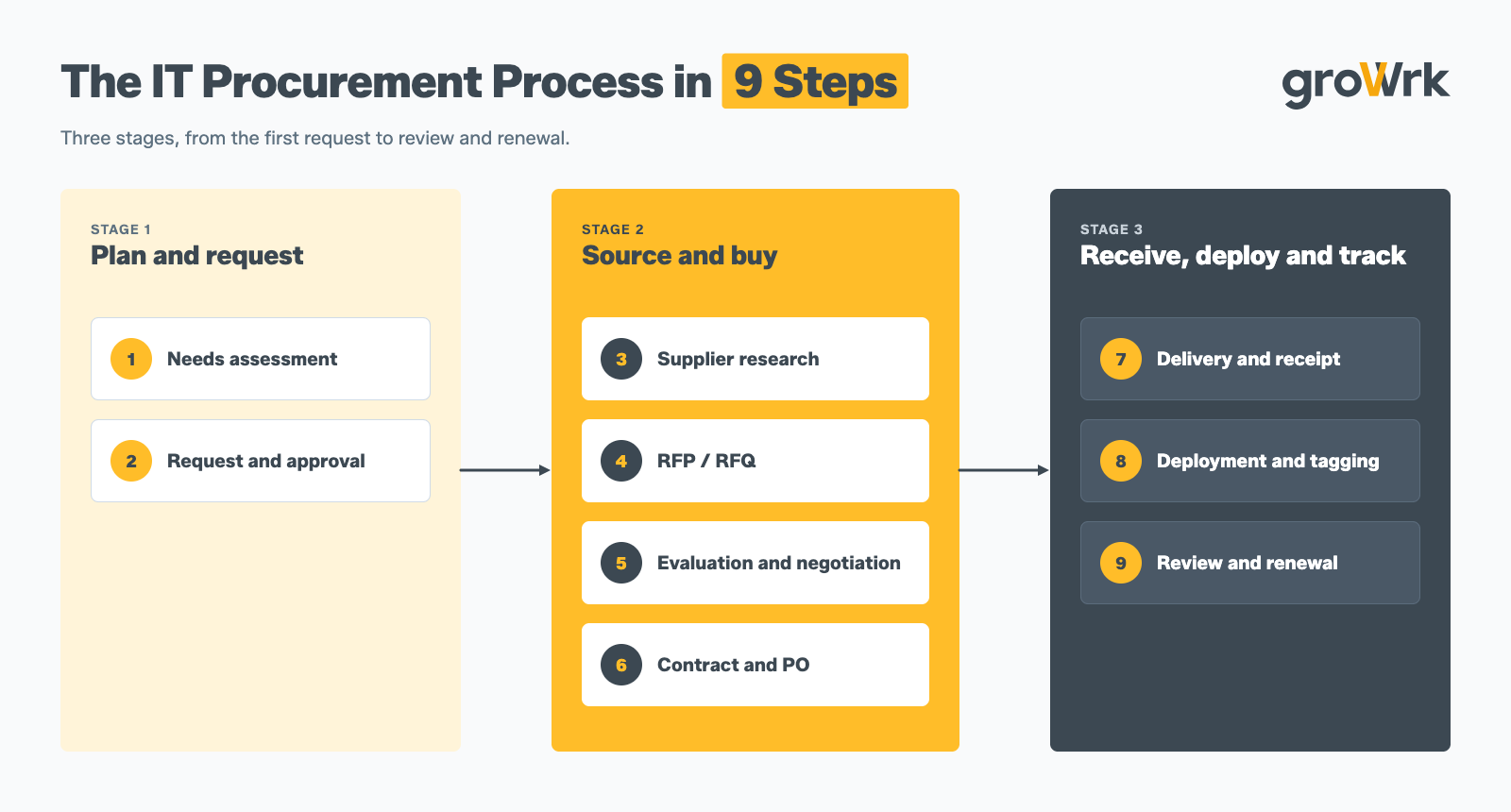
Plan and Request (Steps 1–2)
A common mistake is letting every employee choose their own device configuration. That leaves IT managing dozens of specifications, making purchasing, support, and replacements harder to standardise.
Instead, use pre-approved, role-based bundles. When a designer and an account executive both start on Monday, for example, their requests can be as simple as “Design bundle, Lisbon” and “Sales bundle, Lisbon” rather than a lengthy discussion about RAM and specifications.
Source and Buy (Steps 3–6)
Once requirements and approvals are clear, the next task is finding the right supplier and agreeing on the terms.
An RFQ (request for quotation) asks suppliers to price a defined specification. An RFP (request for proposal) asks them to propose a solution to a broader need. An RFQ is generally sufficient for standard laptop purchases, while an RFP is more useful when evaluating complex services or different approaches to a problem.
When negotiating, look beyond the unit price. Check delivery commitments, warranty coverage, shipping charges, and return terms before choosing a supplier. For global purchases, compare IT hardware procurement services to understand how different providers handle sourcing, pricing, and delivery across regions.
Receive, Deploy and Track (Steps 7–9)
A purchase isn't complete when the box arrives. IT needs to verify the delivery, configure and enrol the device, then record its serial number, assigned user, location, purchase cost, and warranty details in the asset inventory.
Assigning an owner at receipt makes the device easier to locate, audit, and recover when an employee leaves.
The final step is to review what happened by asking questions like:
- Did the supplier meet delivery commitments?
- Were there unexpected costs?
- Did the equipment meet employees' needs?
Use the answers to improve future requirements and supplier decisions.
How to Choose IT Vendors
Choose vendors by what happens when something goes wrong, not by what the brochure says. Here are the eight criteria that cover most of it:
- Country coverage: Can the supplier source and deliver devices in every country where your employees work, and support recovery when they leave? If you're hiring in the UK, compare UK laptop procurement providers for remote teams.
- Lead times: Ask for actual delivery performance by country where comparable data is available.
- Warranty terms: Is the warranty valid in the country where each device will be used?
- Pricing transparency: Are shipping, duties, VAT, and other charges itemised?
- Security certifications: Are relevant certifications current and independently verifiable?
- Integrations: Can the supplier's process work with your MDM, identity provider, HRIS, and ticketing systems?
- Support: What support channels, languages, and time-zone coverage are available?
- End of life: Can the supplier support retrieval, secure data erasure, resale, or recycling where required?
Score suppliers against the same criteria and document your decision. After selecting a vendor, establish clear processes for managing performance, communication, and the ongoing relationship. The IT vendor management best practices cover how to manage that relationship effectively.
Even a well-chosen supplier doesn’t tell you whether you got a good deal. For that, you need the full cost of owning the device.
What Does a Laptop Really Cost? Total Cost of Ownership
Total cost of ownership (TCO) includes the costs of buying, configuring, supporting, recovering, and disposing of a device. For cross-border purchases, shipping, import charges, and retrieval can add substantially to the initial price.
Here’s what that looks like for a real case from GroWrk’s State of Global IT Hardware Procurement 2026: a MacBook Air bought in the US for $999 and shipped to an employee in Brazil. The landed cost comes from the report; the lifecycle lines after it are illustrative and will vary by supplier and support arrangements.
How to Buy IT Equipment for Teams in Multiple Countries?
You can ship devices from headquarters or source them in each employee’s country. Shipping from HQ keeps supplier coordination simple, but adds customs paperwork, duties and harder returns. Sourcing locally keeps delivery, warranty and returns domestic, but means managing a supplier in each country.
Say you’re hiring 12 engineers across Germany, Brazil and India next quarter. Shipping from headquarters means handling customs, duties and delivery timelines in three countries, plus confirming the right keyboard and charger for each hire. Buying locally means coordinating three supply chains, but each delivery stays domestic.
The right choice depends on hiring volume, local availability, total cost, lead times and warranty coverage. Before standardising on either approach, check the requirements in each hiring country and compare the full cost and expected delivery time. Deciding which purchases stay central and which each country makes locally is the core of a global procurement strategy.
The Country-Level Details Teams Forget
Keyboard layouts, plug types, duties, VAT and delivery times all change at the border. One detail catches teams out more than the rest:
- Delivery to home addresses. Couriers may need a phone number, someone home to sign, and in some countries, such as Brazil, a recipient tax ID for customs, one of the steps in the international procurement process.
For duties, VAT, plug types, keyboard layouts and lead times in the 10 countries distributed teams hire in most, see our guide to global IT procurement. Getting the details right still doesn’t help if the device arrives a week after the employee starts.
Timing Purchases to Start Dates
It's always better to trigger procurement from the HRIS record rather than relying on a last-minute Slack message. When an offer is accepted and the employee's start date and country are recorded, the request follows the relevant equipment bundle automatically.
So, work backwards from the start date, allowing time for sourcing, configuration, and delivery. Set an order-by date with a buffer for delays; if that date has passed, consider expedited shipping or a loaner device.
The typical order looks similar almost everywhere. The difference is in the slowest orders: in the Philippines, 1 in 10 deliveries took more than 16 business days, against 8 in Mexico. That’s the number to plan around when you set order-by dates. Deliveries also became more predictable through the year: the time 9 in 10 deliveries finished within fell from 13 business days in January to 8 in August.
Source: GroWrk Logistics Operations, Delivery & Collection Performance by Region (September 2026). The operating clock counts business days an order is actively with GroWrk and stops while it waits on the employee or client; end to end runs from order raised to order closed. Canada’s sample is small, so its figures are less stable. Historical performance, not a contractual commitment.
For your own process, measure both the time from order creation to delivery and the time employees spend waiting for equipment. That distinction helps you identify whether delays come from sourcing and fulfilment or from late requests, approvals, configuration, or employee responses. GroWrk’s IT onboarding service supports sourcing, device configuration, and shipping across countries.
After the Purchase: Tracking, Recovery and Redeployment
Procurement doesn't end at delivery. Your process should define who arranges device returns when employees leave, where recovered devices go, and whether they will be redeployed, resold, or recycled.
GroWrk has recovered more than 50,000 devices. Over the last 12 months alone, it recovered 10,257 devices across 98 countries, with a 99% retrieval success rate and a median recovery time of 14 days.
In its State of IT Lifecycle Management research, 41% of IT professionals identified retrieving devices after an employee leaves as a major pain point, with employee refusal to return a device and shipping logistics the most common obstacles. Together, these figures highlight why device recovery needs to be planned as part of the lifecycle rather than handled as an afterthought.
All of this raises an honest question: should your team manage that work in-house, or would it benefit from external support?
Should You Handle IT Procurement In-House or Outsource?
Handle it in-house while you’re buying in one or two countries and someone has the time. Outsource once procurement becomes a second job for people with other work, across several countries.
A quick test: If sourcing, supplier coordination and fulfilment are taking up too much IT time, outsourcing the execution while you keep the decisions is usually the better trade. Our guide to procurement outsourcing covers what to hand over, what to keep, and when not to outsource.
Whether you keep it in-house or outsource, the tools you use help coordinate requests, approvals, supplier information, and spending.
What Tools Do You Need for IT Procurement?
The right IT procurement software centralises requests, approvals and supplier information so spending is visible. Most teams need some mix of e-procurement, IT asset management, contract management and spend analysis.
Choose tools based on your biggest process gap. If device visibility is the problem, prioritise ITAM. If requests and approvals are scattered, start with e-procurement. Teams focused specifically on hardware purchasing can also explore IT hardware procurement tools to understand the options for managing equipment-related workflows.
How Do You Measure IT Procurement?
Track KPIs that show whether procurement is moving quickly, controlling spend, meeting delivery dates, and recovering devices when employees leave. Use consistent definitions and reporting periods to compare performance over time.
If you’re building a measurement process from scratch, start with time to first device and device recovery rate. They connect procurement to two concrete outcomes: getting new employees equipped on time and recovering company-owned hardware when people leave.
Once these metrics establish a baseline, you can identify where the process is breaking down.
Common IT Procurement Mistakes
Most procurement problems start with small oversights that compound over time. These two mistakes are preventable with clearer purchasing controls and ownership.
- Ignoring contract terms. Check data-protection clauses for services that touch your data, and make sure warranty and return clauses actually cover the country where the device will live. Get legal to read them before signature, not after the first dispute.
- Missing owner records. Assign each device to a named owner in the asset inventory when it arrives. Without one, nobody knows who to chase when the employee leaves, and the device is much harder to recover.
Managing IT procurement across countries takes more than negotiating a good device price. Teams also need reliable sourcing, predictable delivery, accurate asset records, and a plan for recovering equipment when employees leave.
GroWrk supports the physical device lifecycle across 150+ countries, from sourcing and delivering equipment for new hires to coordinating returns when employees leave. This gives IT teams a consistent way to manage device logistics across locations, reduce the administrative burden of coordinating multiple vendors, and maintain visibility into equipment as it moves between employees and locations.