You've got asset tags on everything. Every laptop, every monitor, every piece of hardware has a nice little barcode or RFID sticker. You can tell me exactly which desk that MacBook is sitting on right now.
But here's what you can't tell me: Is anyone actually using it? Is it powerful enough for what they're doing? Is it sitting idle 90% of the day while you're about to buy ten more just like it?
Most companies use asset tags as fancy location trackers. And that's where we stopped thinking about what these things could actually do. Used well, an asset tag can do far more than mark where a device sits.
TL;DR
- Asset tags are basically just telling you where stuff is, not whether it's actually useful
- You need utilization metrics way more than you need location data (but nobody's tracking them)
- Your tagging system and IT management platforms don't talk to each other, which creates massive blind spots in your asset intelligence
- Security vulnerabilities pop up when asset tags can't communicate with access management and compliance tools
- Refresh cycles driven by age rather than actual usage patterns waste capital and create environmental impact
- Modern asset management requires tags that generate actionable insights, not just inventory lists
Why Asset Tags Became Inventory Theater
We started tagging assets because some auditor in 2005 needed proof we hadn't lost a bunch of expensive equipment. Made sense at the time. Still makes sense, actually.
The problem? We never evolved past that first use case. Asset tags became synonymous with accountability in the most basic sense: yes, this laptop exists, and yes, it's in this person's possession.
Finance departments loved it. IT teams tolerated it. Everyone agreed it was necessary. But somewhere between necessary and useful, we stopped evolving the practice.
Where is it? That's the only question we're still asking. That's inventory theater.
I talked to an IT director last month at a mid-sized software company, about 300 people across four offices. They implemented asset tagging three years ago. Scanned everything at deployment, ran quarterly audits, kept their asset register absolutely pristine.
Then the CFO asked why hardware costs were up 40% year-over-year when headcount was flat.
The asset system had nothing. It could tell you every laptop existed and who had it, but it couldn't explain why engineering was demanding new MacBooks every 18 months while marketing's three-year-old devices barely got touched.
They were managing inventory. Not assets.

The Audit-First Mentality That Stuck
Compliance requirements shaped early asset tagging. Financial audits needed physical verification. IT audits needed device counts. Everything pointed to the same goal: prove you still have the stuff, prove you know where it is, move on.
This audit-first approach created systems built for annual counts rather than continuous intelligence. You tag everything at onboarding, scan it during spot checks, verify it at offboarding. Between those events? The asset tag just exists.
We built entire workflows around this. Asset management became something you do four times a year, not something that's always running in the background. In fact, many teams still rely on basic IT asset management checklists that prioritize compliance over actionable intelligence.
The problem runs deeper than frequency. When compliance drives your asset tagging system, you're measuring success by audit pass rates, not by how well asset data informs business decisions. Your asset labels serve external requirements instead of internal needs.
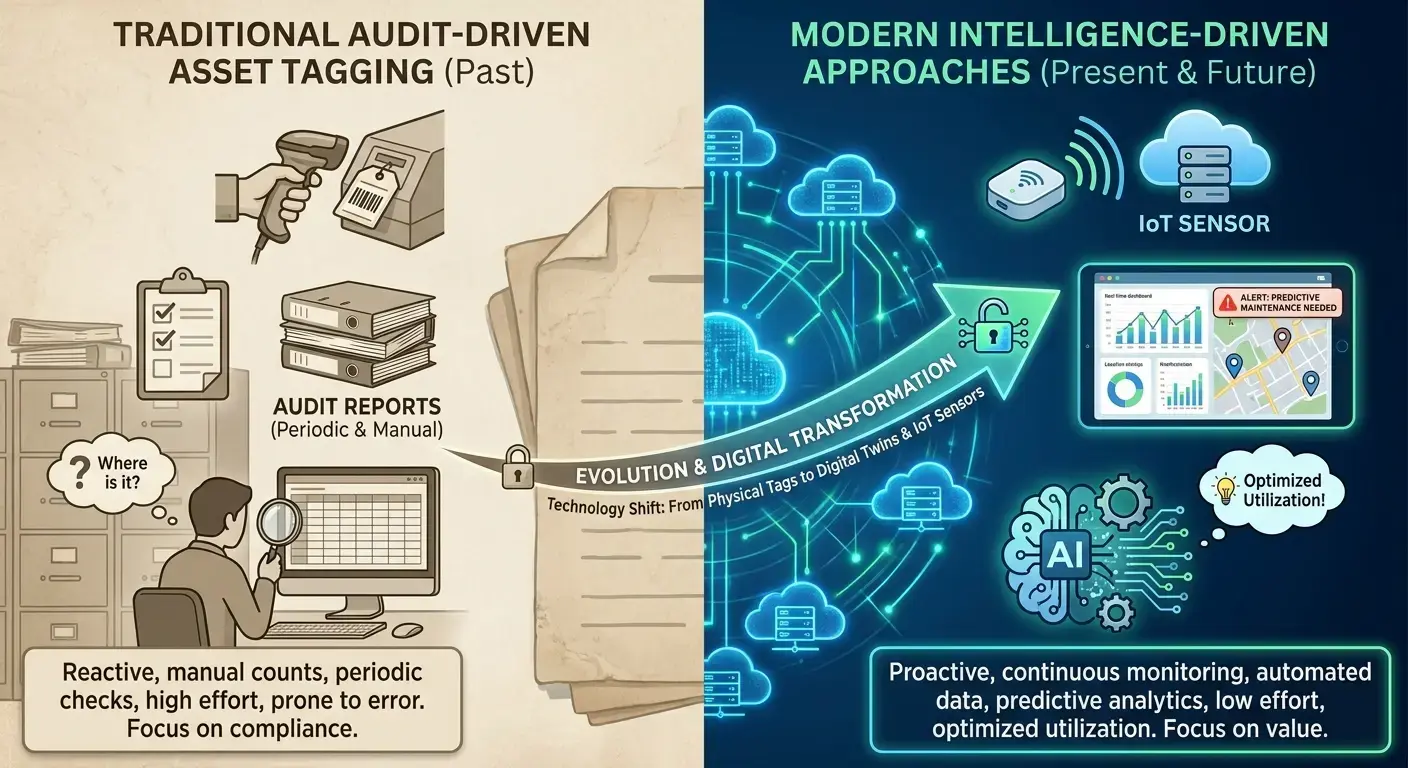
| Traditional Audit-Driven Tagging | Intelligence-Driven Tagging |
|---|---|
| Annual or quarterly scans | Continuous data collection |
| Location verification only | Location + utilization + performance |
| Compliance-focused reporting | Decision-focused analytics |
| Reactive to audit requirements | Proactive for operational needs |
| Siloed in asset management system | Integrated across IT platforms |
| Manual reconciliation processes | Automated data flows |
When Location Data Became the Ceiling
Knowing where an asset sits tells you almost nothing about its value to your organization. You can have perfect location accuracy and still make terrible decisions about hardware spending, refresh cycles, and resource allocation.
That laptop in the Denver office? It's there. Great. Is it being used eight hours a day or eight minutes a day? Is it running the software your team needs, or is it underpowered for current workflows?
Location data can't answer any of those questions.
What is an asset tag really accomplishing if it only confirms physical presence? We've accepted this limitation for so long that we've forgotten to question whether it's sufficient.
We stopped looking up. Asset tag implementations focused on making location tracking more efficient rather than expanding what gets tracked. Better scanners, more durable labels, faster database updates. All improvements to a fundamentally limited approach.
The Hidden Cost of Passive Tracking
Every asset you're tracking passively represents a decision you're making blindly. You're renewing that laptop lease without knowing if the device is being used. You're ordering new equipment based on headcount rather than need.
These aren't small inefficiencies. They're structural problems that cost real money and create real friction for your teams.
Capital Waste You Can't See
Hardware budgets are massive. And most organizations are burning 20-30% more than they need to because they have no idea how their devices are actually being used.
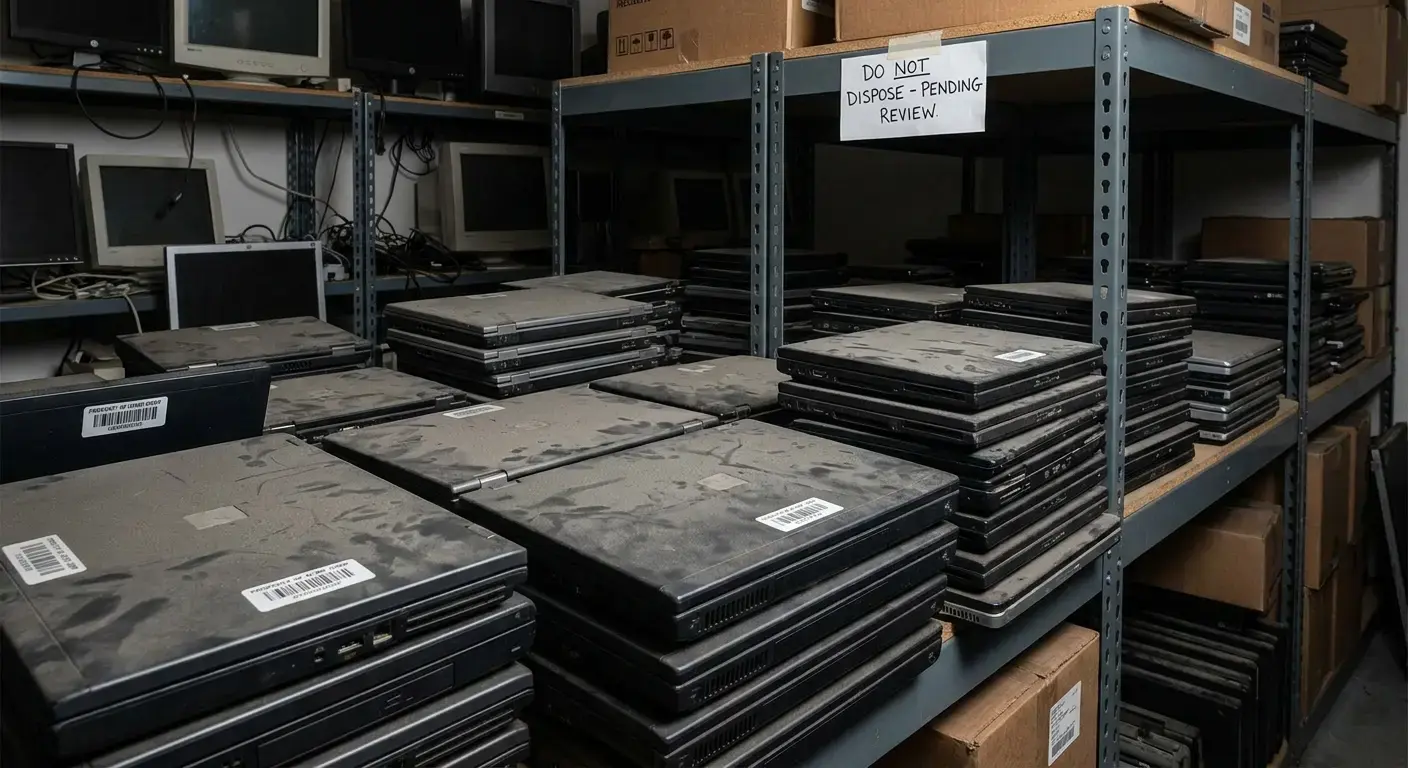
You're paying for laptops that sit in drawers. You're refreshing equipment that's working fine. You're maintaining insurance on devices that haven't been powered on in six months.
Passive tracking makes this possible. Without usage data, you default to conservative assumptions. Better to have too much than too little, right? Except "too much" translates to hundreds of thousands of dollars in unnecessary capital expenditure for mid-sized companies.
The waste extends beyond initial purchase costs. You're paying for licenses tied to devices that aren't in active use. You're maintaining insurance coverage for equipment sitting in storage. Organizations struggling with this often benefit from understanding IT cost optimization strategies that go beyond simple asset tracking.
Your asset labels confirm these idle devices exist. They just can't tell you the devices are idle. That distinction costs you every quarter. An asset tag that surfaces idle devices turns that quarterly leak into a number you can recover, which a location-only asset tag never will.
Capital Waste Audit Checklist:
- Pull your asset register (purchase dates, who has what)
- Cross-reference against your MDM or endpoint management data for last check-in dates
- Identify devices with no activity in the past 90 days
- Calculate total hardware value of inactive devices
- Review software licenses tied to inactive devices
- Assess insurance and maintenance costs for unused equipment
- Interview department heads about actual device needs versus current allocation
- Calculate potential savings from reallocation versus new purchases
- Identify devices eligible for early lease buyout or return
- Develop redeployment plan for underutilized assets
The Productivity Tax of Misallocation
Your developers are compiling code on machines specced for email and spreadsheets. Your sales team has workstations powerful enough to render 3D animation, which they'll never need because they live in Salesforce and Gmail.
Passive tracking can't tell you about these mismatches. So they just... continue. Until someone gets frustrated enough to complain loudly, and even then you're just fixing that one person's problem.
Misallocation creates a productivity tax that's hard to measure but easy to feel. Employees wait for applications to load. They work around hardware limitations.
IT teams feel this pain acutely. They're fielding tickets about performance issues that stem from fundamental mismatches between user needs and device capabilities. Without data about how assets are actually being used, they're troubleshooting symptoms rather than solving root causes.
The asset tag on that underpowered developer laptop confirms it exists and who has it. What it doesn't reveal is that the developer is losing two hours per day to compile times that would take minutes on appropriate hardware. Multiply that across a team, then across departments, and you're looking at real productivity losses that never show up in any report. Connect each asset tag to real utilization data and those mismatches stop hiding behind a clean asset tag scan.
What Utilization Data Actually Tells You
Utilization data changes everything. Your asset tags stop being passive stickers and start telling you something useful. You see patterns in how people actually use their equipment, not how you think they use it.
This information changes every conversation about hardware. Procurement discussions move from "we need 50 laptops" to "we need 30 high-performance machines for engineering and 20 standard configurations for operations." That shift starts the moment your asset tag reports usage instead of just location.
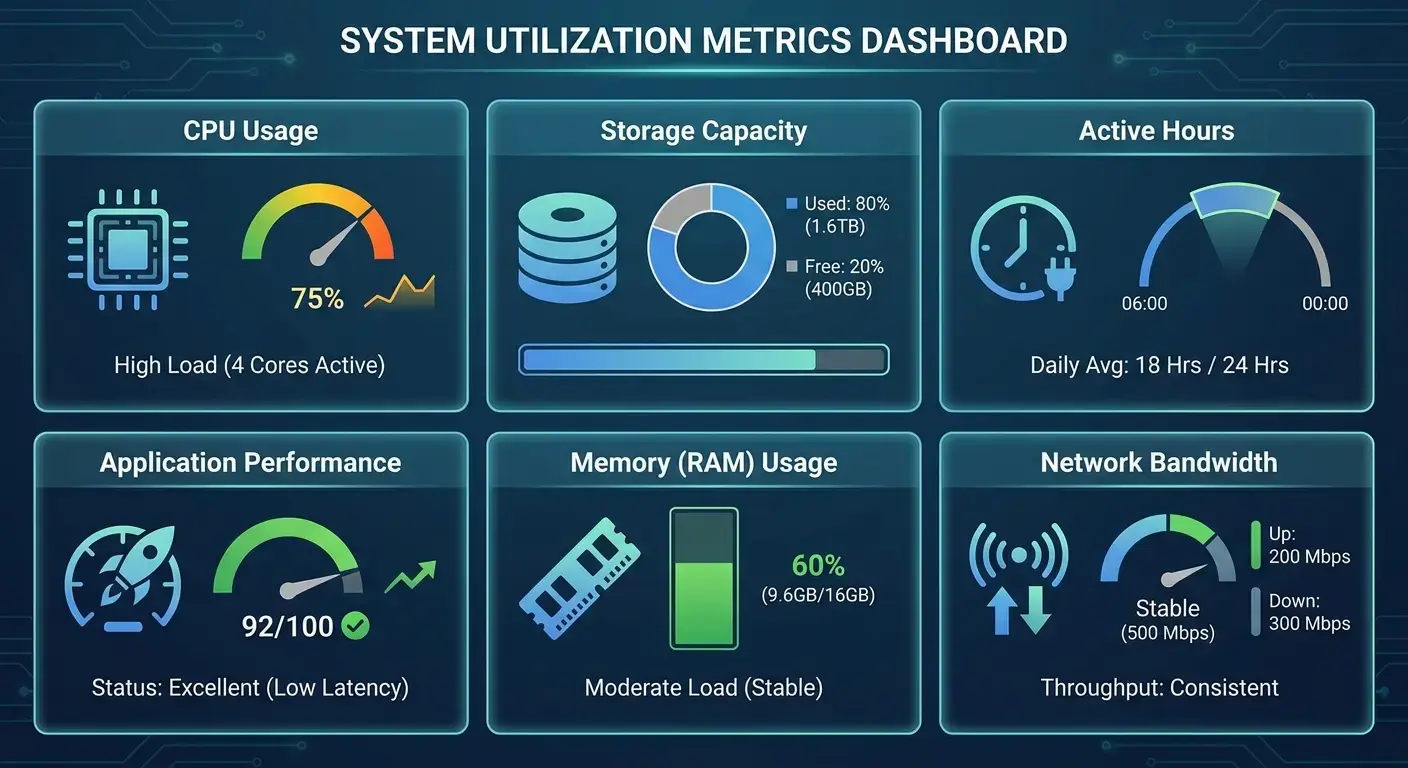
| Utilization Metric | What It Reveals | Business Decision It Informs |
|---|---|---|
| Daily active hours | Actual device usage vs. powered-on time | Reallocation opportunities, right-sizing fleet |
| Application performance | Hardware adequacy for workflows | Specification requirements, upgrade priorities |
| Memory/CPU utilization | Resource constraints and bottlenecks | Configuration improvements, targeted upgrades |
| Storage capacity trends | Approaching limits before failure | Proactive maintenance, refresh timing |
| Multi-user access patterns | Unauthorized sharing or access | Security protocols, policy enforcement |
| Geographic usage patterns | Regional differences in needs | Location-specific procurement strategies |
Active Use vs. Powered On
A device can be powered on without being used. This distinction matters enormously for understanding your true hardware needs. That laptop that's "in use" according to your asset register might be sitting open on someone's desk while they work entirely on their phone.
Active use metrics show you keyboard activity, application usage, and productive time. You discover that 40% of your laptop fleet sees less than two hours of active use per day. These patterns reveal opportunities for reallocation. You can shift underutilized devices to new hires instead of purchasing new equipment.
A financial services company I know ran this analysis on their 500 laptops. Turns out 180 of them were getting used less than 90 minutes a day.
The IT director dug into it and found most of these were with client-facing people (account managers, relationship people) who spent their days in meetings and traveling. They'd pop open the laptop for email, but mostly worked from their phones and tablets.
The company reallocated those underutilized laptops to new hires instead of buying new ones. Saved $270K that quarter. The IT director told me the CFO literally sent her a thank-you email, which apparently never happens.
The gap between "assigned" and "actively used" is where your budget leaks. Asset tags for equipment need to track both states to give you complete visibility.
Application Performance Under Real Conditions
Utilization data shows you how applications perform on your hardware in real-world conditions. You see which devices struggle with your core business applications, where memory constraints create bottlenecks, and which configurations deliver smooth performance.
This is the stuff that actually matters for procurement decisions. You stop guessing about specifications and start buying based on proven performance data from your own environment.
Performance data also reveals software bloat and configuration issues that passive tracking would never surface.
An asset tag tells you the device exists. Performance monitoring tells you whether that device can handle what you're asking it to do. The combination transforms purchasing from an educated guess into a data-driven decision.

Geographic and Team-Based Patterns
Utilization patterns vary dramatically across teams, roles, and locations. Your sales team might have completely different usage patterns than your engineering team.
These patterns inform smarter hardware allocation. You stop treating all employees as identical users with identical needs. You develop role-based hardware profiles backed by usage data.
Geographic patterns reveal opportunities for better resource distribution. Maybe your APAC team has lower utilization rates because they're working across time zones and need different hardware configurations.
Asset labels can tell you which office a device is in. Usage patterns tell you whether that office needs the same hardware specifications as your headquarters. The difference impacts both budget efficiency and employee satisfaction.
Asset Tags That Talk Back: The Integration Gap
Most asset tagging systems are islands. They maintain their own databases, generate their own reports, and exist separately from the tools your IT team uses daily. This isolation kills value.
Integration gaps force manual work and create opportunities for data drift. Your asset register says one thing, your MDM platform says another, and your help desk system has a third version of the truth. Until your asset tag data flows between these systems, every team works from a slightly different version of the same asset tag.
The MDM Disconnect
Your MDM platform knows everything about device configuration, security posture, compliance status (all the technical stuff).
Your asset tagging system knows who has what device and where it's sitting.
These systems should talk to each other. They don't.
And that gap? That's where things fall through the cracks.
This disconnect creates
This disconnect creates blind spots. Your MDM platform can tell you a device is out of compliance, but it can't automatically trigger an asset tag update or notify the right team based on location and ownership data.
Bridging this gap makes automated workflows possible. A device that falls out of compliance can trigger asset tracking protocols. Understanding the difference between RMM vs MDM solutions helps clarify where asset tracking fits in your overall device management strategy.
When your asset label data flows into MDM systems, you get context that makes security decisions faster and more accurate. When those systems remain separate, you're constantly reconciling conflicting information.

Help Desk Systems Living in the Dark
Your help desk system should know everything your asset tags know. When someone opens a ticket about hardware issues, the support team should immediately see device age, configuration, utilization history, and past issues.
Instead, they're asking the user basic questions that your asset system could answer instantly.
This integration failure slows resolution times and degrades user experience. Support teams can't prioritize tickets based on device criticality or usage patterns.
When asset data flows into help desk systems, support becomes proactive. You can identify devices approaching failure before users report issues. The asset tag becomes part of the diagnostic process instead of just a reference number in a database.
Procurement Systems Making Blind Bets
Procurement teams need asset data to make smart buying decisions. They need to know which devices are due for refresh, which configurations are most common, which vendors have the best performance records in your environment.
Most procurement systems don't have access to any of this information.
The result? Procurement decisions based on vendor relationships, pricing negotiations, and gut feel rather than empirical data about what works in your organization.
Integration between asset tracking and procurement systems makes data-driven purchasing possible. You can automatically generate replacement forecasts based on age and utilization. Your asset tag becomes a data point that informs purchasing strategy rather than a label applied after the fact.
Companies looking to modernize their approach often find value in exploring resources like the State of Global IT Hardware Procurement 2026 to understand how leading organizations are connecting asset intelligence with procurement strategy.
Security Implications Beyond Physical Location
Security teams care deeply about device location, but not for the reasons asset managers typically track it. They need to know if devices are in unexpected locations, if they're being accessed outside normal patterns, if they've left secure environments without proper authorization.
Traditional asset tags can't provide this intelligence. They tell you where a device was last scanned, not where it is right now or whether its current location represents a security risk.
The Lost Device Problem
Every organization loses devices. Sometimes they're stolen. Sometimes someone leaves a laptop in an Uber or at a coffee shop and just... forgets to mention it.
With passive tracking, you find out weeks later. Maybe months later, during the next audit cycle.
By then? Someone's had access to your network for eight weeks. Good luck figuring out what they looked at.
Real-time asset intelligence changes this equation. You know within hours when a device hasn't checked in. You can correlate physical location data with network access patterns to identify anomalies.
Organizations need solid protocols for handling missing devices, which is why implementing laptop retrieval services becomes critical for distributed teams.

Unauthorized Access Patterns
A device can be exactly where it's supposed to be according to your asset register while being accessed by someone who shouldn't have it. Your asset tag says the laptop is with Employee A in the Chicago office. What it doesn't tell you is that Employee B has been using it for the past week.
This matters for compliance, security, and access management.
Shared devices create audit trails that don't reflect actual usage, which means when something goes wrong, you're looking at the wrong person's activity. And they allow unauthorized access to systems and data, obviously.
Computer asset tags that include usage patterns and access logs can identify these situations. You can flag devices being used by multiple people and identify unusual access patterns.
Security-Integrated Asset Tracking Protocol:
Device Security Status Check:
□ Last successful MDM check-in: [timestamp]
□ Current network location matches assigned user location: [Y/N]
□ Login patterns consistent with assigned user: [Y/N]
□ Encryption status: [enabled/disabled]
□ OS and security patches current: [Y/N]
□ Failed login attempts in past 30 days: [count]
□ VPN access from unexpected geolocations: [Y/N]
□ Device sharing indicators detected: [Y/N]

Automated Alert Triggers:
- No check-in for 48 hours → notify IT security
- Login from new geolocation → require MFA verification
- Multiple failed login attempts → lock device remotely
- Encryption disabled → escalate to security team
- Device reported missing → initiate wipe protocol
Offboarding Gaps That Linger
Employee leaves. IT gets notified. Asset return gets scheduled. Everything seems fine until you discover six months later that the device was never returned, or it was returned but not properly wiped.
These offboarding gaps create persistent security vulnerabilities. Former employees retain access to systems through devices that were never properly decommissioned.
Integrated asset tracking and offboarding workflows close these gaps. Device return triggers automatic security protocols. Asset status updates flow into access management systems.
Proper secure offboarding automation ensures asset tag labels are part of a thorough security protocol, not just inventory management.
The Refresh Cycle No One's Optimizing
Three-year refresh cycles are standard. Everyone does it. Leases are built around it. Budgets assume it.
But why three years?
Honestly? Because that's what everyone's always done. Some analyst at Gartner probably said it was best practice in 2010, and now we're all stuck with it.
Some devices are obsolete after 18 months of heavy use. Others are perfectly functional after five years of light use. Age-based refresh cycles ignore these realities.
The Environmental Cost of Premature Replacement
Electronic waste is a massive problem, and premature hardware replacement is a significant contributor. Every device replaced before its useful life is exhausted represents unnecessary environmental impact.
Organizations committed to sustainability need better refresh strategies. Age-based policies conflict with environmental goals. You can't minimize waste while replacing perfectly functional equipment on arbitrary schedules.
Utilization-based refresh cycles align environmental and financial incentives. You extend the life of lightly-used devices, reducing waste and capital expenditure.
Asset tags for equipment should track performance degradation, not just chronological age. The difference determines whether a device gets another productive year or ends up in a recycling facility prematurely.

Performance Degradation You're Not Measuring
Hardware doesn't fail suddenly. It degrades gradually. Battery life decreases. Storage fills up. Components wear out. Performance slows incrementally until users start complaining.
Age-based refresh cycles ignore this degradation curve. A two-year-old device might be performing worse than a four-year-old device depending on usage patterns and maintenance.
Performance monitoring integrated with asset tracking reveals which devices need attention. You can identify batteries that need replacement before they fail.
Your asset label tells you when the device was purchased. Performance metrics tell you when it needs attention. Both data points matter, but only one drives smart refresh decisions.
The Power User Problem
Power users burn through hardware faster than anyone else. Developers compiling code constantly. Designers rendering video. Analysts running complex models. These users need refresh cycles measured in months, not years.
Standard policies serve these users poorly. They suffer with degraded performance for months before hitting the arbitrary refresh threshold.
Usage data makes differentiated refresh strategies possible. Power users get faster refresh cycles based on device stress. Light users get extended cycles based on continued good performance.
Design agency, 120 people, strict three-year refresh across everyone.
They started tracking utilization and realized their video editors were absolutely destroying their laptops (maxing out CPU and memory every single day, render times getting 40% slower in year two).
Meanwhile, the account managers and project coordinators were using maybe 25% of their device capacity even after three years.
So they split the difference. Video editors and 3D artists get new equipment every 18-24 months based on performance metrics. Client-facing roles go four years.
Result? Annual hardware spending dropped 22%. Designer satisfaction went way up. And project turnaround improved because people weren't waiting on renders all day.
My asset tag might say my laptop is two years old, but if I'm rendering 4K video daily, that device has aged differently than someone using the same model for email and spreadsheets.

Building a Tag Strategy That Feeds Business Intelligence
Asset tags generate data. Business intelligence systems consume data to inform decisions. The connection seems obvious, yet most organizations never make it.
Asset data sits in specialized systems used only by facilities or IT operations. A strong asset tag strategy pushes that data outward instead of leaving it stuck in a silo.
This represents a massive missed opportunity. Asset data can inform workforce planning, real estate decisions, budget forecasting, and operational efficiency initiatives.
Breaking Down Data Silos
Asset data lives in one system. Financial data lives in another. HR data lives in a third. Each system generates reports for its own stakeholders. Nobody sees the complete picture.
Breaking down these silos requires technical integration and organizational alignment. Systems need APIs that allow data sharing. Teams need shared definitions of what asset data means.
Here's the thing: the payoff is worth the effort. When asset data flows into business intelligence platforms, you can answer questions that were previously impossible. How does hardware allocation correlate with team productivity? What's the true total cost of ownership for different device configurations?
Modern platforms support integrated inventory management approaches that break down traditional data silos across IT operations.
Asset management tags become valuable when they feed systems that drive decisions across finance, operations, and strategy. Isolation limits their value to compliance and basic accountability.
Defining Metrics That Matter
Not all asset data is equally valuable. Tracking everything creates noise. You need to identify which metrics inform business decisions and focus your collection and reporting on those signals.
Start with the decisions you need to make. Procurement planning needs utilization rates and performance data. Budget forecasting needs accurate refresh predictions.
Work backward from these decisions to identify the metrics that matter. This discipline prevents data hoarding. You're collecting information because it informs specific decisions that impact business outcomes.
IT asset tags should capture data that answers real questions, not just populate database fields. The distinction determines whether your asset tracking system is useful or just thorough.
Making Data Accessible to Non-Technical Users
Asset data is useful only if the people who need it can access and understand it. Finance teams shouldn't need IT support to run basic asset reports. Department heads should be able to see their team's hardware allocation without submitting requests.
This requires user-friendly interfaces and thoughtful data presentation. Raw asset registers are useless to most stakeholders. They need dashboards that answer their specific questions.
Self-service access democratizes asset intelligence. Teams can make informed decisions about hardware without waiting for IT to generate reports.
Organizations using AI insights for asset management can surface actionable intelligence without requiring technical expertise from end users.
How GroWrk Connects Asset Visibility to Operational Decisions
Look, if you're managing hardware across multiple countries and time zones, you need more than location data. You need to know if devices are actually working, if anyone's using them, if they're creating security problems you don't know about yet.
Full disclosure: GroWrk built their platform around exactly this problem. I'm bringing them up because they're one of the few companies that actually gets it. Asset tracking isn't a standalone thing you do once a quarter.
Their system integrates with procurement, deployment, support, lifecycle management, all of it. When you tag a device in the GroWrk system, that data flows into every operational decision you're making.
Procurement decisions are informed by utilization data from your existing fleet. Deployment workflows include automated asset registration and security protocols. Support tickets are enriched with complete asset history and performance data. Refresh planning is driven by actual usage patterns rather than arbitrary timelines.
This integration solves the fundamental problem with traditional asset tagging systems. The data doesn't sit idle between audit cycles. It's actively informing decisions, triggering workflows, and supporting the kind of proactive management that passive tracking can never deliver.
Teams managing distributed workforces feel this difference immediately. You're not chasing down asset information when someone needs support. You're not guessing about refresh timing. The asset intelligence you need is already connected to the operational systems you use daily.
Companies handling complex global deployments have seen measurable improvements. Upwork's case study demonstrates how integrated asset management transforms operations for distributed teams at scale.
Final Thoughts
Asset tags should tell you more than location. They should tell you if your hardware is creating value or just sitting there. If people are actually using it. If it's about to die.
Most organizations aren't there yet. They're still treating asset tags like fancy inventory stickers, missing the chance to turn all that data into something useful.
The technology exists. The integration capabilities are available. What's missing is the mindset shift from passive tracking to active management.
You don't need perfect data to start. You need to start asking better questions: What are these assets actually doing? Who's using them and how? Where are we giving people the wrong equipment for what they need to do?
The answers are already in your asset data. You just need systems that can surface them and workflows that can act on them.
Whether you're implementing barcode for asset tracking, updating your asset tag barcode system, or rethinking how fixed asset tags and fixed asset labels function in your organization, the goal is the same. Turn passive identifiers into something that tells you what's actually happening.
Property tags for equipment serve their purpose when they tell you something useful. When they just confirm existence, they're missing the point entirely. Fixed asset label systems that generate insights rather than just inventory lists represent the future of asset management. Treat the asset tag as an intelligence source rather than a sticker, and every asset tag starts earning its place.