.png)
Table of Contents
- Automated stock level syncing across procurement tools
- Real-time asset location tracking without manual updates
- Cross-departmental approval workflows built into your system
- Unified vendor catalogs that prevent duplicate orders
- Automated reorder triggers based on usage patterns
- Centralized device lifecycle tracking from purchase to retirement
- Integration between finance systems and inventory platforms
- Automated compliance documentation tied to asset records
- Cross-location inventory visibility for distributed teams
- Predictive analytics that forecast hardware needs
- Integration with employee onboarding and offboarding systems
- Automated warranty and support contract tracking
- Real-time budget impact visibility during procurement
- Integration with help desk systems for device issue tracking
- Automated asset assignment and reassignment workflows
- Cross-platform reporting that eliminates manual data pulls
- Integration with shipping and logistics providers
- Automated audit trail generation for compliance reviews
- Unified dashboard that connects all inventory touchpoints
TL;DR
Your inventory chaos isn't a software problem. It's a coordination problem. When IT, Finance, HR, and Ops work in separate systems, you get duplicate orders, budget surprises, and lost equipment. Fix it by automating the connections between systems so data flows automatically. This post covers 19 specific integrations that solve real problems. Start with the 2-3 that address your biggest pain points.
Here's the Thing Nobody Tells You About Inventory Software
Last Tuesday, I talked to an IT director who'd spent $80K on what she called "the Rolls Royce of inventory systems." Three months in, her team was still using spreadsheets for half their workflow. The software was great. It just didn't talk to anything else they used.
This happens everywhere. Your software? It's probably fine. Not great, not terrible, but fine. That's not where you're bleeding money. Real integrated inventory management focuses on exactly where the money leaks instead.
The real chaos lives in the gaps between systems. Finance, IT, Operations, and HR all touch the same assets but work in different tools. Your procurement platform knows what you're ordering. Your inventory system knows what you have. Your finance software knows what you're spending. But none of them are sharing notes, so you're manually playing telephone between them. That manual relay is the first thing integrated inventory management eliminates.

Picture this: Finance sends an email saying you're 15% under budget on IT equipment. Great news, right? That same afternoon, your IT director is staring at a spreadsheet showing you're actually over budget. Someone in Operations just approved another laptop purchase based on numbers from last month. Three weeks later, everyone's confused about how you overspent.
Nobody's lying. Nobody's incompetent. Everyone's just looking at different data.
Here's what these disconnects actually cost you:
| System Disconnect | How This Screws You | What Integration Solves |
|---|---|---|
| Procurement and asset tracking operate separately | Duplicate orders (you buy stuff you already have), inaccurate stock counts, budget overruns that surprise everyone | Automatic quantity adjustments across all platforms when purchases happen, so everyone sees the same numbers |
| Finance and IT use different data sources | Reconciliation takes forever, spending surprises that make your CFO panic-call you, and reports that never match so everyone thinks everyone else is wrong | Real-time financial impact visibility and unified asset valuation that both teams can trust |
| HR and inventory systems don't communicate | Last-minute equipment scrambles, delayed onboarding (new hires sitting at empty desks), lost devices during offboarding that you write off months later | Automated equipment workflows triggered by hiring and termination events, so IT knows what's coming |
| Help desk and asset records stay isolated | Repeated issues go unnoticed (same laptop breaks three times), poor repair vs. replace decisions, no pattern analysis to spot systemic problems | Complete device history informing support and replacement strategies, so you stop throwing money at unfixable hardware |
| Location tracking relies on manual updates | Lost equipment (it's somewhere, we think?), inefficient transfers between offices, inaccurate audits that waste everyone's time | Automatic location updates through shipping and workplace integrations, so you actually know where stuff is |
These aren't software problems. They're integration problems. When implementing these automated connections, following comprehensive IT procurement best practices ensures your vendor relationships support seamless data flow. Strong integrated inventory management depends on that kind of clean data flow.
Stop Manually Updating Stock Counts (Automate the Syncing)
You know what nobody ever remembers to do? Update stock counts after placing an order.
IT orders 15 MacBooks on Monday. The procurement system knows. But your inventory platform still shows the old count because nobody logged in to update it. Finance is making decisions based on wrong numbers. Operations thinks you have more budget than you do. Three weeks later, everyone's confused about how you overspent.
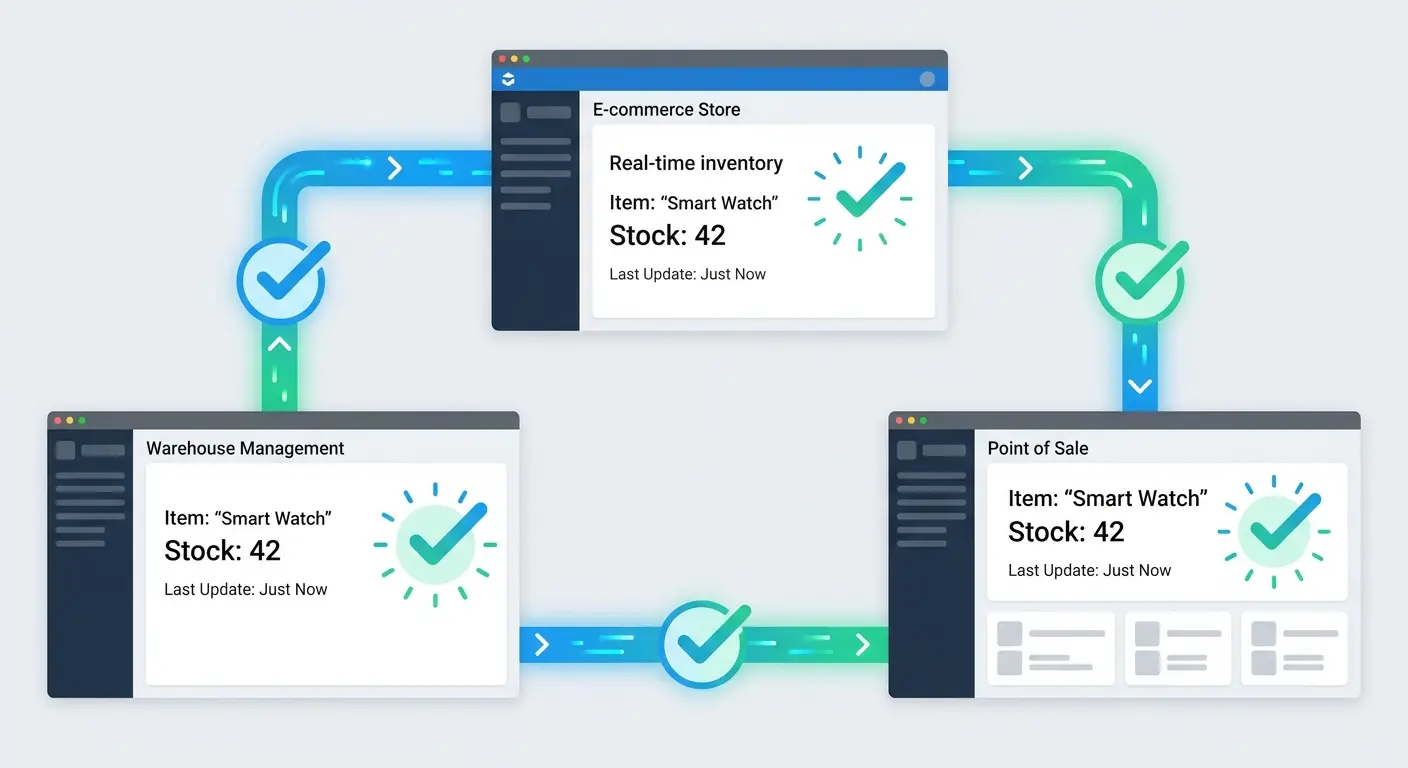
Automated stock syncing fixes this by connecting your systems so they all update simultaneously. IT orders those 15 MacBooks, and instantly (without anyone touching anything) your inventory count adjusts, your budget updates, and Finance sees the pending expense. Everyone's working from the same numbers at the same time. That single source of truth is the whole point of integrated inventory management.
This prevents the scenario where Finance thinks you have budget for new equipment because their system shows 20 devices in stock, while IT knows you have 3 (and two of those need repairs). The integrated system shows everyone the same reality.
The integration works both ways. Returns, repairs, and retirements flow back through automatically. An employee returns a laptop for repair? The available stock count adjusts immediately across all platforms. Finance sees the asset status change. Procurement knows not to count it toward available inventory. IT knows it's in the repair queue. That shared visibility is what integrated inventory management is supposed to deliver.
A 200-person marketing agency we worked with was placing 8-12 duplicate orders every quarter. Same equipment, different vendors, nobody knew about the others. They were hemorrhaging about $15K per quarter on redundant purchases. Costs like that disappear once integrated inventory management is actually in place.
After implementing stock syncing, duplicate orders dropped to 1-2 per quarter (usually edge cases where someone genuinely needed a backup). That's $52K back in their annual budget, and their IT director stopped getting angry emails from Finance asking why they bought six of the same monitor.
Actually Knowing Where Your Equipment Is (Without Playing Detective)
Manual location updates don't work.
They just don't. They require people to remember to log changes during the exact moments when they're busiest, which is like asking someone to text you while they're moving furniture. It's not happening.
Real-time asset location tracking through integrated systems captures movement automatically. Employee ships a laptop from Austin to Denver? The integration between your shipping provider and inventory platform updates the record. Someone swaps a monitor between conference rooms? Your workplace management system logs it. No tickets, no reminders, no "hey did you update the system?" Slack messages.
You can see where every piece of hardware sits right now, not where someone said it was three weeks ago. This becomes critical when you're managing distributed teams across multiple offices, coworking spaces, and home offices. The system knows if that spare monitor is in your Seattle office or sitting in a box at an employee's apartment in Portland.
For distributed teams, implementing asset tracking for global teams provides the foundation for automated location visibility. From there, integrated inventory management turns location data into decisions.
Why Your Approval Process Takes 5 Days (And How to Fix It)
Want to know what hell looks like? It's a purchase request that's been sitting in someone's inbox for six days while a new employee stares at an empty desk.
Marketing emails IT. IT forwards to their manager. Manager checks with Finance. Finance asks for budget justification. Request goes back to Marketing. Marketing takes three days to respond because the original email is buried under 147 other messages. Meanwhile, the new hire is borrowing someone's personal laptop and wondering if they made a mistake taking this job.
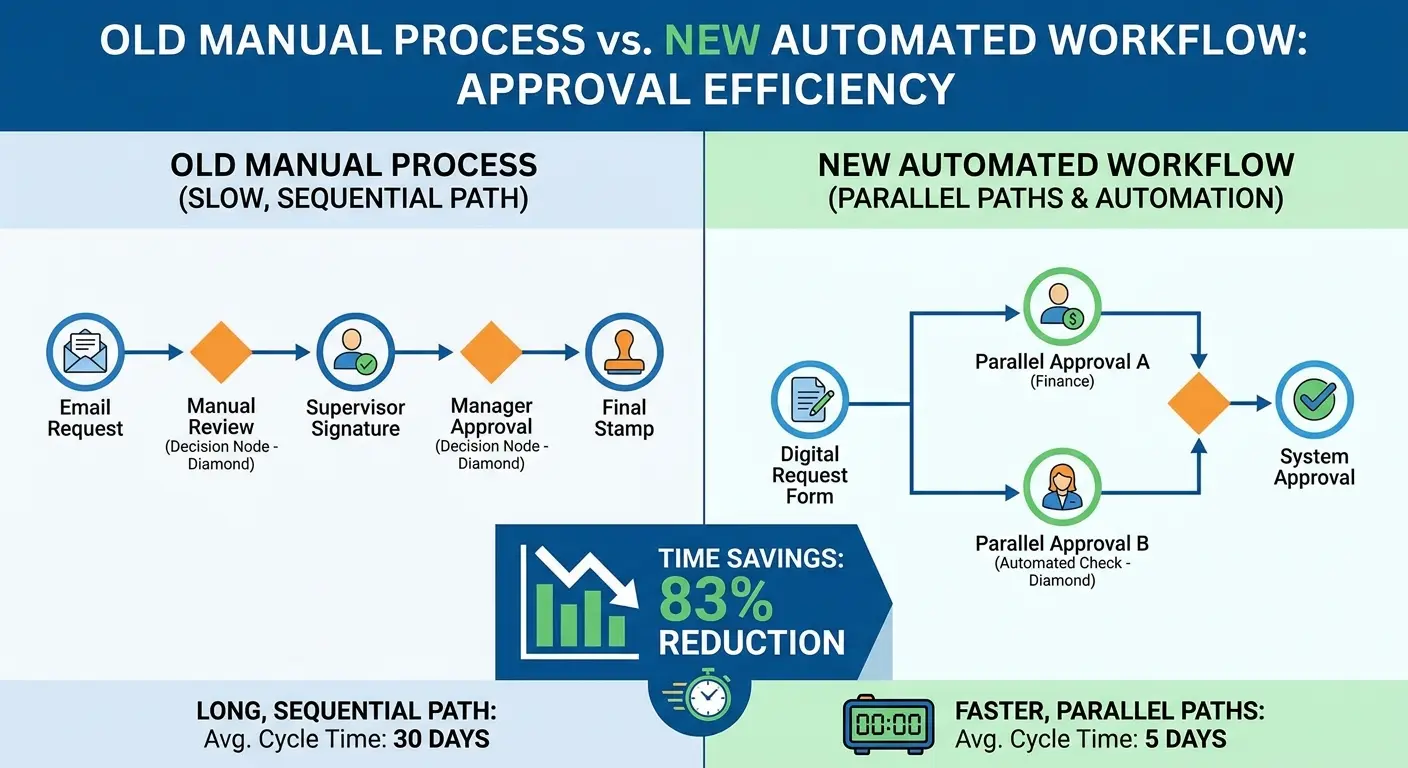
Integrated approval workflows route requests automatically based on rules you set once. A $1,200 laptop request goes directly to the IT manager and auto-approves if budget exists. A $3,500 video editing workstation triggers approvals from IT, finance, and the department head in parallel, not sequentially. Parallel workflows like this are where integrated inventory management saves real time.
Everyone sees the request status in real time. Finance can see pending purchases before they hit the budget. IT can plan deployment schedules around approved orders. The requester knows exactly where their request stands without sending "just checking in" messages.
The time savings add up fast:
| Purchase Scenario | Manual Workflow Timeline | Integrated Workflow Timeline | Key Difference |
|---|---|---|---|
| Standard laptop under budget threshold | 3-5 days of email ping-pong, waiting for approvals, and manually checking if there's budget (spoiler: Finance takes 2 days to respond) | 2-4 hours with automatic routing, instant budget check, single-click approval | No more waiting for Dave to check his email. No more manually verifying the same info across three systems |
| High-value specialized equipment | 1-2 weeks as requests move sequentially through approvals, budget justification gets requested, vendor research happens | 1-3 days with parallel approvals (multiple approvers work simultaneously), pre-loaded vendor catalogs, automated justification templates | Sequential bottlenecks eliminated because everyone reviews at the same time |
| Bulk order for new hires | 5-7 days to confirm headcount, allocate budget, negotiate with vendors | 1-2 days because HRIS integration provides headcount automatically, budget auto-allocated, preferred vendor pricing already loaded | System already knows hiring plans and has vendor terms ready instead of starting from scratch |
| Emergency replacement | 2-3 days even for "expedited" approvals that still require manual routing and sign-offs | 2-4 hours with emergency workflow triggering immediate notifications to all approvers | Pre-configured emergency paths bypass standard queues so critical requests don't wait |
The Duplicate Order Problem (And How One Company Ordered the Same Mouse Four Times)
Want to know what's quietly draining your budget? Three people in three departments ordering the exact same wireless mouse from three different vendors at three different prices. Nobody's being malicious. They literally don't know the others are ordering. It's like watching a sitcom, except you're paying for it.
Fun fact: We once audited a client's purchases and found they'd ordered the same wireless mouse from four different vendors in six weeks. Same model. Different prices ranging from $23 to $41. When we pointed this out, the IT director just stared at the screen and whispered, "I need a drink."
Unified vendor catalogs fix this by showing everyone what's already approved, what's on order, and what you're actually paying. Revolutionary? No. Effective? Absolutely.
The integration prevents scenarios where IT orders 10 monitors from Vendor A on Monday while operations orders 8 of the same model from Vendor B on Tuesday, both unaware the other order exists. You can set preferred vendors, negotiate volume discounts that actually get used, and maintain consistency in the hardware your team supports.
When someone searches for "monitor," they see the three approved models with current pricing and availability, not an overwhelming list of every monitor that exists.
Establishing a strategic approach through global procurement strategies helps consolidate vendor relationships into unified catalogs.
Never Run Out of Laptops Again: Automated Reorder Triggers
Your hiring manager just told you they're bringing on 15 people next quarter. Quick, do you have enough laptops?
If you're pulling up a spreadsheet and doing math, you're already behind.
Reordering based on minimum stock levels made sense when your team size was stable and hardware needs were predictable. That's not your reality anymore, is it?
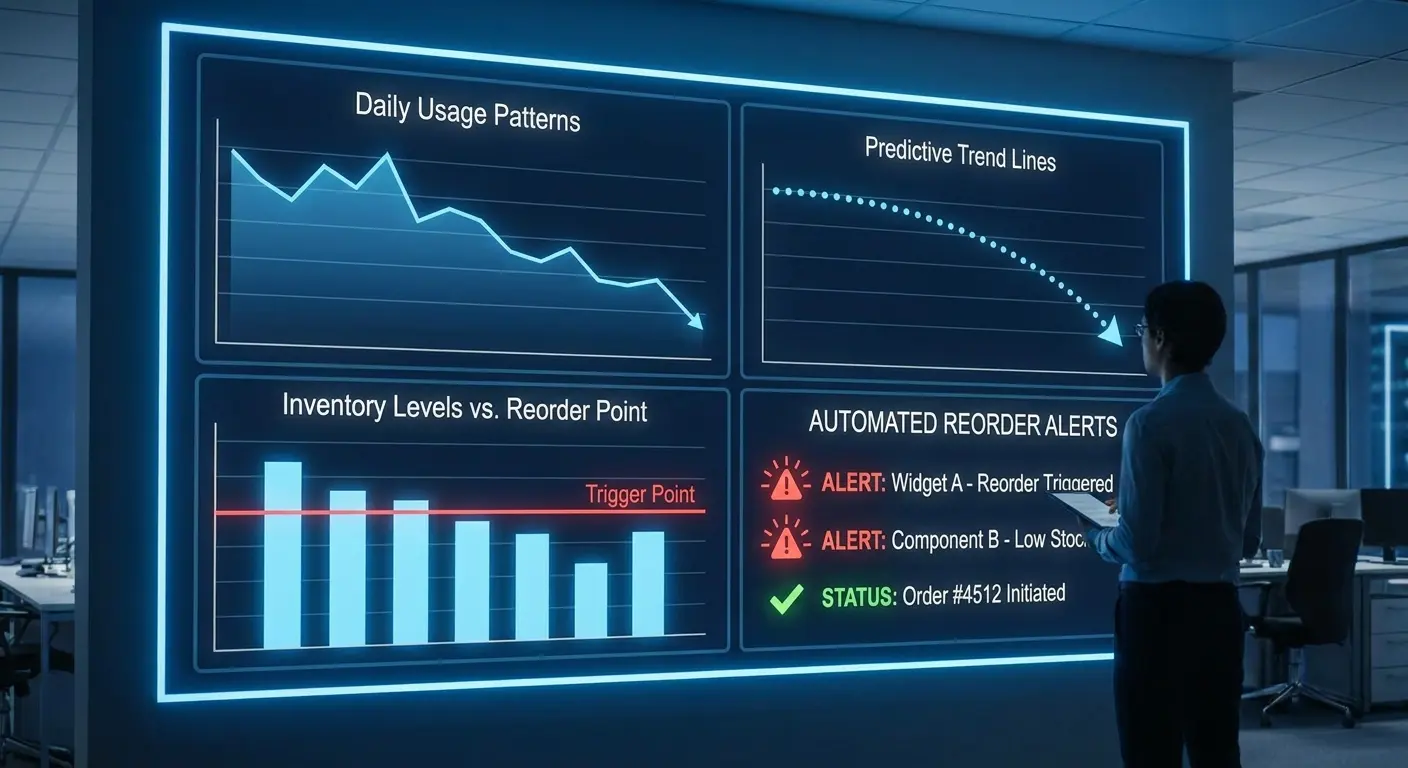
Automated reorder triggers look at your actual usage patterns (not just current stock) and tell you to order now before lead times screw you. The system notices you've deployed 12 laptops in the past month (your usual rate is 4), checks your hiring pipeline integration, sees 15 new employees starting next quarter, and flags that you should order now to avoid delays.
This works for accessories too. If your pattern shows employees request new keyboards every 18 months on average and you have 30 keyboards approaching that age, the system suggests a bulk order. You're not guessing or waiting until someone complains their keys are sticking.
One IT director I know hasn't paid for expedited shipping in eight months. Eight months! Before automated reorder triggers, he was overnighting equipment at least twice a month. His CFO actually asked if he'd secretly gotten better at his job. (He had. He just automated the planning part.)
Stop Making Repair Decisions in the Dark
Here's a mistake I made early in my career: Approved a $2,200 repair on a laptop because I only looked at the age (2 years, seemed worth fixing). Didn't check that it had been repaired three times already, assigned to four different people, and was running hardware that couldn't support our current software requirements.
We spent $2,200 fixing a laptop we retired four months later. If I'd had complete lifecycle data, I would've replaced it immediately and saved the company money. Now I'm obsessive about tracking the full device history.
Centralized device lifecycle tracking follows each asset through its entire existence in your organization. Purchase date, initial assignment, all subsequent users, repair history, OS updates, software licenses tied to it, performance issues logged through your help desk, and eventual retirement or resale all live in one connected record.
When you're deciding whether to repair or replace a three-year-old laptop, you can see it's been assigned to four different people, required three repairs, and is running software that won't support the next OS update. That context makes the decision obvious.
Without integration, that information exists across five different systems and you're making the call based on age alone.
Here's a fun one: A client recently sold a batch of retired laptops
for $8K more than expected because they could show complete maintenance records and prove the devices were well-maintained. The lifecycle tracking paid for itself in one equipment refresh cycle.
Understanding device lifecycle management strategies provides the framework for comprehensive tracking from purchase to retirement.
When Finance and IT Actually Speak the Same Language
Finance needs to know what you own, what it cost, how it's depreciating, and what you're planning to buy. Integration with your finance systems feeds this information automatically instead of through monthly reconciliation spreadsheets that are outdated the moment you send them.
When IT purchases a new device, the cost hits the right budget line, creates the asset record for depreciation tracking, and updates your capital expenditure forecasts simultaneously. When you retire equipment, the system handles the accounting adjustments.
Finance can run reports on IT asset value, spending by department, or budget utilization without asking IT to export data. IT can see budget impact before placing orders.
The integration eliminates the disconnect where IT thinks they're under budget while Finance sees overspending because timing differences haven't been reconciled. Both teams work from the same real-time data.
Compliance Audits Don't Have to Be Nightmares
Compliance audits reveal how disconnected your systems really are. You need to prove which devices have encryption enabled, which employees signed acceptable use policies, which assets contain regulated data, and which security patches are current. Gathering this information from separate systems takes weeks and you're never confident it's complete.
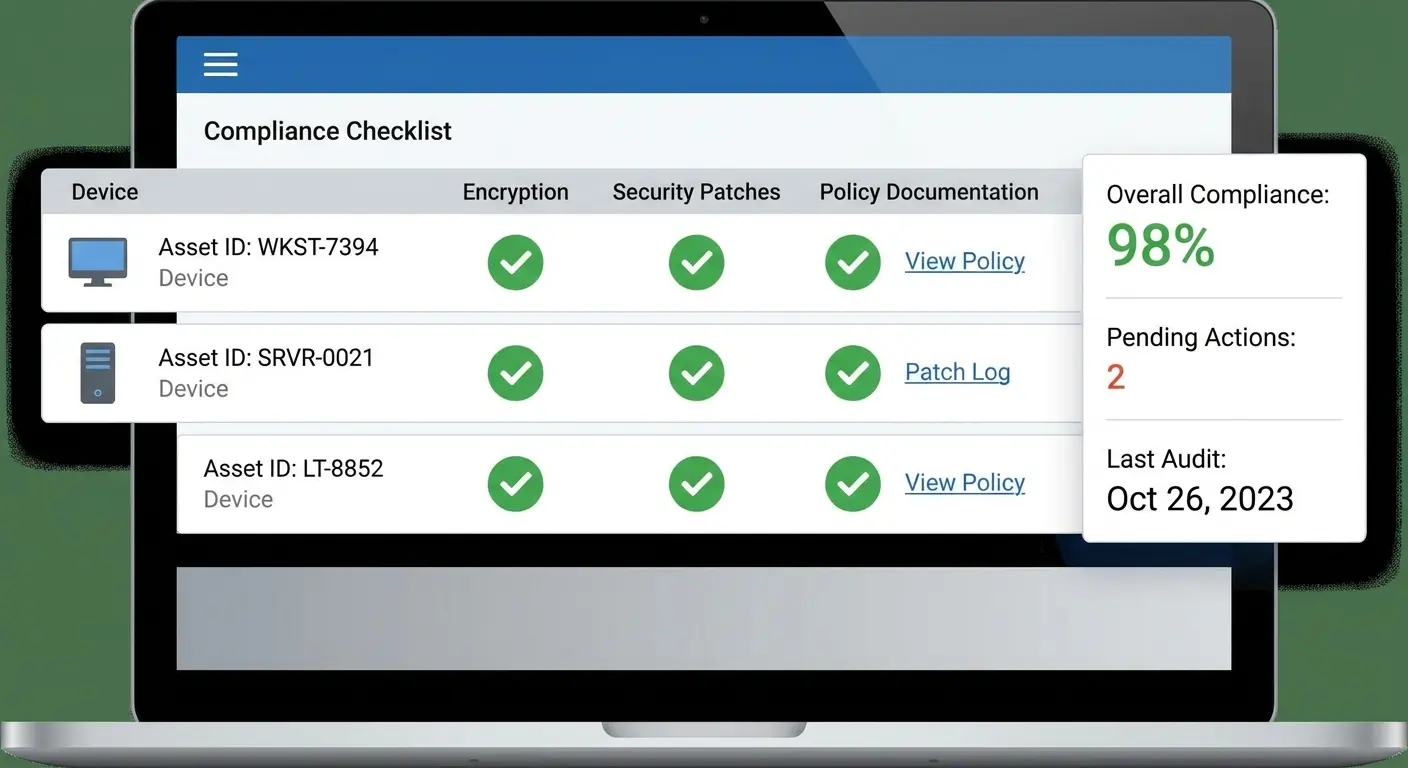
Automated compliance documentation ties these requirements directly to asset records. When a laptop gets deployed, the integration confirms encryption is enabled, logs the signed policy, applies the required security configuration, and schedules patch compliance checks.
During an audit, you pull a report showing every device's compliance status with supporting documentation linked. The integration works with your MDM, security tools, and document management systems to maintain proof continuously instead of scrambling to assemble it when auditors ask.
Ever had an auditor ask to see proof that all laptops deployed in Q2 had encryption enabled and users signed your acceptable use policy?
Without automated compliance documentation, you're about to spend two weeks hunting through email archives, MDM logs, and HR records, hoping you can piece together proof that won't get you fined.
With integration, you pull a report. Every device shows its compliance status with documentation linked. The audit that would've consumed your entire month takes an afternoon.
One client avoided a $50K fine because they could instantly prove compliance during a surprise audit. The integration paid for itself in one panicked Tuesday afternoon.
Seeing Everything Everywhere All at Once
Managing inventory across multiple locations fails when each site operates independently. You have surplus monitors in Denver while San Francisco is ordering more, or spare laptops sitting unused in your New York office while your Austin team is waiting on shipments.
Cross-location inventory visibility shows you what exists across all sites in real time. You can see that Chicago has 8 spare laptops, Seattle has 3, and Austin has none before approving a new purchase order.
The integration lets you transfer equipment between locations when it makes sense or identify which office should receive the next bulk order based on actual need rather than arbitrary allocation. This visibility becomes crucial when you're supporting remote employees.
You can see which assets are deployed to home offices versus which are in physical locations, making recall and refresh planning manageable. For teams managing assets across borders, understanding how to master IT asset management for distributed teams provides critical visibility strategies. Companies using Pi Health's approach have successfully scaled their distributed inventory operations while maintaining complete visibility across locations.
Predictive Analytics: Know What You'll Need Before You Need It
Reacting to hardware needs means you're always behind. Someone needs a laptop, you don't have one, you rush an order, pay for expedited shipping, and the new hire waits.
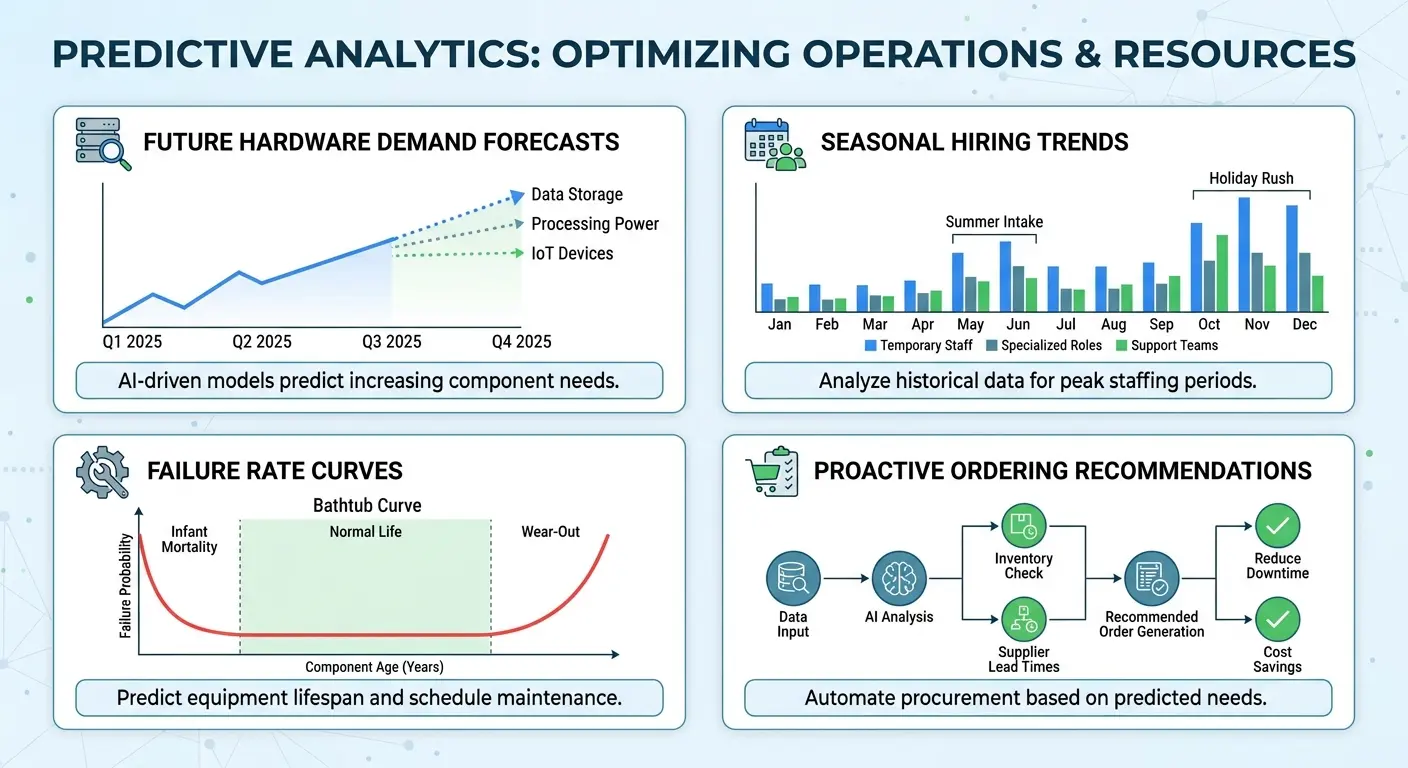
Predictive analytics flip this dynamic by forecasting needs based on patterns your team might not consciously notice. The integration analyzes your hiring velocity, seasonal trends, hardware failure rates by model and age, and upcoming projects that require specific equipment.
It tells you that based on current trends, you'll need 12 new laptops in Q3, 4 monitor replacements in the next 60 days, and should plan for 6 accessory refresh requests. You can order proactively, negotiate better pricing through planned purchases instead of urgent ones, and ensure equipment is ready when people need it.
Full transparency: Predictive analytics for inventory is still evolving. The accuracy varies wildly depending on how much historical data you have and how stable your growth patterns are.
If you're a startup that went from 20 to 150 people in 8 months, predictions based on your historical data might be useless because you have no stable patterns to analyze. But if you're an established company with 3+ years of data and predictable seasonal hiring, the forecasts can be scary accurate.
I've seen predictions be off by 30% and I've seen them nail it within 5%. Your mileage will vary. Start with the predictions as suggestions, not gospel, and adjust as you learn what works for your specific situation.
Stop Scrambling When People Join or Leave
New hire equipment requests shouldn't require IT to monitor their email for HR announcements. Integration between your HRIS and inventory systems creates automatic workflows.
When HR marks a new employee as hired with a start date, the system generates an equipment request based on their role, checks available inventory, and either assigns existing hardware or triggers a purchase if needed. IT sees the requirement weeks in advance instead of days.
The integration works in reverse for offboarding. When an employee's termination date is entered, the system creates a return workflow, schedules device pickup, assigns the returned equipment for refurbishment or reassignment, and updates all relevant records.
You're not tracking down devices weeks after someone leaves or discovering equipment gaps because returns weren't processed properly. The entire cycle runs on data that already exists in your HR system. Implementing comprehensive IT onboarding and offboarding checklists ensures your automated workflows cover every critical step.
Never Miss Another Warranty Expiration
Nothing says "we're professionals" like discovering your warranty expired three months ago when you're on the phone with support trying to get a laptop repaired. The rep's apologetic tone as they quote you $800 for a fix that would've been free last quarter? Perfect way to ruin a Tuesday.
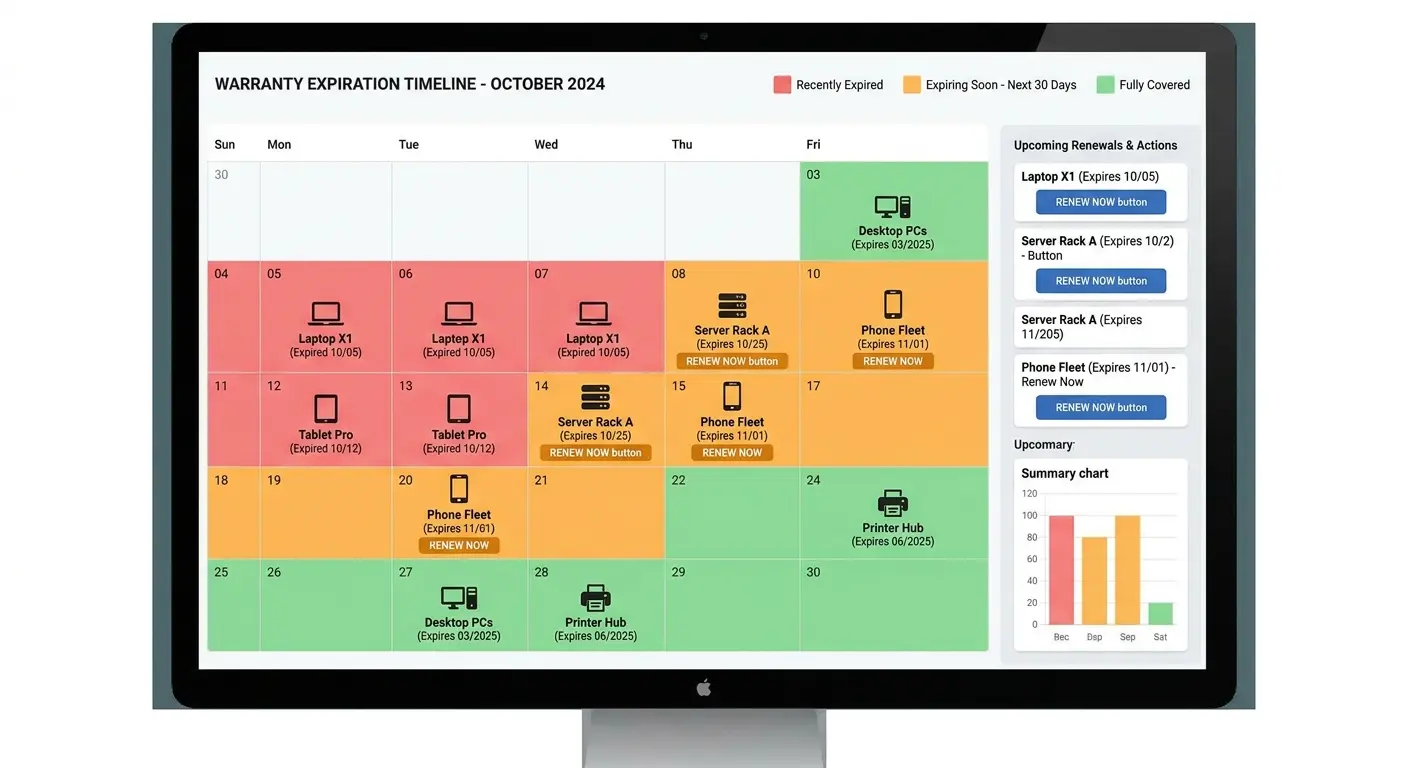
Automated warranty tracking means you'll never have that conversation again. The system alerts you 90 days before warranties expire. You decide whether to renew or plan for replacement while you still have options, not while you're staring at a broken laptop and a repair quote that makes you want to cry.
The integration with your purchase records and vendor systems maintains current coverage information for every asset. When a device needs repair, the integration confirms warranty status instantly and can even initiate the claim process with your vendor automatically. You can see which assets have active coverage, which are approaching expiration, and what your total support contract spend looks like across all equipment.
This prevents the common problem where you're paying for extended warranties on devices you're about to retire or missing coverage renewals on critical equipment. The financial impact matters. Extended warranties cost less than out-of-warranty repairs, but only if you renew before they lapse.
See Budget Impact Before You Click "Approve"
Budget surprises happen when procurement and financial tracking operate on different timelines. Someone approves a purchase, the order is placed, and Finance doesn't see the impact until the invoice arrives weeks later, potentially after other purchases have been approved against the same budget.
Real-time budget impact visibility integrates your procurement workflow with financial systems so every approved purchase immediately affects budget availability. When IT approves a $15,000 equipment order, that amount is encumbered instantly.
Finance sees it. Other teams requesting purchases see updated available budget. You avoid scenarios where three different departments spend against the same budget pool because their view of available funds was outdated.
The integration shows pending orders, approved but not yet invoiced purchases, and actual spend in one view. You can make informed decisions about whether to approve the next request or wait until next quarter. Establishing clear IT cost management practices ensures budget visibility translates into actionable financial control.
Connect Your Help Desk to Your Inventory (Your Support Team Will Thank You)
Device problems tell you things about your inventory that pure asset tracking misses. When the same laptop model generates 15 help desk tickets in two months, that's a signal to stop ordering that model. When a specific employee submits frequent hardware issues, maybe they need different equipment or additional training.
Integration between your help desk and inventory system connects support tickets to specific assets and users. You can see a device's complete issue history when making repair or replacement decisions. You can identify patterns across models, locations, or user groups that suggest systemic problems.
The integration also speeds up support. When an employee submits a ticket about their laptop, the system automatically pulls the device specs, warranty status, previous issues, and current configuration. Support staff have context immediately instead of asking the employee for serial numbers or playing detective across multiple systems.
Make Reassignments Actually Work
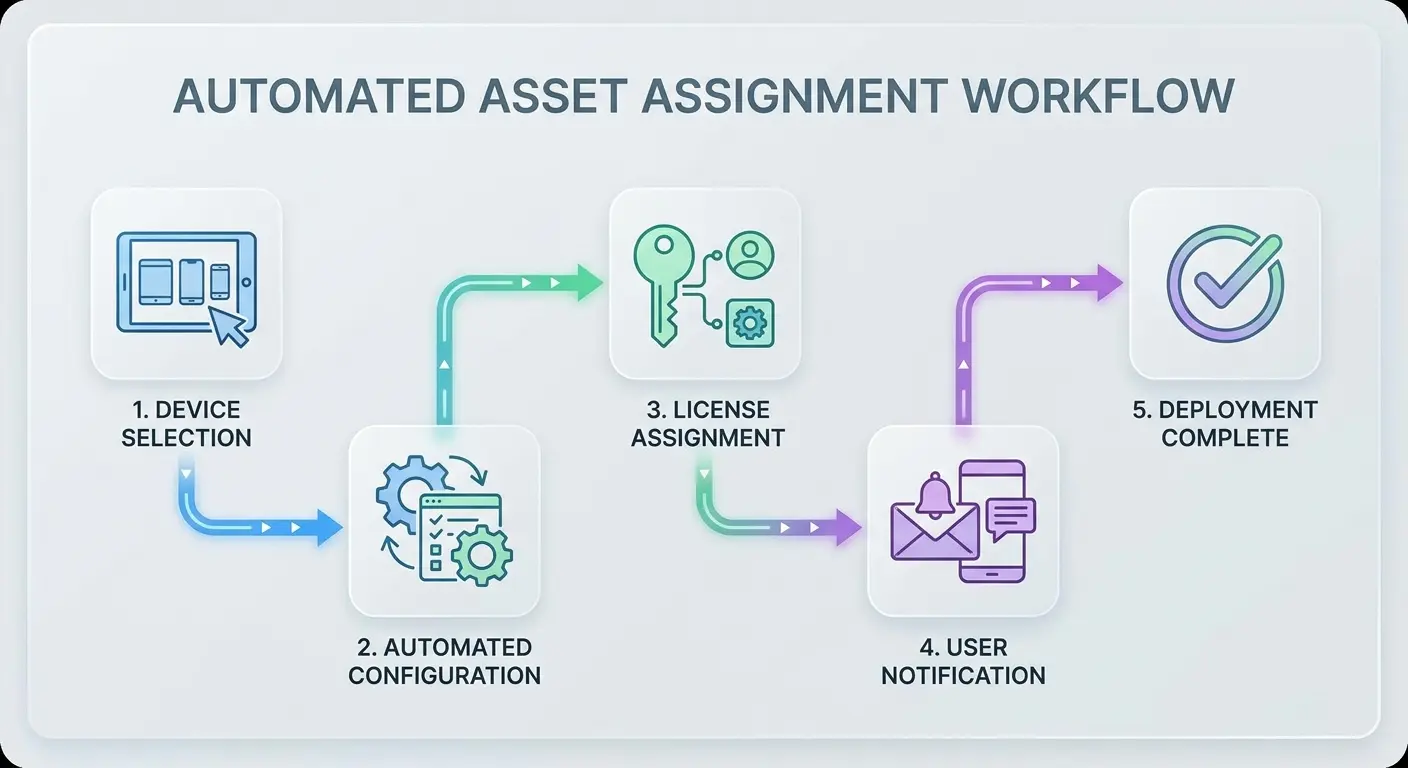
Assigning and reassigning equipment involves more steps than people realize. You need to update the asset record, configure the device for the new user, transfer licenses, update location tracking, notify relevant parties, and document the change. Miss any step and you create problems.
Automated asset assignment workflows handle this entire process through integrations with your MDM, identity management, inventory platform, and communication tools.
When you assign a laptop to a new employee, the system updates the asset record, triggers device configuration for that user's role, assigns appropriate software licenses, updates location tracking, and sends setup instructions to the employee automatically.
Reassignments work the same way. When a device moves from one employee to another, the system handles wiping, reconfiguration, license transfers, and documentation without manual intervention. You're not juggling five different systems to complete one task.
Stop Building Reports Manually
Monthly reports shouldn't require exporting data from four systems, cleaning it in spreadsheets, and hoping your formulas are right. Cross-platform reporting integration pulls data from all connected systems into unified reports automatically.
You can see total inventory value, spending by department, device utilization rates, pending orders, warranty coverage, compliance status, and support costs in one dashboard. The reports update in real time, not when someone remembers to refresh them.
You can schedule automated distribution so stakeholders get the information they need without asking for it. Finance gets their monthly asset reports. Department heads see their team's equipment costs. IT leadership tracks procurement efficiency and support metrics.
Everyone works from the same data instead of maintaining separate versions that never quite match. When someone asks a question about inventory, you pull the report instead of promising to "look into it and get back to you." Leveraging IT asset management best practices ensures your cross-platform reporting captures the metrics that matter most.
Actually Know Where Your Shipments Are
Shipping equipment creates a visibility gap. The device leaves your warehouse or office, enters the carrier's system, and you're checking tracking numbers on FedEx's website hoping it arrives.
You know what's fun? Explaining to a new hire that their laptop is "somewhere between Memphis and Denver" according to FedEx tracking, and no, you can't be more specific than that. They start Monday. It's Friday. The laptop might arrive. It might not. Everyone's just hoping.
Integration with shipping providers ends this guessing game. You see exactly where equipment is, when it'll arrive, and get alerts if something goes sideways. Still can't control FedEx, but at least you'll know when to panic.
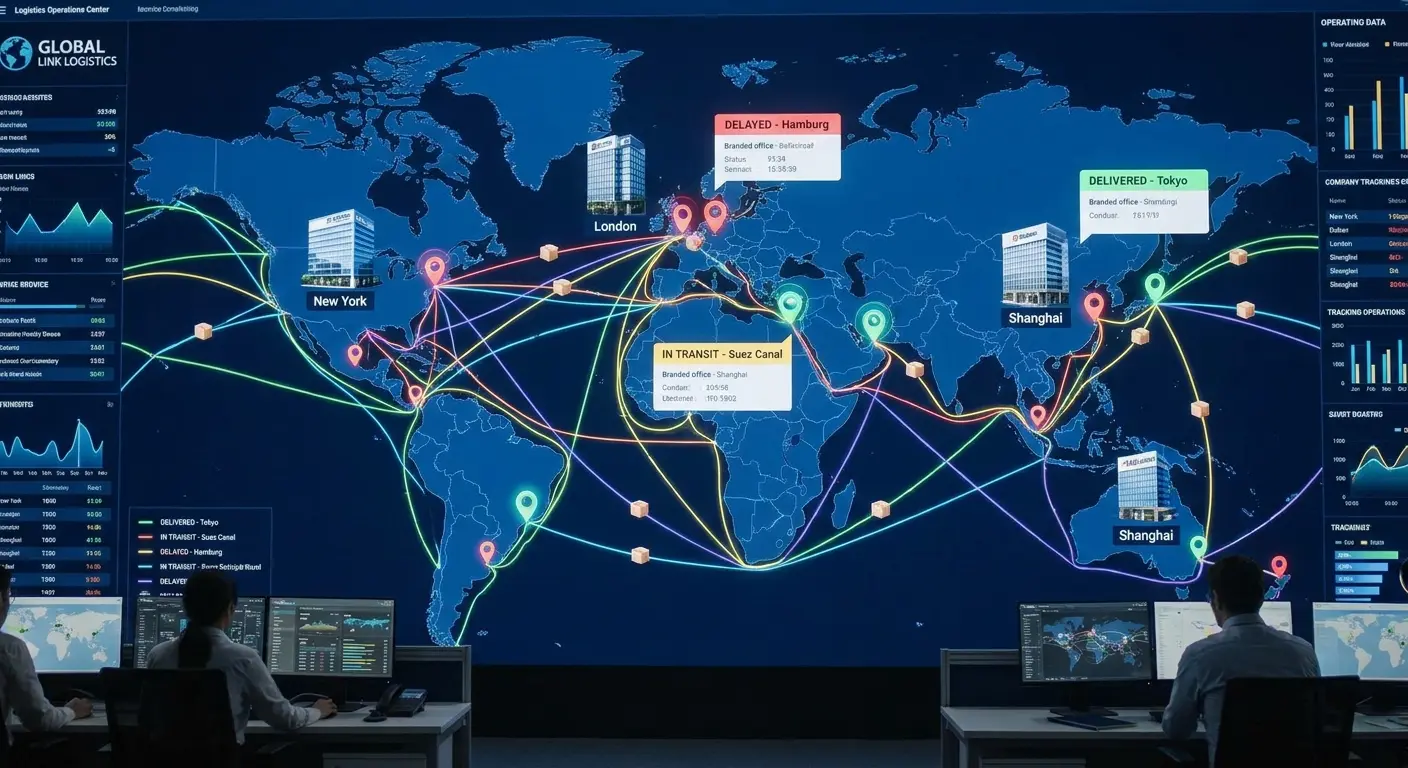
When you ship a laptop to a new employee, the system creates the shipment, generates the label, updates the asset location to "in transit," and monitors delivery status. You can see which devices are currently being shipped, where they're going, and expected delivery dates without leaving your inventory platform. When the employee confirms delivery, the system updates the asset location to their address.
This integration becomes essential when you're managing global teams. You need to know if that laptop shipped to Singapore is stuck in customs or if the monitor heading to your London office was delivered last week. The State of Global IT Hardware Procurement 2026 report highlights how shipping visibility directly impacts deployment timelines and employee satisfaction.
Audit Trails That Actually Exist When You Need Them
Compliance audits demand detailed records of who accessed what equipment, when changes were made, who approved purchases, and how assets were disposed of. Creating these audit trails manually means hoping everyone logged their actions correctly and completely.
Automated audit trail generation captures every action across your integrated systems without anyone needing to remember to document. When someone assigns a device, the system logs who made the assignment, when, which device, to whom, and any associated approvals.
When equipment is retired, the system documents the disposal method, data wiping confirmation, and responsible parties. During audits, you can produce complete records showing the entire chain of custody and all actions taken for any asset.
The integration creates audit trails that meet regulatory requirements for data security, financial controls, and asset management without adding extra work to anyone's process. Companies like Upwork have streamlined their compliance processes by implementing automated audit trails that capture every inventory transaction automatically.
One Place to See Everything That Matters
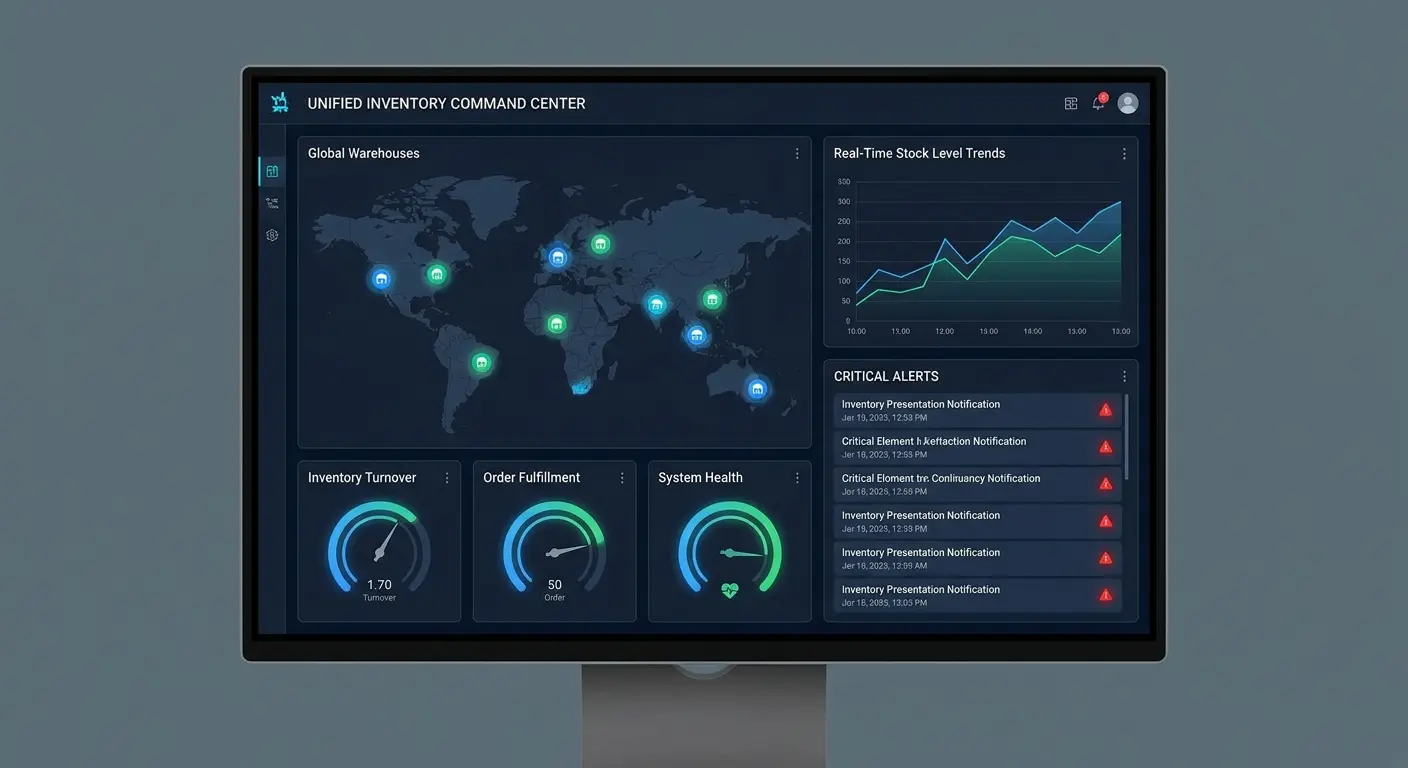
The ultimate integration brings everything together in one unified dashboard where you can see your entire inventory operation at a glance. Available stock, pending orders, budget utilization, compliance status, upcoming warranty expirations, devices in transit, open support tickets, and forecasted needs all visible without switching between systems.
You can drill down into any area for details or stay at the high level for operational oversight. The dashboard pulls real-time data from every integrated system, so you're seeing current status, not yesterday's snapshot.
Different team members can customize their view based on what they need. IT focuses on device availability and support metrics. Finance monitors spending and asset value. Operations tracks deployment timelines and location distribution.
Everyone works from the same underlying data but sees the information relevant to their role. This unified view transforms inventory management from a fragmented task spread across multiple tools into a coordinated function where all the pieces connect.
We've helped hundreds of companies move from disconnected inventory
systems to truly integrated operations. The difference shows up immediately in reduced emergency orders, fewer budget surprises, and teams that can find the equipment they need when they need it. If you're managing IT assets for distributed teams and tired of the coordination chaos that comes with growth, we should talk about how GroWrk's integrated inventory management platform connects your procurement, deployment, tracking, and recovery processes into one system that works together.
So What Actually Matters Here?
Look, I've thrown 19 integrations at you. That's overwhelming. You're not implementing all of these next week.
Here's what I'd actually do if I were you:
Start with the integration that's costing you the most money right now. For most teams, that's one of three things:
Stock syncing between procurement and inventory if you're ordering duplicates or running out unexpectedly. Finance and IT system integration if you're getting budget surprises or spending hours on reconciliation. HR and inventory connections if new hires are waiting on equipment or you're losing devices during offboarding.
Pick one. Get it working. Let your team adjust. Then add the next one.
The companies that succeed with this stuff don't try to integrate everything at once. They fix their biggest pain point, prove the value, then expand. The ones that fail try to boil the ocean on day one and overwhelm everyone.
Real talk: If you're still managing inventory in spreadsheets while running a 100+ person company, you're not being scrappy. You're being cheap. And that cheapness is costing you way more than a proper system would.
I've seen companies waste $50K in duplicate orders and inefficiency while refusing to spend $10K on integration because "spreadsheets work fine." They don't. You've just normalized the dysfunction.
What Your Day Looks Like When This Actually Works
Let me paint you a picture of life with fully integrated inventory management:
Monday, 9 AM: You arrive at work. Your dashboard shows 3 equipment requests that came in over the weekend. All three were automatically routed to the right approvers based on cost and type. Two are already approved. The third needs CFO sign-off because it's over $5K. You can see it's sitting in her queue. You don't send any "just checking" emails. You don't hunt through your inbox. The system shows you everything.
Monday, 10:30 AM: HR adds 5 new employees to the system with start dates 3 weeks out. Your inventory system automatically checks available stock, sees you have 3 laptops available, triggers a purchase order for 2 more (to maintain your buffer), routes the PO for approval, and adds the new hires to your deployment schedule. You didn't do anything. It just happened.
Tuesday, 2 PM: Finance pings you: "Can you send me the current IT asset value for the board deck?" Instead of spending 2 hours pulling data from three systems and building a spreadsheet, you click a button. The report generates in 30 seconds with real-time data. You send it. Finance is shocked it was that fast.
Wednesday, 11 AM: An employee in your Austin office needs to ship their laptop to your Denver office for a project. They initiate the transfer in the system. It updates the asset location to "in transit," generates a shipping label, notifies the Denver office manager, tracks delivery status, and updates location when delivered. Nobody emails you asking "where's that laptop?" because everyone can see its status.
Thursday, 9 AM: Your system alerts you that 8 laptops are approaching 3 years old and their warranties expire in 60 days. It shows you each laptop's repair history, current assigned users, replacement cost, and budget impact. You decide to replace 5 and extend warranties on 3. You approve the replacements. The system adds them to next week's purchase order, schedules deployment, plans for old laptop retirement, and updates budget forecasts. The whole decision takes 10 minutes instead of half a day.
Friday, 3 PM: You run your weekly operations review. The dashboard shows zero duplicate orders this week, average approval time of 6 hours (down from 3 days), 100% of new hires had equipment on day one, $0 spent on rush shipping, and budget utilization at 73% with 8 weeks left in quarter. You're ahead of schedule, under budget, and nobody's complaining about equipment delays.
That's what success looks like. Not perfect (problems still happen) but manageable, visible, and mostly automated.
Your Next Move
Here's what to do in the next 30 minutes:
List your three biggest inventory headaches from the last month. Duplicate orders? Budget surprises? Lost equipment? Pick the top three.
Match each headache to the integration that solves it. Use the list in this post. If your biggest problem is duplicate orders, that's unified vendor catalogs. If it's budget surprises, that's finance integration or real-time budget visibility.
Check if your current tools support those integrations. Look at your inventory system's integration page. See if it connects to your other tools. If not, that's valuable information.
Decide: DIY or get help? If your tools have pre-built integrations and you have someone technical, you might implement this yourself. If not, talk to vendors who specialize in this. (That's us, but there are others too.)
Don't just read this and do nothing. Pick one integration. Implement it. See the results. Then come back for the next one.
What About Just Using Better Spreadsheets?
Look, I've seen some impressive spreadsheets. Formulas, macros, pivot tables. People build entire inventory systems in Excel. And for 15-20 people, that might be fine.
But spreadsheets break at scale for three reasons:
They can't trigger actions in other systems. Your spreadsheet can't automatically create a purchase order, update your finance system, and notify HR. You're still doing that manually.
They have no access controls. Everyone's editing the same file. Someone accidentally deletes a formula, and suddenly your counts are wrong. Nobody knows who changed what or when.
They don't update in real-time. Your spreadsheet shows what was true when someone last updated it. Could be accurate. Could be from last Tuesday. Who knows?
If spreadsheets are working for you, great. Keep using them. But when you find yourself spending 10 hours a week maintaining them and still getting surprised by inventory issues, it's time to consider integrated systems.
What Matters at Your Company Size
10-30 employees: You probably don't need most of these yet. Focus on stock syncing if you're ordering from multiple sources. Everything else can wait until you hit 50 people.
30-100 employees: Time to get serious. Start with stock syncing, finance integration, and HR integration. These solve the coordination problems that emerge when you're too big for spreadsheets but too small for dedicated operations staff.
100-300 employees: You need most of these. Prioritize stock syncing, location tracking, finance integration, cross-location visibility, HR integration, and budget visibility. The coordination overhead at this size will kill your efficiency without automation. Budget 3-6 months to implement your core integrations.
300-1000 employees: All 19 integrations are probably relevant. You're large enough that even small inefficiencies cost serious money. Focus on the high-priority integrations first, then systematically add the others. Consider dedicated operations staff to manage your integrations.
1000+ employees: You likely need custom integrations beyond what's listed here. Use this as a baseline, but expect to build additional connections specific to your workflows. Budget for a full-time integration specialist or operations team.
When Integration Makes Things Worse
Not all integration stories have happy endings. Let me tell you about a company that integrated themselves into paralysis.
They connected everything. Every action triggered notifications in three systems. Every purchase required data entry in four places (even though it was "integrated"). Every workflow had so many automated checks that simple tasks took longer than before.
Employees started finding workarounds. They'd buy equipment on personal credit cards to avoid the integrated approval system. They'd track inventory in secret spreadsheets because the integrated system was too cumbersome.
What went wrong:
They automated bad processes. Instead of fixing their broken approval workflow, they automated it. Now it was broken faster and harder to bypass.
They over-notified. Every integration sent alerts. People got 30+ notifications per day about inventory actions. They started ignoring all of them, including important ones.
They integrated for integration's sake. They connected systems that didn't need to talk to each other, creating complexity without value.
They didn't train anyone. Launched 10 integrations simultaneously with a single email announcement. Nobody understood how to use the new workflows.
The lesson: Integration should simplify workflows, not complicate them. If your integration makes something take more steps or require more input, you've failed. Go back and redesign.
Good integration is invisible. Users shouldn't think "wow, these systems are so integrated!" They should think "huh, that was easy."
The Cost of Waiting
Every month you operate with disconnected systems costs you real money.
Real example from a client who waited:
- 6 duplicate orders per month at around $2,500 average = $15,000/month wasted
- 4 rush shipments per month at $300 each = $1,200/month in expedited fees
- 20 hours of manual coordination work per month at $50/hour loaded cost = $1,000/month
- 1-2 budget surprises per quarter averaging $10,000 = $3,300/month averaged
Total: $20,500/month in preventable costs.
They waited 8 months to implement integrations because "it wasn't urgent." That's $164,000 in waste while they procrastinated.
The longer you wait, the more money walks out the door. And it compounds. As you grow, these coordination failures get worse, not better.
Why We Built GroWrk This Way
Most inventory platforms bolt on integrations as afterthoughts. They build the core product, then add API connections because customers demand them.
We went the opposite direction. We built GroWrk as an integration-first platform because we kept seeing the same problem: companies had good tools that didn't talk to each other.
What's different:
Pre-built connections to 40+ platforms. Not "we have an API you can use to build integrations." Actual working connections to the tools you already use (HRIS systems, finance platforms, help desks, MDM, shipping providers).
Deployment in 2-4 weeks, not months. Because the integrations already exist, we're configuring, not building from scratch.
We handle the maintenance. When Workday updates their API and breaks something, that's our problem to fix, not yours.
Built for distributed teams specifically. If you're managing IT assets across multiple countries, remote employees, and coworking spaces, we've solved the problems you haven't hit yet.
Is GroWrk the only option? No. But if you're tired of duct-taping systems together and want integrations that actually work, we should talk.
Full disclosure: This is what we do. We built our platform specifically to solve these coordination nightmares for distributed teams because we kept seeing companies struggle with the same disconnected-systems problems.
If you're managing IT assets across multiple locations and spending more time coordinating between tools than actually managing inventory, we should talk. If you're not ready for that conversation, bookmark this post and come back when the chaos gets unbearable. We'll still be here.