



Most companies treat IT asset management like a checkbox exercise. You've got your spreadsheet, maybe some fancy tracking software, and once a quarter someone runs a report. Everything looks good on paper.
It's all bullshit.
I've been managing IT assets for distributed teams for over a decade, and here's what actually happens: Your tracking says you have 247 laptops. You probably have 247 laptops. But I guarantee you can't tell me where 60 of them are right now. Not "which employee," I mean physically where they are. Because they're in transit. Or sitting in someone's closet because they forgot to return it. Or in a FedEx facility in Memphis for reasons nobody understands.
These in-between states, that's where everything falls apart. And your checklist doesn't account for them because they're messy and don't fit in neat categories.
TL;DR
- Traditional checklists track fixed points and completely miss the transition periods where most problems actually happen
- Pre-deployment planning should nail down configuration standards and user requirements before you spend a dollar
- Real-time assignment tracking prevents the "ghost inventory" problem where devices exist on paper but not in reality
- Maintenance protocols need clear escalation paths that account for the fact that your employees are scattered across time zones
- Return processes fail without specific timelines, prepaid shipping infrastructure, and actual verification that data got wiped
- Shadow IT emerges when your official process creates more friction than just using your personal laptop
- Automate decision bottlenecks, not just data entry
- Your checklist needs quarterly revision based on what actually broke, not annual compliance theater
Why Your Current Checklist Misses What Actually Matters
Traditional IT asset management checklists operate on a fundamentally flawed assumption: that assets exist in neat, trackable states. You purchase a laptop, assign it, track it, recover it, dispose of it. Five clean boxes to check.
The problem is that assets spend most of their lifecycle in transitional states that don't fit into those categories.
A laptop sitting in a warehouse waiting for a delayed employee start date. A monitor that's been "returned" but hasn't been inspected for damage. A phone that's assigned to an employee who left three weeks ago but hasn't shipped back yet. These in-between moments create the actual risk.
Your IT asset management checklist probably doesn't account for them because they're messy, variable, and require judgment calls rather than binary yes/no answers. I've seen companies with 98% asset tracking accuracy on paper while simultaneously having 30% of their hardware in these undefined states. The checklist looked perfect. The reality was chaos.
This happens because most frameworks were designed for on-premise environments where physical proximity made transitions quick and visible. Someone leaves, you walk to their desk, you retrieve the laptop. That same process in a distributed environment can take weeks and involves shipping logistics, time zone coordination, and trust in employees you've never met face-to-face.
Your IT asset management checklist needs to acknowledge these realities, not pretend they don't exist. We map out those lifecycle realities in the state of IT lifecycle management.
Last year, a marketing manager quit on a Friday. Our system did its thing, sent the return email, generated the label, everything automated and beautiful. She shipped the laptop Wednesday, we got delivery confirmation Friday afternoon.
And then it sat in our mailroom for four days because apparently nobody checks the mailroom on Fridays, and then it was the weekend, and then Monday was some holiday I forgot about.
Eleven days total where this laptop was just... nowhere. Not with her, not in our system, not anywhere. But our checklist showed green because she "initiated return within required timeframe."
Cool. Very helpful.

Before You Buy Anything: The Pre-Deployment Phase
Most asset management begins at purchase order creation. That's already too late.
The decisions you make before procurement determine whether you'll have a manageable asset ecosystem or an expensive mess of incompatible devices and configurations. I start the checklist before anyone clicks "buy."
What's the employee's role, location, and specific software requirements? What's the expected device lifespan based on their function? Are there regional compliance requirements that affect hardware specs?
These questions should have documented answers before a single dollar gets spent. You're not just buying a laptop. You're committing to a multi-year support relationship with specific cost implications.
One client came to us with 47 different laptop models in circulation across 200 employees. Every support ticket became a research project. Inventory management required a full-time person just to track which chargers worked with which devices. All because they let department heads order whatever they wanted without upstream planning.
Your pre-deployment checklist should include standardized configuration profiles (not just hardware specs, but software loads and security settings), vendor evaluation criteria that account for repair turnaround times in your employees' actual locations, and a clear decision tree for exception requests.
Someone will always need something different. The checklist should make approving or denying that request a five-minute decision, not a week-long email thread.
| Device Category | Standard Spec | Exception Triggers | Approval Required |
|---|---|---|---|
| General Business User | 8GB RAM, 256GB SSD, Integrated Graphics | Video editing, CAD software, development work | Department Head |
| Developer | 16GB RAM, 512GB SSD, Dedicated GPU | Machine learning, mobile development, database admin | IT Director |
| Executive | 16GB RAM, 512GB SSD, Premium Build | None (standard spec meets all needs) | Auto-approved |
| Creative Professional | 32GB RAM, 1TB SSD, High-end GPU | 3D rendering, professional video production | IT Director + Finance |
| Remote International | Region-specific keyboard, local warranty coverage | Specialized software requiring local compliance | IT Director + Legal |
Procurement That Doesn't Turn Into Instant Waste
Procurement tracking sounds straightforward until you realize most companies can't answer a simple question: how many devices did we buy last quarter that we didn't actually need?
Not devices that broke or got lost. Devices that were ordered, received, and then sat unused because the employee left before their start date, or the project got canceled, or someone found an old laptop in a drawer that still worked.
Your IT asset management checklist needs to track purchase intent separately from purchase execution. We implemented a 48-hour cooling-off period between approval and order placement for non-urgent requests. Sounds bureaucratic, and sometimes it is. But it's caught countless orders that would have become instant waste.
An employee who requested a new monitor on Monday might mention on Tuesday that they're going part-time next month. That context changes the procurement decision entirely.
You also need to track vendor lead times against employee start dates with automatic alerts when they diverge. If a laptop takes three weeks to arrive and configure, ordering it two weeks before someone starts creates a problem your checklist should flag before it happens.
The goal isn't to slow down procurement. It's to make sure every purchase has an immediate, confirmed destination. Inventory should be a temporary state, not a storage strategy. We look at how distributed teams approach buying in the state of global IT hardware procurement.
Pre-Procurement Verification Checklist:
- Employee start date confirmed in HR system (not verbal commitment, learned this one the hard way)
- Shipping address verified (we've sent laptops to old addresses three times this year)
- Vendor lead time documented and compared against start date (Dell says 5 days, Dell means 12 days)
- Buffer time calculated, minimum 3 business days between delivery and start date
- Exception requests reviewed against standard spec decision tree (if someone says they "need" 64GB RAM, they better explain why)
- Software licensing requirements identified and available
- Regional compliance requirements checked (keyboard layout, warranty coverage, import restrictions)
- Backup device availability confirmed if lead time is marginal
- Purchase approval includes both hardware cost and first-year support cost projection
- Cooling-off period respected, 48 hours between approval and order for non-urgent requests
We used to have 15 items on this list. Then we had 8. Now we're at 10. It evolves.

Configuration Standards: The Thing Nobody Prioritizes
Nobody thinks configuration belongs in an asset management checklist. It's an IT thing, right?
Wrong. So wrong.
A laptop that's not configured right isn't an asset. It's a $1,500 paperweight that's going to generate support tickets for the next three years.
Your IT asset management checklist should include verification points for security baselines, software licensing compliance, and user-specific application loads before a device gets marked as "deployment ready."
I've found that about 40% of the time when someone says "my new laptop doesn't work," it's because we forgot to install something or enable some certificate. Which is embarrassing but fixable.
These aren't technical failures. They're process failures.
Your checklist should specify who verifies each configuration element and what the rollback procedure is if verification fails. That second part matters more than people think. I've seen devices get shipped to employees with known configuration issues because there was no clear process for saying "stop, send it back, fix this first."
The pressure to hit a start date overrode the IT asset management checklist. If your process allows that, your checklist is decorative, not functional.
Assignment and Deployment: Where Accountability Disappears
The moment you hand off a device to an employee (or a shipping company, in remote scenarios), you create an accountability gap. Who owns this asset right now? What's its expected location? What happens if it doesn't arrive?
Your IT asset management checklist needs specific answers with specific timelines.
For shipped devices, you need tracking numbers logged in your asset management system within 24 hours of shipment, employee confirmation of receipt within 48 hours of delivery, and automated escalation if either deadline gets missed.
That last part is critical. Without automatic escalation, this checklist item becomes someone's mental to-do list, and mental to-do lists fail.
We had a situation where a laptop showed "delivered" via FedEx but the employee never confirmed receipt. It sat in that ambiguous state for two weeks before anyone noticed. Turned out it was delivered to the apartment building's main office, and the employee didn't know to check there. Two weeks of productivity lost because the checklist had a "confirm receipt" item but no enforcement mechanism.
You also need to document the device's condition at deployment. We require employees to complete a simple form within 72 hours noting any physical damage, missing accessories, or functionality issues. This isn't about blaming anyone. It's about establishing a baseline so you know whether damage happened during their use or arrived that way.
That distinction matters for cost recovery and vendor accountability.
A software engineer in Portugal, I think his name was Miguel, ordered a development laptop three weeks before his start date. This was back in February, freezing cold. The device shipped on time, arrived two days before he started, and tracking showed successful delivery. Perfect execution, right?
Except when he opened the box, the laptop wouldn't power on. Dead on arrival.
Because we had a 72-hour condition verification requirement in our checklist, he reported it immediately. I still remember the panic in his Slack message. We shipped a replacement via overnight service, which cost us like $200 in shipping, but whatever, he needed to work. He had a working device by day two.
Without that verification step, he might have spent his first week troubleshooting, assuming he'd done something wrong, or worse, trying to work from a personal device while waiting for IT to "fix" a laptop that was never going to work.
User Acceptance: More Than Just a Signature
User acceptance typically means an employee signs something acknowledging they received a device. That's insufficient.
Real acceptance means the employee has verified the device works for their actual job requirements and knows what to do when it doesn't. Your checklist should include a structured onboarding verification within the first week.
Can they access all required systems? Do they know how to submit a support ticket? Have they been informed about return procedures and data backup requirements?
I've learned that employees who don't understand the support process within their first week will develop workarounds instead of using official channels. That's how shadow IT starts. It's not malicious, it's just practical. If I don't know how to get my laptop repaired and I have a deadline, I'm going to borrow my roommate's computer and work from there.
Congratulations, your company data is now on an unmanaged device because your checklist treated "acceptance" as a formality instead of a functional verification.
A comprehensive employee equipment agreement should outline device responsibilities and return procedures from day one, making acceptance more than just a signature.

Active Use: Monitoring Without Losing Your Mind
Active use is where most checklists go quiet. The device is deployed, the employee is working, everything seems fine. Your checklist says "monitor quarterly" or something equally vague.
That's where problems incubate.
You need specific monitoring triggers, not calendar-based check-ins. Your IT asset management checklist should include automated alerts for devices that haven't connected to your network in 14 days, software that's more than two versions behind current, or storage capacity exceeding 85%.
These aren't arbitrary thresholds. They're early warning signs of emerging problems.
A device that hasn't connected in two weeks might belong to an employee who's on leave, or it might be sitting in a drawer because they're using their personal laptop instead. You need to know which. Storage capacity matters because employees who run out of space start storing files in unauthorized locations. Cloud drives, USB sticks, email attachments
A device that hasn't connected in two weeks might belong to an employee who's on leave, or it might be sitting in a drawer because they're using their personal laptop instead. You need to know which. Storage capacity matters because employees who run out of space start storing files in unauthorized locations. Cloud drives, USB sticks, email attachments to personal accounts.
Your checklist should trigger intervention before they hit that point.
We also track support ticket frequency per device. A laptop that's generated four tickets in two months is telling you something. Maybe it's defective and needs replacement. Maybe the employee needs additional training. Maybe the device spec doesn't match their workload.
Your IT asset management checklist should flag this pattern and trigger a root cause analysis, not just keep closing tickets.
| Monitoring Trigger | Alert Threshold | Escalation Timeline | Responsible Party | Action Required |
|---|---|---|---|---|
| Network Connectivity | No connection for 14 days | Immediate alert, 48-hour response required | IT Operations | Contact employee, verify device status, confirm not on extended leave |
| Software Version Compliance | 2+ versions behind current release | 7-day warning, 14-day escalation | IT Security | Schedule update window with employee, provide update instructions, verify completion |
| Storage Capacity | 85% full | 7-day warning, manual intervention at 90% | Help Desk | Contact employee, identify large files, recommend cleanup or archival options |
| Support Ticket Frequency | 4+ tickets in 60 days for same device | After 4th ticket | IT Operations Manager | Root cause analysis, evaluate for replacement or additional training |
| Battery Health | 80% of rated cycles consumed | 30-day advance notice | IT Operations | Order replacement battery, schedule swap window with employee |
| Failed Security Scans | 2 consecutive failed compliance checks | Immediate alert, 24-hour remediation required | IT Security | Revoke system access until compliant, contact employee with remediation steps |
Software License Compliance During Active Use
Software licensing is usually treated as a separate compliance function. It shouldn't be. It's an asset management issue that your checklist needs to address during active use.
You need quarterly audits (actual audits, not just reports) of installed software against licensed software. I've found unauthorized installations on about 15% of devices during these audits. Usually it's not piracy. It's an employee who needed a tool, couldn't figure out how to request it officially, and downloaded a trial version that expired three months ago.
Your checklist should make requesting software easier than finding workarounds. If your official process takes two weeks and involves three approval layers, employees will route around it.
The checklist item isn't just "audit software." It's "audit software and streamline the request process based on what you find."
You're looking for patterns. If 12 people have independently installed the same unauthorized screen recording tool, that's not a compliance problem. That's a signal that you should probably license that tool officially.
Hardware Health Checks: Proactive vs. Reactive
Most hardware maintenance is reactive. Something breaks, you fix it. Your checklist should include proactive health monitoring that catches problems before they become failures.
For laptops, that means tracking battery cycle counts and flagging devices approaching manufacturer-specified limits. A battery that's at 85% of its rated cycles should trigger a replacement order before it fails, not after.
For all devices, you need temperature monitoring (if your endpoint management allows it) to catch cooling system failures early. An overheating laptop is usually still functional, so employees don't report it. They just deal with the noise and the discomfort until something fails catastrophically.
Your checklist should catch it first.
You also need to track physical damage reports over time. A device with three separate "minor damage" reports in six months isn't having bad luck. Something about how that employee uses or transports the device needs to change, or you need to provide better protective equipment.
Your checklist should flag this pattern and trigger a conversation, not just keep processing repair orders.
When Assets Become Liabilities: Maintenance Windows
Devices under maintenance exist in a particularly expensive limbo. The employee doesn't have their primary work tool, you're paying for repair or replacement, and productivity takes a hit.
Your IT asset management checklist needs to minimize this window while maintaining quality standards.
That starts with clear escalation paths based on employee role and location. A developer without a laptop is different from a sales person without a laptop. Your checklist should prioritize based on business impact, not just ticket order.
For remote employees, you need pre-negotiated repair partnerships in their regions or a swap device program. We maintain a buffer stock of configured devices specifically for this purpose. When someone needs a repair that'll take more than 24 hours, we ship them a swap device immediately and they return the broken one in the same box.
This keeps the maintenance window from becoming a productivity blackout.
Your IT asset management checklist should specify maximum acceptable maintenance windows by device type and employee role, with automatic escalation to overnight shipping or emergency replacement if those windows are at risk.
You also need a clear decision tree for repair vs. replace. We use a simple calculation: if repair cost plus shipping plus productivity loss exceeds 60% of replacement cost, we replace. Your threshold might be different, but it should be documented in your checklist so the decision takes minutes, not days.
Loaner Device Management: The Forgotten Asset Category
Loaner devices are where asset management discipline goes to die. They get treated as temporary, so they don't get the same tracking rigor as primary devices.
That's how you end up with loaner laptops that have been "temporarily" assigned for 18 months.
Your checklist needs specific protocols. Loaner assignments should have mandatory return dates in the system from day one, with automatic reminders starting 48 hours before the deadline.
You need a different configuration profile for loaners that limits data storage and requires more aggressive backup policies. Employees shouldn't be saving critical files to loaner devices because those devices should be wipeable and reassignable on short notice.
I've also learned that loaner devices need more frequent physical inspections than primary devices. They get handled by more people, transported more often, and generally abused more. Your checklist should require a full inspection and any necessary repairs before each reassignment, not just when someone reports a problem.
The Return Process (Where Everything Usually Falls Apart)
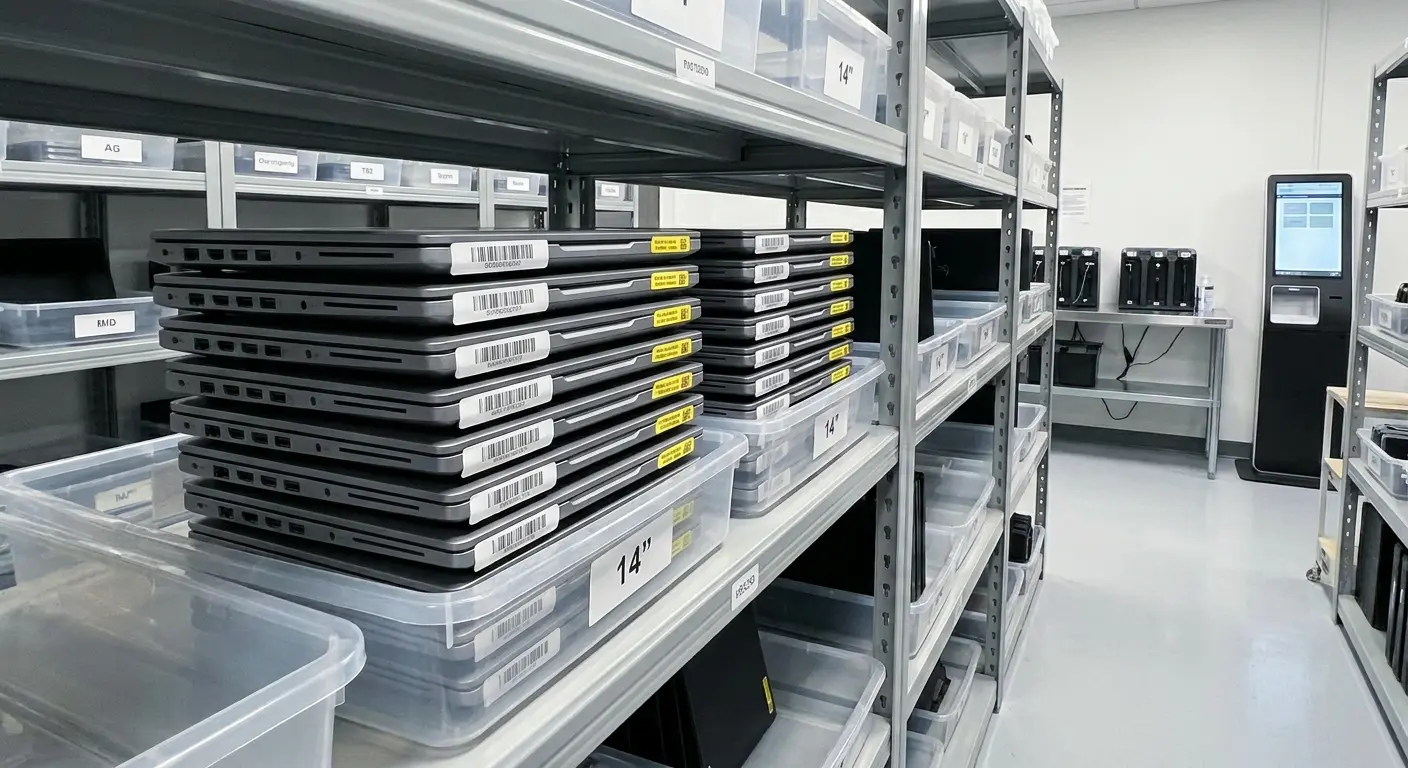
Asset return is where even good management programs fall apart. An employee leaves or gets a device upgrade, and suddenly you're in a negotiation about when and how they'll return the old equipment.
Your IT asset management checklist needs to make return non-negotiable and frictionless.
That means prepaid shipping labels generated automatically when an employee's departure is logged in your HR system, clear instructions sent to the employee's personal email (not their work email, which they're about to lose access to), and specific deadlines with consequences.
We use a 10-business-day window. If the device isn't in transit by day 10, we charge the employee's final paycheck (where legally permitted) or send it to collections. That sounds harsh until you realize that the alternative is endless "I'll send it next week" promises while the device sits in someone's closet depreciating.
You also need receiving protocols that are just as rigorous as deployment. Who inspects returned devices? What are they checking for? What's the process if damage exceeds normal wear and tear?
We use a simple rubric: cosmetic damage that doesn't affect function is acceptable, anything that impacts performance or requires repair triggers a damage assessment. That assessment needs to happen within 48 hours of receipt, while the employee's departure is still fresh and cost recovery is still feasible.
Building a structured employee offboarding process ensures device returns happen on schedule and nothing falls through the cracks during employee transitions.
Device Return Process Template:
Day of Departure Notification:
- HR system triggers asset return workflow automatically
- Prepaid shipping label generated and sent to employee's personal email
- Return instructions include: packaging requirements, data backup reminder, accessory checklist, shipping deadline (10 business days)
- Asset status changed to "pending return" in tracking system
Days 1-7:
- Automated reminder sent on day 3
- Automated reminder sent on day 7
- Manager receives copy of day 7 reminder for awareness
Day 8:
- Escalation notice sent to employee and manager
- Finance team notified of potential paycheck deduction
- Tracking system flags asset as "overdue return"
Day 10:
- If not in transit: final notice sent, paycheck deduction processed (where legal), or collections referral initiated
- If in transit: tracking number logged, expected delivery date calculated
Upon Receipt:
- Device logged into receiving system within 4 hours
- Physical inspection completed within 24 hours
- Damage assessment (if needed) completed within 48 hours
- Employee notified of successful return or damage charges within 72 hours
Returns Are Already Annoying. Remote Returns? Complete Nightmare.
Returns are already annoying when everyone's in the same building. For remote employees? It's a complete nightmare.
I've had laptops stuck in customs. I've had employees who "shipped it" but used the wrong label. I've had devices delivered to old addresses because someone moved and didn't update their info. Every single one of these should have been prevented by the checklist.
You can't just say "mail it back" and hope for the best. You need actual steps.
First, shipping materials. We send a prepaid box with protective padding to the employee's address as soon as their departure is confirmed. Waiting for them to find a box and figure out packaging adds days and increases damage risk.
Second, tracking and insurance. Every return shipment should be tracked and insured for replacement value. Your checklist should flag any shipment that doesn't show movement within 72 hours of label creation.
Third, international returns. If you have employees in different countries, you need customs documentation and import procedures in your checklist. We've had devices stuck in customs for weeks because nobody included the right paperwork. The employee did everything right, but the checklist didn't account for cross-border complexity.
You also need a backup plan for employees who can't or won't ship devices. We partner with IT asset disposition companies in major cities who will do on-site pickup and secure transport. It costs more, but it's cheaper than writing off the device entirely.
When managing remote employee equipment returns, having a dedicated laptop retrieval service streamlines the process and eliminates the guesswork from international logistics.
Upgrade Cycles: Managing the Overlap
Device upgrades create a temporary period where an employee has two devices. Your old checklist probably says something vague about "return old device after data transfer." That's not specific enough.
You need defined timelines and verification steps.
We give employees 72 hours to complete data migration and return the old device. That's enough time to transfer files and reconfigure their workspace without turning the old device into a permanent backup they keep "just in case."
Your checklist should include a data migration verification step. Before the old device ships back, someone needs to confirm that critical files have been transferred and backed up. We've had situations where employees returned devices and then realized three days later that they forgot to transfer a folder of client files.
By then, the device was already wiped.
Your checklist needs to prevent that without slowing down the return process. You also need clear guidance on what happens to software licenses during upgrades. Some licenses transfer automatically, others need manual reassignment, and some require new purchases.
Your checklist should specify who handles license migration and verify it's complete before the old device gets processed for disposition.
Data Sanitization: Be Paranoid Here
Data sanitization is where you need to be paranoid. Not careful, paranoid. Because if you screw this up, you're not just out a laptop. You're potentially looking at a data breach, regulatory fines, and a very uncomfortable conversation with your legal team.
So yes, paranoid.
Every returned device should go through a verified wipe process, and "verified" means more than just running a deletion tool. You need cryptographic verification that the wipe completed successfully and documentation of which standard you used (DoD 5220.22-M, NIST 800-88, whatever your compliance framework requires).
Your IT asset management checklist should specify different sanitization protocols for different device types and data sensitivity levels. A laptop used by finance needs more rigorous treatment than a basic employee workstation.
We maintain separate processing queues based on data classification. High-sensitivity devices get physical destruction of storage media even after software wiping.
Your checklist also needs to account for devices that can't be wiped normally. Broken laptops with non-functional operating systems, phones with cracked screens that won't respond to input, tablets with corrupted firmware. You need a protocol for physical storage removal and destruction when software methods aren't viable.
I've seen companies try to resell devices that couldn't be properly wiped because their checklist didn't have a "destroy if unwipeable" step. That's how data breaches happen.
The $12,000 Mistake:
Back in 2022, we had an executive leave and we followed our checklist perfectly. Return email sent, tracking number logged, device received and wiped within our standard timeline. Green checkmarks everywhere.
Three months later, we got a letter from her lawyer. Turned out the laptop had personal photos from a family trip that she'd forgotten to back up. We'd wiped them. Legally we were fine, she'd signed the agreement, we'd given her the standard 10-day window, everything was documented.
But it cost us $12,000 to settle because fighting it would have cost more, and we lost a potential client because she bad-mouthed us to her new company.
Now our checklist includes a 24-hour "last chance" reminder specifically mentioning personal files, sent to the employee's personal email with a checklist of common places people store personal stuff (Desktop, Downloads, Photos folder). It costs us nothing and we haven't had the problem since.
Was it her fault for not backing up? Absolutely. Did our checklist technically work? Yes. Was it actually good enough?
No.
Cloud Account Disconnection: The Digital Asset Layer
Wiping a device doesn't mean you've wiped the employee's access to company data. Your checklist needs to include cloud account disconnection as a parallel process to physical device recovery.
Every cloud service the employee accessed should be documented and systematically disconnected. Email accounts, file storage, SaaS applications, VPN credentials, API keys. This should happen on the employee's last day, not when you eventually receive their device back.
I've found that about 20% of departed employees retain access to at least one company system for weeks after leaving because the offboarding checklist treated account deactivation and device return as sequential steps instead of parallel ones.
They're related but independent. You need both.
Your checklist should include verification that mobile device management profiles have been removed from personal devices if you have a BYOD policy. Just because someone left doesn't mean their personal phone automatically loses its connection to your corporate email.
You need to actively revoke those certificates and verify the revocation was successful.
Disposal and Compliance Documentation
Devices eventually reach end-of-life, and how you dispose of them has legal, environmental, and financial implications your checklist needs to address.
You can't just throw old laptops in the trash (well, you legally can in some places, but you shouldn't). Your checklist should specify certified e-waste recycling partners with documented chain-of-custody tracking.
When you hand over 50 laptops for recycling, you should receive certificates of destruction that specify exactly what happened to each device. We require recycling partners to provide serial number-level documentation. It sounds excessive until you face an audit and need to prove that a device containing regulated data was properly destroyed.
You also need to track the financial recovery from disposal. Some devices have resale value, others have scrap value, some cost money to dispose of properly.
Your checklist should include a cost-benefit analysis for each disposal batch. Sometimes paying for certified destruction is cheaper than the staff time required to wipe and resell low-value devices. Your checklist should make that calculation explicit, not assume that recovery is always worth the effort.
Understanding IT asset disposition best practices ensures you're handling end-of-life devices compliantly while maximizing recovery value.
Compliance Documentation: Building Your Audit Trail
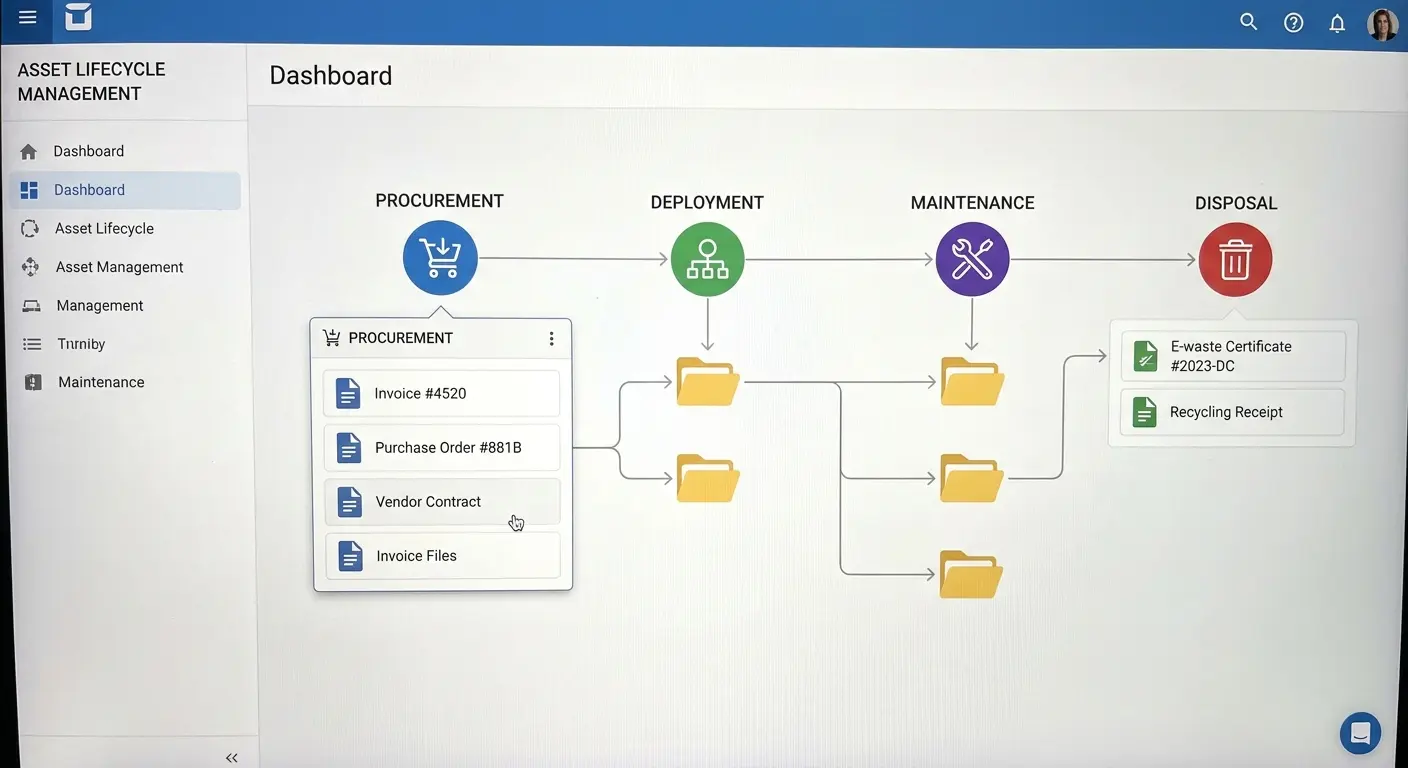
Every step in your asset lifecycle should generate documentation that survives longer than the asset itself. Your checklist needs to specify what gets documented, where it's stored, and how long you retain it.
Purchase orders, assignment records, maintenance logs, return confirmations, wipe certificates, disposal receipts. These aren't just nice-to-have records. They're legal requirements in many industries and your only defense in disputes.
We maintain a complete asset history that follows each device from procurement through disposal. When an employee claims they returned a device we have no record of receiving, we can pull up shipping tracking, delivery confirmation, receiving inspection notes, and wipe certificates.
Without that documentation trail, it becomes a he-said-she-said situation you'll probably lose.
Your checklist should also specify retention periods based on your industry's requirements. Financial services companies might need seven years of asset records. Healthcare organizations might need longer.
Your checklist should enforce those retention requirements automatically, not rely on someone remembering to keep old records.
The Shadow IT Problem Nobody Wants to Talk About
Shadow IT is what happens when your official asset management process creates more problems than it solves. Employees need tools to do their jobs. If your process makes getting those tools difficult, slow, or uncertain, they'll find alternatives.
Those alternatives don't appear in your asset inventory.
Your checklist needs to acknowledge this reality and address the root causes, not just try to enforce compliance harder. I've found that shadow IT correlates directly with friction in the official process. Every additional approval layer, every extra day of waiting, every unclear requirement increases the likelihood that someone will just use their personal device or download unauthorized software.
Your checklist should include a friction audit. How many steps does it take to request a new device? How long is the average fulfillment time? How often do requests get denied, and why?
If you're seeing significant shadow IT, your checklist isn't working. You need to fix the process, not just punish the workarounds.
That might mean delegating approval authority, maintaining larger buffer stock for faster fulfillment, or creating pre-approved equipment packages that employees can request without justification. The goal is to make the official process the path of least resistance.
BYOD: Acknowledging What You Can't Control
Bring Your Own Device policies are an admission that you can't (or don't want to) provide every device an employee might use. Your checklist needs to address BYOD without pretending you have the same control as company-owned devices.
You need clear policies about what company data can be accessed from personal devices, what security controls are required (mobile device management, encryption, remote wipe capabilities), and what happens when an employee leaves.
The tricky part is enforcement. You can require employees to install MDM profiles on personal devices, but you can't force them to keep those profiles installed.
Your checklist should include periodic verification that BYOD devices still meet security requirements. We do quarterly checks that confirm MDM enrollment is active and required security settings haven't been disabled. Devices that fail verification lose access to company systems until they're compliant again.
Your checklist also needs an exit strategy for BYOD. When someone leaves, you need to remove company data from their personal device without wiping their personal files. That requires selective wipe capabilities and verification that the wipe actually happened.
We've had former employees claim they couldn't remove the MDM profile and just kept using company email for months. Your checklist needs to verify disconnection, not just assume it.

What to Automate (And What to Keep Manual)
Everyone wants to automate asset management. The question is what to automate and what to keep manual.
Your IT asset management checklist should identify specific decision points where automation adds value and others where human judgment is essential.
Automate data entry, tracking number logging, reminder emails, compliance report generation. These are repetitive tasks with clear inputs and outputs. Don't automate exception handling, damage assessments, or repair-versus-replace decisions. These require context and judgment.
I've seen companies try to fully automate their asset management and end up with systems that handle the easy 80% perfectly while completely failing on the complex 20%.
Your checklist should specify which steps are automated and what the manual override process is when automation fails. That second part is critical. Automated systems fail. Shipping tracking numbers don't update. Employees don't respond to automated emails. Devices get delivered but not scanned.
Your checklist needs to specify how long you wait for automated processes to complete before human intervention kicks in. We use 48-hour timeouts on most automated workflows. If an expected response or status update hasn't happened within 48 hours, the system escalates to a person who can investigate and intervene.
Integration Points: Making Systems Talk
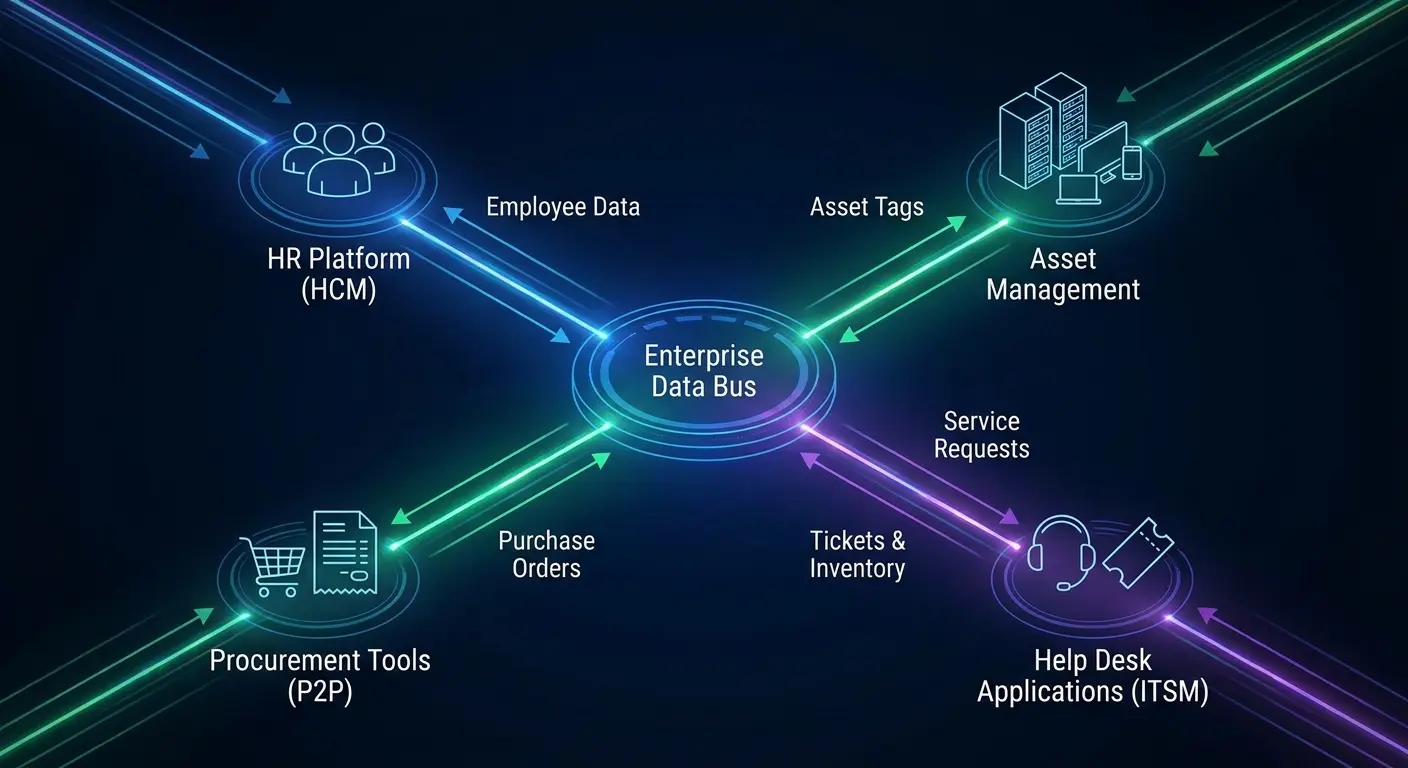
Asset management doesn't exist in isolation. Your checklist needs to account for integration with HR systems, procurement platforms, help desk software, and financial reporting tools.
When someone gets hired in your HR system, that should automatically trigger device procurement workflows. When someone submits their resignation, that should trigger return processes.
These integrations prevent the gaps where information lives in one system but hasn't propagated to others. We've seen situations where an employee left, HR processed their departure, but the asset management system didn't get updated for two weeks because someone forgot to manually enter the change.
During those two weeks, the device was still assigned to someone who no longer worked there, creating a tracking gap and delaying recovery.
Your checklist should specify required integrations and verify they're functioning. That means periodic testing. We run monthly audits comparing HR records to asset assignments looking for mismatches.
Any employee who's marked as departed in HR but still has assigned assets triggers an investigation. Usually it's a timing issue (they left yesterday, we haven't processed the return yet), but sometimes it reveals integration failures that need fixing.
Building a Checklist That Actually Evolves
The worst thing you can do is create a comprehensive checklist and then treat it as finished. Your asset management environment changes constantly. New device types, new remote work patterns, new security threats, new compliance requirements.
Your checklist needs to evolve with those changes.
We review our entire IT asset management checklist quarterly based on actual failure points from the previous quarter. Where did devices get lost? Where did processes break down? Where did we waste time on unnecessary steps?
Those failures inform the next iteration.
Your checklist should include a review schedule and specific criteria for triggering updates. Major criteria: any asset loss event, any security incident involving a managed device, any compliance violation, any process step that consistently takes longer than specified timeframes.
You also need input from the people actually using the checklist. The IT staff processing returns, the procurement team ordering devices, the help desk handling support tickets. They see problems that don't make it into reports.
We do monthly feedback sessions where anyone involved in asset management can flag checklist items that don't work in practice. Sometimes the issue is training. Sometimes the checklist is genuinely wrong.
You need both perspectives to improve.
Role-Specific Checklist Views
A comprehensive IT asset management checklist might have 200 items across the entire lifecycle. Nobody needs to see all 200 items at once.
Your framework should support role-specific views that show people only the checklist items relevant to their function. Procurement sees pre-deployment and purchasing items. IT sees configuration and deployment items. Managers see assignment and return items. Help desk sees maintenance and support items.
This isn't about hiding information. It's about reducing cognitive load so people can focus on their specific responsibilities without getting overwhelmed by the full process.
I've found that giving someone a 200-item checklist guarantees they'll miss things because they're spending mental energy filtering out irrelevant items. Give them a 15-item checklist focused on their role, and completion rates go way up.
Your framework should also support escalation visibility. If a help desk ticket escalates to urgent status, managers should see that in their checklist view even though they're not handling the ticket directly.
The checklist becomes a communication tool, not just a task list.
Metrics That Drive Improvement
Your checklist should generate metrics that reveal process health, not just completion statistics. Tracking that 95% of checklist items get completed is meaningless if the 5% that don't are the most critical ones.
We track metrics that indicate real problems: average time from employee departure to device receipt, percentage of returned devices requiring repair beyond normal wear, number of devices in "unassigned" status for more than 30 days, cost per device for the full lifecycle.
These metrics tell you where your process is breaking down.
If your average return time is creeping up, you need to investigate why. Are shipping delays increasing? Are employees less responsive to return requests? Is your inspection process taking longer?
The metric doesn't tell you the cause, but it tells you where to look.
Your checklist should automatically generate these metrics from the data points you're already collecting. If you're logging assignment dates and return dates, calculating average return time is trivial. If you're documenting repair costs, calculating lifecycle cost is straightforward.
The question is whether anyone's looking at those metrics and acting on them.
Where GroWrk Fits Into Your Asset Management Reality
You've probably noticed that executing this level of asset management rigor requires significant infrastructure. Warehousing for buffer stock. Shipping partnerships in multiple regions. Receiving and inspection facilities. Tracking systems that integrate with your HR and procurement platforms. Disposal partnerships with proper certifications.
Most companies don't have this infrastructure and don't want to build it.
Look, full disclosure: this is what we built GroWrk to solve. Because I got tired of managing warehouse space in six countries and trying to find vetted e-waste recyclers in Brazil at 11pm.
We handle all the physical stuff (buying, shipping, fixing, retrieving, destroying) while you keep control over the actual decisions. Who gets what, what security you need, when to upgrade.
Your checklist still exists. We just execute most of it for you.
This matters particularly for the high-friction items we've discussed. International returns, urgent device swaps, secure disposal with proper documentation. These are the things that break down when you're trying to manage them internally across distributed teams.
We've built the infrastructure specifically for remote-first companies where traditional asset management approaches don't work. See how Pi Health scaled remote IT asset management with GroWrk.
If you're spending more time tracking FedEx shipments than actually doing IT strategy, we should probably talk. You can focus on the decisions that matter (who gets what devices, what security standards apply, when to upgrade) while we handle the logistics that don't require your specific expertise.
Final Thoughts
Asset management checklists fail when they're designed for perfect scenarios. Employees who always follow procedures. Devices that never break unexpectedly. Shipping that always arrives on time.
Your IT asset management checklist needs to be built for reality, which means accounting for the gaps, delays, and exceptions that actually happen.
The items I've covered here aren't comprehensive. Your specific environment will have unique requirements based on your industry, team structure, and risk tolerance. What matters is the approach: identify where assets exist in ambiguous states, create specific protocols for those transitions, automate what can be automated, and build in verification steps for what can't.
Review your checklist against actual failures, not theoretical risks.
The best checklist is the one that prevents the problems you experienced last quarter, not the ones you read about in a compliance framework. Start there. Build from your real pain points.
Your asset management will improve faster than any generic best practices could deliver.