You've closed the candidate. Signed the offer letter. Sent the welcome email with confetti GIFs. And then what? Most companies treat the time between acceptance and start date like dead air. A placeholder. A waiting room.
Here's what actually happens in that gap: HR marks the hire as "complete" in their system and moves on. The manager gets excited and starts planning the first project. IT has no idea this person exists until someone remembers to file a ticket, usually the Thursday before a Monday start date. Finance hasn't been looped in, so there's no budget approval for software licenses. The new hire's sitting at home, excited about their first day, completely unaware that on the backend, it's pure chaos.
That gap is where preboarding actually happens, and most organizations are wasting it. We're not talking about sending another branded Slack invite or a link to your handbook. We're talking about the operational groundwork that determines whether your new hire shows up ready to work or spends their first week chasing IT tickets and waiting for someone to remember they exist.
Here's how preboarding got screwed up: someone in HR decided it was about "engagement" and "culture," so now we're all sending welcome videos and Slack GIFs while the actual laptop is stuck in a warehouse in New Jersey. Look, I'm not saying the warm fuzzy stuff doesn't matter. But if your new hire can't log in on day one, they're not going to care how personalized that CEO video was. And if you're still thinking about it as a series of emails, you're already behind.
TL;DR
You're treating preboarding like an HR engagement task when it's actually an operational coordination challenge that determines day one productivity. Hardware delays, access provisioning gaps, and missing documentation are the most common preboarding failures, and they're all preventable. Remote and global teams require different preboarding infrastructure, not just adjusted timelines. Most companies don't have the internal systems to execute preboarding well at scale, especially across multiple countries and time zones. Also, your engagement surveys aren't measuring what you think they're measuring. Time-to-productivity is what matters, not survey scores.
Why Preboarding Fails Before It Starts
Every company I've worked with swears they care about preboarding. And they do! They really do. But caring doesn't mean shit when HR thinks IT ordered the laptop, IT thinks the manager requested it, and the manager assumes HR sent the checklist three weeks ago. Nobody owns the gap between "offer signed" and "first day," so that's exactly where your new hire ends up in the gap, wondering what the hell they signed up for.
We've built processes that can't scale, can't adapt, and can't be measured in ways that matter. The issue isn't that companies don't care about what is preboarding or what does preboarding mean to their new hires. They've created systems with built-in failure points that guarantee disaster before the first day even arrives. Hardware lead times drive a lot of that risk, which we break down in our report on the state of global IT hardware procurement.
The Ownership Problem No One Wants to Admit
Preboarding doesn't have a home. HR thinks IT is handling the laptop. IT assumes the manager requested it. The manager believes HR sent the onboarding checklist. Everyone is waiting for someone else to move first.
This isn't a communication breakdown. You've got a broken system. Preboarding requires getting different departments to actually talk to each other, but most companies don't have a system for that. They have email threads. Slack channels that go quiet. Spreadsheets that live in someone's downloads folder. For a team that replaced that patchwork with a real system, see how Pi Health scaled remote IT asset management.

You can't fix a coordination problem with better intentions. You need one place where everything lives, clear ownership, and automated handoffs. Without that, preboarding will always feel like damage control.
Why Engagement Metrics Miss the Point
We measure preboarding success with surveys. How excited are you to join? How welcomed do you feel? How clear is our culture?
Those questions matter, but they don't tell you if the new hire can actually do their job on day one.
Engagement without execution is just good vibes with no output.
A new hire can feel welcomed and still spend their first week locked out of systems, waiting for a laptop, or trying to figure out where the product roadmap lives.
I know a senior engineer who joined a Series B that was supposedly "operationally mature." First day, his MacBook shows up without Docker installed. Fine, he thinks, I'll set it up. Except he can't access GitHub because nobody bought the license. Then he finds out the environment setup docs were last updated in 2019. Three days of Stack Overflow troubleshooting later, he's written zero code and is already updating his LinkedIn.
The engagement survey shows high marks for "feeling welcomed," but the engineer has contributed zero value and is already questioning the company's operational maturity.
Understanding what is preboarding from an operational perspective means measuring time-to-productivity. How long does it take a new hire to complete their first meaningful task? That's the metric that matters, and most companies don't track it.
The Timeline Trap
Most preboarding programs start too late. A week before the start date, maybe two if you're organized. That's not enough time to procure hardware, provision access, or coordinate across departments, especially if you're hiring globally.
Starting late is bad enough. But the real killer? Treating everything like it's equally urgent.
Spoiler: it's not.
Your laptop order needs two weeks minimum. That's not negotiable. Background checks? Three weeks if you're lucky. Meanwhile, compliance training can happen whenever because it's just videos. But most companies panic-mode everything at once, which means nothing gets the attention it actually needs. It's like trying to cook a five-course meal by throwing everything in the oven at 450 degrees and hoping for the best.
| Preboarding Task | Minimum Lead Time | Common Delay Causes | Impact of Delay |
|---|---|---|---|
| Hardware procurement (domestic) | 7-10 business days | Vendor stock issues, approval delays, address confirmation | New hire can't work, productivity loss, poor first impression |
| Hardware procurement (international) | 15-30 business days | Customs clearance, import documentation, local vendor coordination | Extended productivity loss, potential start date pushback |
| Software license procurement | 3-5 business days | Budget approval, vendor contract negotiation | Access delays, workaround inefficiencies |
| Access provisioning | 5-7 business days | Multi-level approvals, security reviews, role definition | Blocked workflows, IT ticket backlog |
| Background checks | 10-15 business days | Third-party processing, international verification | Compliance risk, delayed start date |
| Compliance documentation | 5-10 business days | Legal review, localization requirements, contract execution | Regulatory exposure, payroll delays |
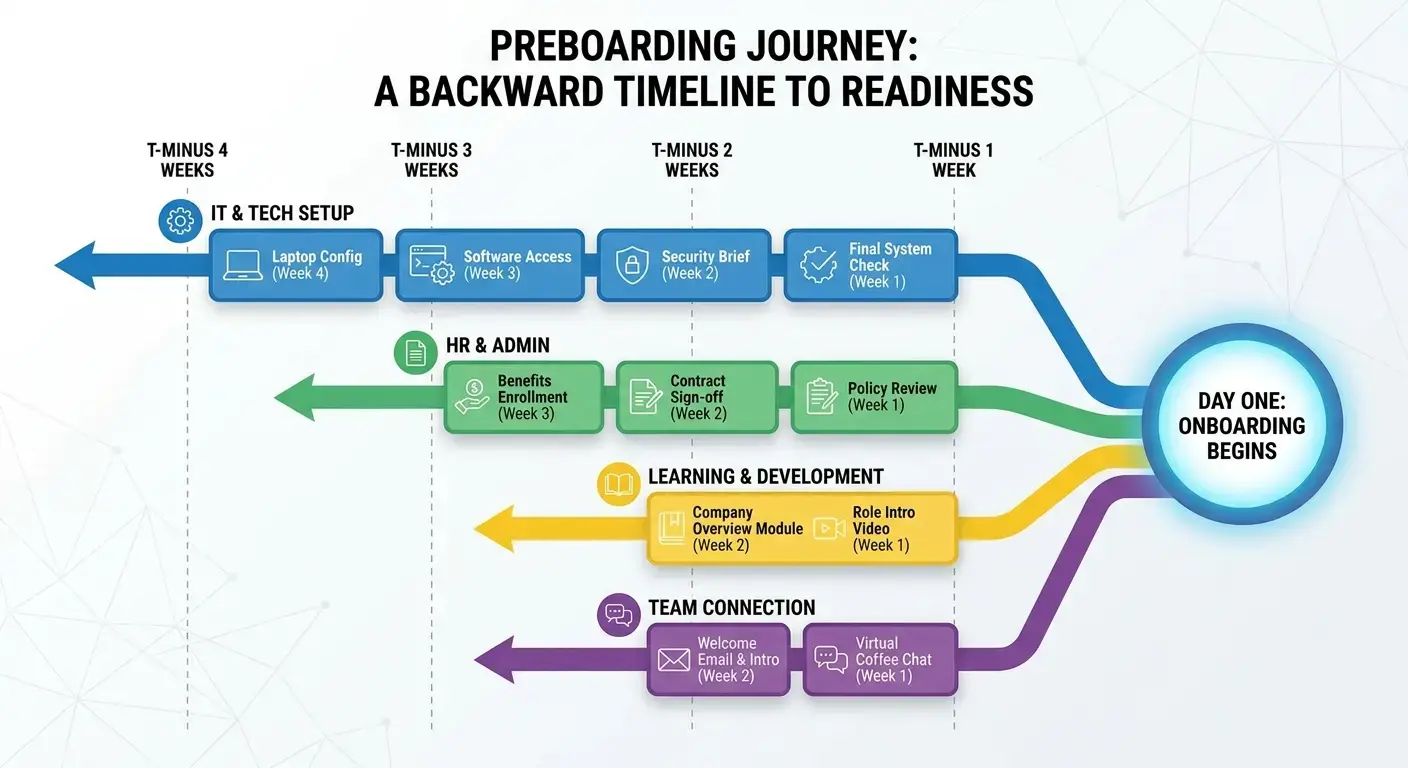
You need a timeline that works backward from day one, not forward from the offer letter. Work backwards from day one. Seriously, start there and count back. International laptop? Add three weeks, minimum. Background check? Two weeks, and that's if nothing gets flagged. Then add a buffer week because something always goes wrong. The vendor's out of stock. Customs holds the shipment. Someone's on vacation and can't approve the access request. Plan for Murphy's Law, because Murphy works in preboarding.
The Operational Blind Spot: What Actually Needs to Happen Before Day One
Most companies focus on the visible parts of preboarding: welcome emails and culture decks. The operational foundation is what determines whether day one is smooth or chaotic.
I'm going to walk through the invisible work that has to happen before a new hire logs in for the first time. These are the specific tasks that need to be completed, who should own them, and why they're harder than they look. This isn't about adding more steps. It's about seeing the steps that are already happening (or should be) and building a system around them.
The Checklist You're Not Using
Every company has an onboarding checklist. Most of them are useless. They're either too vague ("set up workspace") or too granular ("send welcome email with company values PDF"). Neither version helps you execute.
Your checklist is useless unless it answers three questions: Who's doing this? When does it actually need to be done? And what's blocking what? Because I guarantee you've got tasks sitting in limbo right now because nobody knows whose job it is, or because someone's waiting on something that hasn't happened yet.
A functional preboarding checklist needs three things. Clear ownership for each task. A realistic timeline based on actual lead times. Dependencies mapped so you know what blocks what.
Functional Preboarding Checklist Template
Week 4 Before Start Date:
- ☐ Offer letter signed and filed (HR Owner)
- ☐ New hire information collected: home address, equipment preferences, time zone (HR Owner)
- ☐ Hardware specifications confirmed based on role requirements (IT Owner)
- ☐ Vendor order placed with tracking number documented (IT Owner)
- ☐ Software license budget approved (Finance Owner)
Week 3 Before Start Date:
- ☐ Background check initiated (HR Owner)
- ☐ Email address created and documented (IT Owner)
- ☐ Access provisioning requests submitted for all required systems (IT Owner)
- ☐ Manager briefing scheduled with HR to review first-week plan (HR Owner)
- ☐ Team introduction meeting scheduled (Manager Owner)
Week 2 Before Start Date:
- ☐ Hardware shipped with tracking confirmation sent to new hire (IT Owner)
- ☐ Software licenses purchased and assigned to email address (IT Owner)
- ☐ Access approvals completed and tested (IT Owner)
- ☐ Documentation links compiled and organized in central location (Manager Owner)
- ☐ Compliance training assigned (HR Owner)
Week 1 Before Start Date:
- ☐ Hardware delivery confirmed by new hire (IT Owner)
- ☐ IT support contact information sent with escalation path (IT Owner)
- ☐ Day one agenda sent to new hire with meeting links (Manager Owner)
- ☐ All system access tested and verified (IT Owner)
- ☐ Final check-in call scheduled for day before start date (HR Owner)
Here's what should be on it:
- Hardware procurement and shipping (with tracking)
- Software licenses purchased and assigned
- Access provisioning for tools, systems, and platforms
- Background checks and compliance documentation
- Manager briefing and team introductions scheduled
- Documentation links organized and tested
- IT support contact and escalation path confirmed
If any of those preboarding activities aren't assigned to a specific person with a specific deadline, they won't get done. Understanding the preboarding meaning starts with recognizing it's getting people to work together, not a communication exercise. A well-structured preboarding checklist eliminates ambiguity and creates accountability across teams.
The Dependency Chain Most Teams Ignore
You can't provision access until you have an email address. You can't ship a laptop until you have a confirmed address. You can't schedule onboarding sessions until you know the new hire's time zone.
These dependencies seem obvious, but they're the reason preboarding timelines collapse. One delay cascades into five. And because no one is tracking dependencies, the delay doesn't surface until it's too late to fix.
Here's what kills me: a marketing manager accepts an offer to join a Series B startup. HR collects their information but doesn't immediately create their email address because IT is waiting for the signed offer letter to be officially filed. Three days pass. Once the email is created, the access provisioning requests go out, but the Salesforce admin is on vacation and won't return for a week.
Meanwhile, the laptop order was placed using the candidate's personal email because the work email didn't exist yet, and when IT tries to pre-configure the device with the company's MDM software, they can't because the work email still isn't in the system. By the time everything is sorted, the new hire's start date is two days away, and the laptop is still in transit. The manager has to tell them to use their personal computer for the first week, which creates security concerns and sets a poor precedent.

You need a system that catches problems early. That means visibility into every step, not just the ones HR owns. It means knowing when IT ordered the laptop, when it shipped, and when it's expected to arrive. It means tracking access requests in real time, not waiting for the new hire to Slack you on day one asking why they can't log in. Organizations managing complex global operations should explore the State of IT Lifecycle Management to understand how leading companies are addressing these coordination challenges at scale.
Hardware Procurement Isn't an IT Problem, It's a Preboarding Problem
Hardware is the most common preboarding failure point, and it's not because IT is slow. It's because hardware procurement is treated as a last-minute task instead of the thing blocking everything else.
I'm going to examine why hardware delays happen, what they cost, and how to build a procurement process that works for distributed teams. We'll also look at the hidden complexity of global hardware logistics and why most companies underestimate the lead time required.
Why Laptops Don't Arrive on Time
So why do laptops never show up on time? Let me tell you, it's almost never IT's fault.
The laptop didn't ship late because IT forgot. It shipped late because no one told IT the new hire
was starting until five days before their start date. Or IT ordered it on time, but the vendor was out of stock. Or it shipped to the wrong address because the new hire moved and didn't update their info.
Hardware delays are almost never single-point failures. They're the result of a broken handoff somewhere upstream. And because hardware has the longest lead time of any preboarding task, delays here are the hardest to recover from.
You need a procurement process that starts the moment the offer is accepted, not when someone remembers to file a ticket. That means automated intake, vendor relationships that guarantee stock, and tracking that updates in real time.
The Global Shipping Problem
Shipping a laptop across the U.S. takes three days. Shipping one to Brazil takes three weeks if customs doesn't hold it. Shipping to Germany requires VAT documentation. Shipping to India might require an import license.
Most companies don't find this out until they've already hired someone in that country. And by then, it's too late to adjust the timeline.

Shipping to Brazil isn't just "slower than shipping to Boston." It's a completely different beast. You need customs brokers. Import licenses. VAT documentation. And God help you if you didn't account for the fact that some countries restrict certain tech imports. I watched a company try to ship encrypted laptops to China without checking regulations first. Those laptops sat in customs for two months before getting sent back. The employee quit before they arrived.
If you're hiring globally and you're still trying to ship everything from a single warehouse, you're going to miss deadlines. Teams managing equipment across borders should review strategies for optimizing global IT procurement to reduce lead times and compliance risks.
The Cost of a Missing Laptop
A new hire without a laptop on day one isn't just inconvenienced. They're unproductive. And that unproductivity is expensive.
If you're paying someone $100,000 a year, every day they can't work costs you roughly $400 in salary alone. Add in the opportunity cost of delayed projects, the manager time spent troubleshooting, and the risk of the new hire questioning whether they made the right choice, and the real cost is much higher.
Hardware delays don't just slow down onboarding. They erode trust before the relationship even starts. The benefits of preboarding become immediately clear when you calculate the cost of getting it wrong.
Access Provisioning and the Myth of "We'll Get You Set Up on Monday"
If hardware delays are bad, access provisioning is worse. Way worse. Because at least with hardware, you're dealing with one vendor and a tracking number. Access provisioning? You're coordinating across twelve different systems, each with its own approval workflow, each owned by someone who's probably on vacation. It's like herding cats, except the cats all have different managers and security clearances.
I'm going to break down why access requests get stuck, what happens when new hires can't log in, and how to build a provisioning process that doesn't rely on someone remembering to file a ticket. We'll also address the security vs. speed tension and why most companies get the balance wrong.
Why Access Requests Get Stuck
You submitted the access request. IT approved it. The new hire still can't log in.
Access provisioning fails because it requires coordination across multiple systems, each with its own approval workflow. Slack access is easy. GitHub access requires a team lead to approve. AWS access requires security review. Salesforce access requires a license purchase.
Each of those steps introduces a potential delay. And because they're happening in parallel across different platforms, no one has full visibility into what's blocking what.
You need a provisioning system that centralizes requests, tracks approvals, and escalates blockers automatically. Without that, you're relying on someone to manually chase down every approval, and that doesn't scale.
The Security Bottleneck
Yeah, security teams need to be paranoid. I get it. Data leaks are career-ending. But when you swing too far the other way, you've got engineers twiddling their thumbs for a week waiting for GitHub access. There's a middle ground, and most companies are nowhere near it.
The tension between security and speed is real, but it's not unsolvable. You need role-based access templates that pre-approve common permission sets. You need automated workflows that route requests to the right approver based on the role. And you need a fallback process for edge cases that doesn't require three levels of approval.
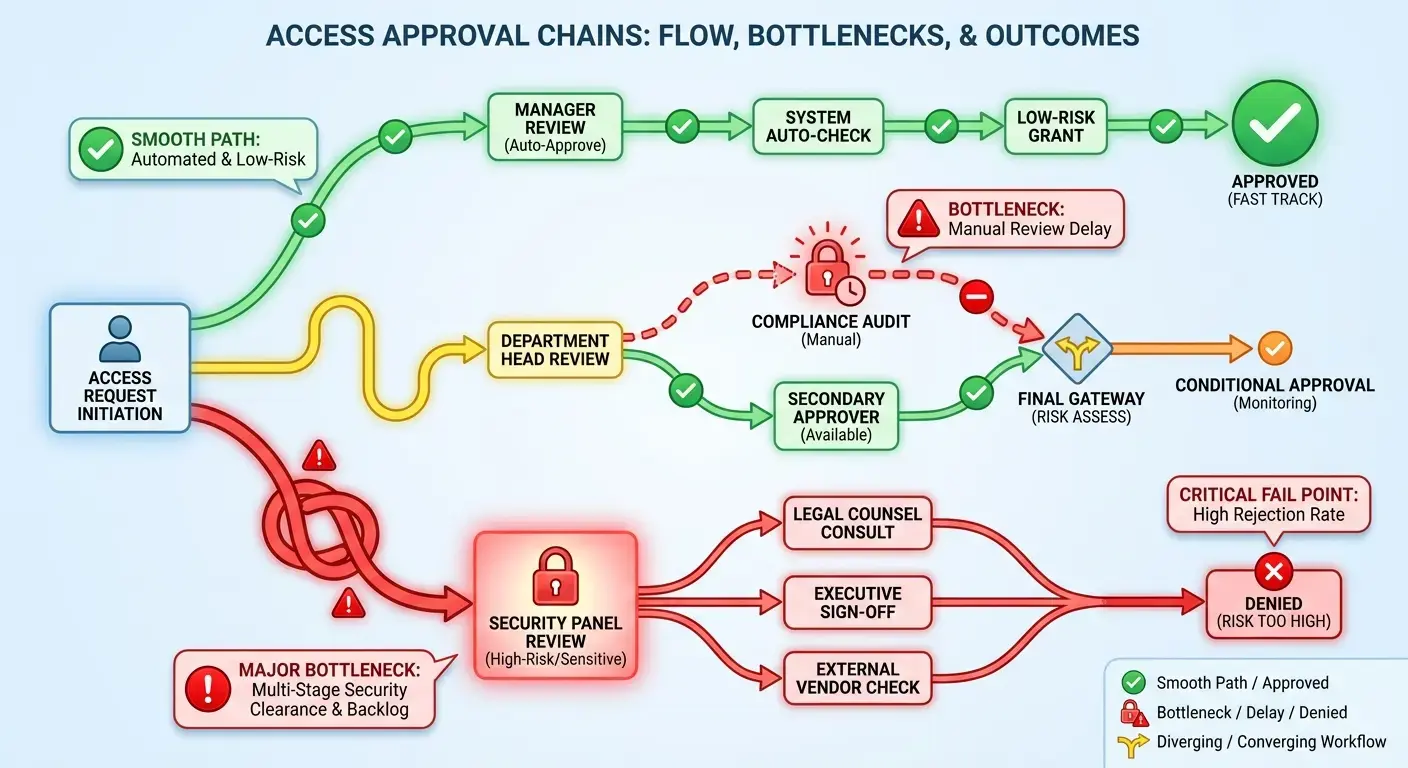
Let me break down how insane the approval chains get:
Basic stuff like Slack and email? IT can handle that in a day, maybe two. Fine.
Department tools like Salesforce or Figma? Now you need the department head to sign off, plus IT. That's 3-5 days if everyone's responsive. They won't be.
Code repositories like GitHub? Team lead approval, then security review. 5-7 days, and that's assuming security doesn't come back with questions.
Production access to AWS or databases? Buckle up. Security team, engineering lead, compliance officer all need to weigh in. I've seen this take ten days. For someone who's supposed to be deploying code on week one.
The kicker? Most of this could be templated and pre-approved based on role. But it's not. So every single request goes through the whole circus.
| Access Type | Typical Approval Chain | Average Delay | Solution |
|---|---|---|---|
| Basic productivity tools (Slack, email, calendar) | IT admin approval only | 1-2 days | Pre-approved for all new hires, automated provisioning on email creation |
| Department-specific tools (Figma, Salesforce, HubSpot) | Department head + IT admin | 3-5 days | Role-based templates with pre-approved access levels by position |
| Code repositories (GitHub, GitLab) | Team lead + security review | 5-7 days | Standardized developer access tiers with automated security scanning |
| Production systems (AWS, database access) | Security team + engineering lead + compliance | 7-10 days | Tiered access model with time-limited elevated permissions and audit trails |
Most companies don't have any of this. They have a ticketing system and a backlog.
What Happens When New Hires Can't Log In
A new hire who can't access their tools on day one isn't just frustrated. They're forming an opinion about how your company operates. And that opinion is hard to reverse.
Access delays signal disorganization. They suggest that no one planned for this hire. That systems are fragile. That getting things done here is going to be harder than it should be.
You can recover from a delayed laptop with good communication. You can't recover from a new hire who spends their first day filing IT tickets and wondering if they made a mistake. For distributed teams, implementing identity and access management for remote teams ensures new hires have the right permissions from day one.
Documentation That Doesn't Require a Scavenger Hunt
Documentation is the least visible part of preboarding, but it's the foundation for everything else. New hires need to know where to find information, how to complete common tasks, and who to ask when they're stuck.
Your documentation probably exists. It's just scattered across Notion, Google Drive, Confluence, and Brad's personal folder that he swears he'll organize "next week." I'm going to examine why documentation fails, what good documentation looks like, and how to organize it so new hires can actually use it.
The Problem with "It's in the Wiki"
Your documentation exists. It's just impossible to find. The onboarding guide is in Notion. The product roadmap is in Google Drive. The team structure is in Confluence. The actual process docs are in someone's personal folder because they never got around to uploading them.
New hires don't know where to start. They don't know which version is current. They don't know if the doc they found is still relevant or if it was replaced by something else.
Documentation that requires a scavenger hunt isn't documentation. It's a test, and most new hires fail it.
What Good Documentation Looks Like
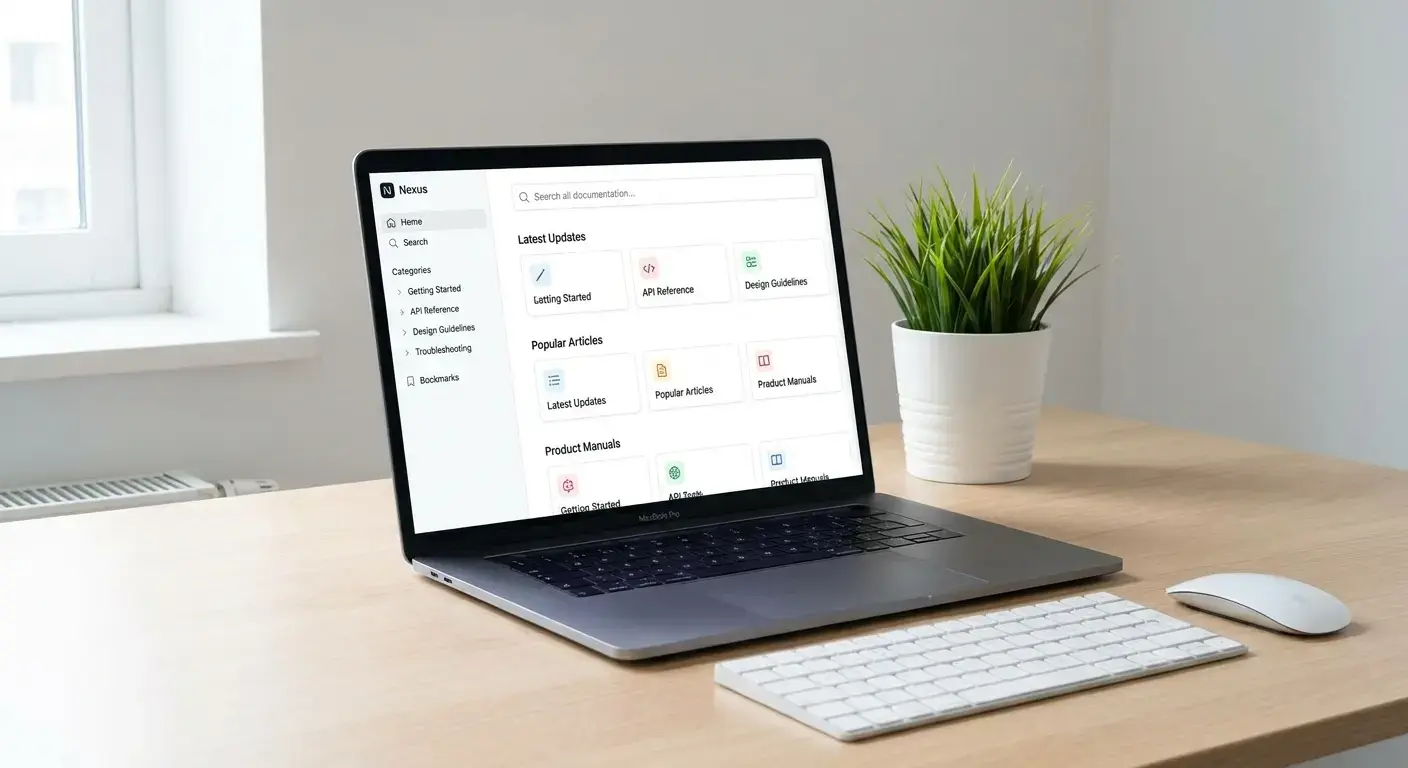
Good documentation? It lives in one place. ONE. Not scattered across Notion, Google Drive, Confluence, and Brad's personal folder that he swears he'll organize "next week." And it's organized by what people actually need to DO, not by which team created it. Because your new hire doesn't care that this doc came from Engineering and that one came from Product. They just need to know how to submit a damn expense report.
It includes:
- One place where everything lives for all onboarding materials
- Role-specific guides that outline what the new hire needs to know in their first week, month, and quarter
- Process docs with step-by-step instructions and screenshots
- Contact lists with clear escalation paths
- FAQs that answer the questions new hires ask
Documentation Structure Template for New Hires
Level 1: Essential First-Day Information
- Company directory with names, roles, time zones, and contact methods
- IT support contact with ticket submission process and response time expectations
- Building/security access instructions (for hybrid roles)
- Emergency contacts and escalation procedures
- Benefits enrollment deadlines and HR contact
Level 2: First-Week Operational Knowledge
- Tool access guide with login credentials location and password reset procedures
- Communication norms: response time expectations, meeting culture, async vs. sync guidelines
- Team structure with reporting lines and cross-functional partnerships
- Project management system overview with where to find current priorities
- Expense and reimbursement process with approval thresholds
Level 3: Role-Specific Deep Dives
- Technical setup guides with environment configuration steps
- Product documentation with feature specs and roadmap access
- Process workflows specific to the role with decision trees
- Training materials and certification requirements
- Performance expectations and evaluation criteria
Level 4: Cultural and Strategic Context
- Company history and mission with key milestones
- Strategic priorities for current quarter and year
- Customer profiles and market positioning
- Competitive landscape overview
- Cultural values with practical examples of how they show up in daily work
And it's maintained. Outdated documentation is worse than no documentation because it wastes time and creates confusion.
Who Owns Documentation?
No one, usually. And that's the problem.
Documentation needs an owner. Someone who is responsible for keeping it current, organized, and accessible. That person isn't HR. It's not IT. It's not the new hire's manager.
It's someone whose job is to make sure information flows correctly. And most companies don't have that role.
Preboarding for Remote and Global Teams: Different Rules, Same Mistakes
Remote and global preboarding introduces complexity that in-office preboarding doesn't have to deal with. Time zones, shipping logistics, compliance requirements, and cultural differences all create new failure points.
I'm going to break down what's different about preboarding distributed teams and why the strategies that work for co-located teams don't translate. We'll also look at the specific challenges of hiring in multiple countries and how to build preboarding infrastructure that scales globally.
Time Zones Aren't Just a Scheduling Problem
When your new hire is in Manila and your IT team is in San Francisco, "day one" doesn't mean the same thing. The new hire logs in at 9 a.m. their time. IT doesn't start work for another twelve hours.
Time zone misalignment means delays compound. A question that would take five minutes to resolve in person takes a full day over Slack. Access requests sit in queues overnight. Hardware issues can't be troubleshooted in real time.
A customer success manager joins a company from Sydney, Australia. Their start date is Monday, but the IT team based in New York won't be online until Monday evening Sydney time. The new hire logs in Monday morning, discovers their Zendesk access wasn't provisioned, and sends a Slack message to IT. By the time IT sees the message and responds, it's already Tuesday morning in Sydney. The access gets provisioned Tuesday afternoon New York time, which is Wednesday morning in Sydney. The new hire has now lost two full days of productivity because the preboarding process assumed synchronous support availability.

You need asynchronous preboarding processes that don't rely on live support. That means self-service documentation, pre-configured access, and hardware that's tested before it ships. Organizations building distributed operations should explore how to manage a distributed team effectively during the preboarding phase and beyond.
Compliance and Localization
Hiring in a new country means navigating local labor laws, tax requirements, and data privacy regulations. And all of that has to be sorted before the new hire starts.
Most companies underestimate how long this takes. Employment contracts need to be localized. Benefits need to be structured according to local norms. Payroll needs to be set up through a local entity or an employer of record.
And if you're shipping hardware internationally, you're dealing with customs, import restrictions, and VAT. None of this is optional, and all of it has lead times that don't fit into a standard two-week preboarding window. Teams expanding internationally benefit from understanding global IT procurement compliance requirements before initiating the preboarding process.
Cultural Onboarding for Distributed Teams
Remote preboarding isn't just about logistics. It's about helping a new hire feel connected to a team they've never met in person.
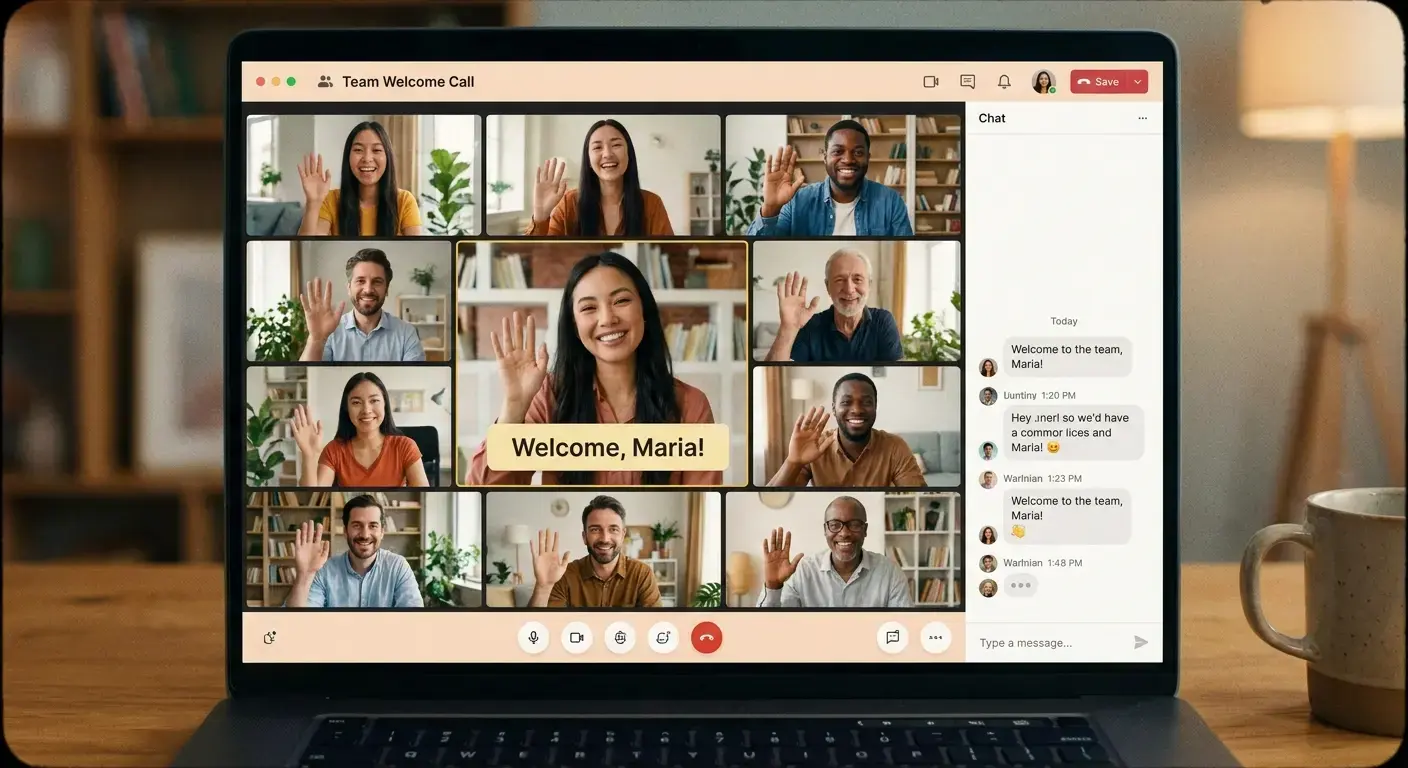
That requires intentional design. Video introductions from the team. Scheduled one-on-ones with key stakeholders. Clear communication norms so the new hire knows when to expect responses and how to escalate issues.
Most companies skip this part because it feels soft. But a new hire who doesn't feel connected to their team is more likely to churn, and replacing them costs more than getting preboarding right the first time.
Where GroWrk Fits (And Why Most Companies Need Help Here)
You can build preboarding infrastructure in-house. You can hire a dedicated ops person to manage how you buy and ship stuff. You can create workflows for how you give people access. You can map out global shipping routes and vendor relationships in every country where you hire.
Or you can recognize that this isn't your core competency and partner with someone who does it at scale.
Look, I work for GroWrk, so obviously I'm biased here, but here's what we actually do: we handle the operational layer of preboarding that most companies struggle with. Global hardware procurement with local vendor networks. Automated provisioning workflows. Asset tracking and lifecycle management. The entire backend that needs to work perfectly so your new hire shows up on day one with a laptop that's configured, tested, and ready.
We work with distributed teams who are hiring across multiple countries and need preboarding infrastructure that doesn't break every time they enter a new market. If you're spending more time troubleshooting laptop shipments than building your product, we should talk. Understanding IT onboarding solutions that integrate hardware, access, and documentation can transform preboarding from a coordination nightmare into a streamlined process.
The reality is that pre-onboarding at scale requires infrastructure most companies don't have. And building it internally diverts resources from what you're supposed to be doing: growing your business. Companies like Vividly have demonstrated how running IT across six countries with a team of one becomes possible when you have the right systems in place.
Final Thoughts
Preboarding isn't a nice-to-have. It's the basic setup work that determines whether your new hire is productive on day one or spending their first week chasing down IT tickets.
Most companies treat it as an engagement problem when it's a logistics problem. They focus on welcome emails and culture decks while ignoring the fact that the laptop hasn't shipped and the new hire can't access Slack.
The companies that get preboarding right are the ones that treat it as getting teams to work together with clear ownership, realistic timelines, and systems that catch problems before they become crises. They measure success by time-to-productivity, not survey scores. And they recognize that scaling preboarding globally requires infrastructure most companies don't have in-house.
You can't fix preboarding with better intentions. You need better systems. And if you're hiring distributed teams across multiple countries, you need systems that were built for that complexity from the start.
Preboarding employees effectively means understanding that every hour a new hire spends waiting for equipment or access is an hour they're not contributing value. The preboarding meaning extends beyond welcome messages to encompass the entire operational backbone that makes day one possible. When you grasp what is preboarding in its full operational scope, you stop thinking about it as an HR task and start treating it as the critical infrastructure it is.
Real talk: the benefits of preboarding done right compound over time. Faster time-to-productivity. Higher retention. Stronger first impressions. Better operational efficiency. And a team that doesn't spend half their time putting out fires that never should have started. For teams ready to optimize their entire employee journey, exploring remote employee lifecycle management provides a framework for maintaining operational excellence from preboarding through offboarding.