
A new remote hire starts Monday in Brazil.
IT has 7 days to get them their laptop.
If they were based in the U.S for sure they would have stock, but in Brazil this is their second hire, and they have no IT people in the region. Their first hire in Brazil ended up keeping their laptop since there was no reliable recovery method or a place to store it.
Sending the laptop from the U.S. to Brazil would take too long, and the customs fees would be a nightmare. So the company ends up spending top dollar at an online retail store to get a laptop that meets their requirements. The IT lead then has to have a call with the new employee to get their laptop set up and meet their security requirements.
That entire process could have been avoided if they had IT asset storage in Brazil.
This guide covers what happens to a device between retrieval and redeployment, why that stage gets overlooked, and how storage fits into broader IT asset management.
What is IT Asset Storage?
IT asset storage is the secure, tracked holding of company-owned technology between active use and its next lifecycle event, such as redeployment, repair, resale, recycling, or disposal.
It is more than finding a physical place for unused laptops. The device needs to remain identifiable, locatable, accounted for, and connected to its next action while it is out of active use. That makes storage a defined stage within the broader IT asset lifecycle management process.
A proper IT asset storage process includes:
- Asset identification and tagging
- Serial-number tracking
- Location tracking
- Condition assessment
- Secure physical storage
- Data sanitization
- MDM status tracking
- Chain-of-custody records
- Inventory visibility
- Retrieval on demand
- Redeployment preparation
- End-of-life routing
Storage sits after retrieval and before redeployment or disposition. Because it falls between two stages that already have names, most lifecycle models skip it. Here's where it belongs.
Where IT Asset Storage Fits in the Device Lifecycle
Traditional lifecycle models describe planning, procurement, deployment, maintenance, and retirement. IBM and Atlassian both frame IT asset management as an end-to-end lifecycle rather than a procurement-only function.
But when a device leaves active use, there is a practical stage that still needs to be managed: what happens after retrieval and before the device's next use?
For distributed workforces, that stage can become a recurring operational challenge. A laptop may be returned weeks before it is needed again, while IT still needs to know where it is, what condition it's in, whether it has been processed, and what happens next.
→ That is where IT asset storage fits into the device lifecycle.
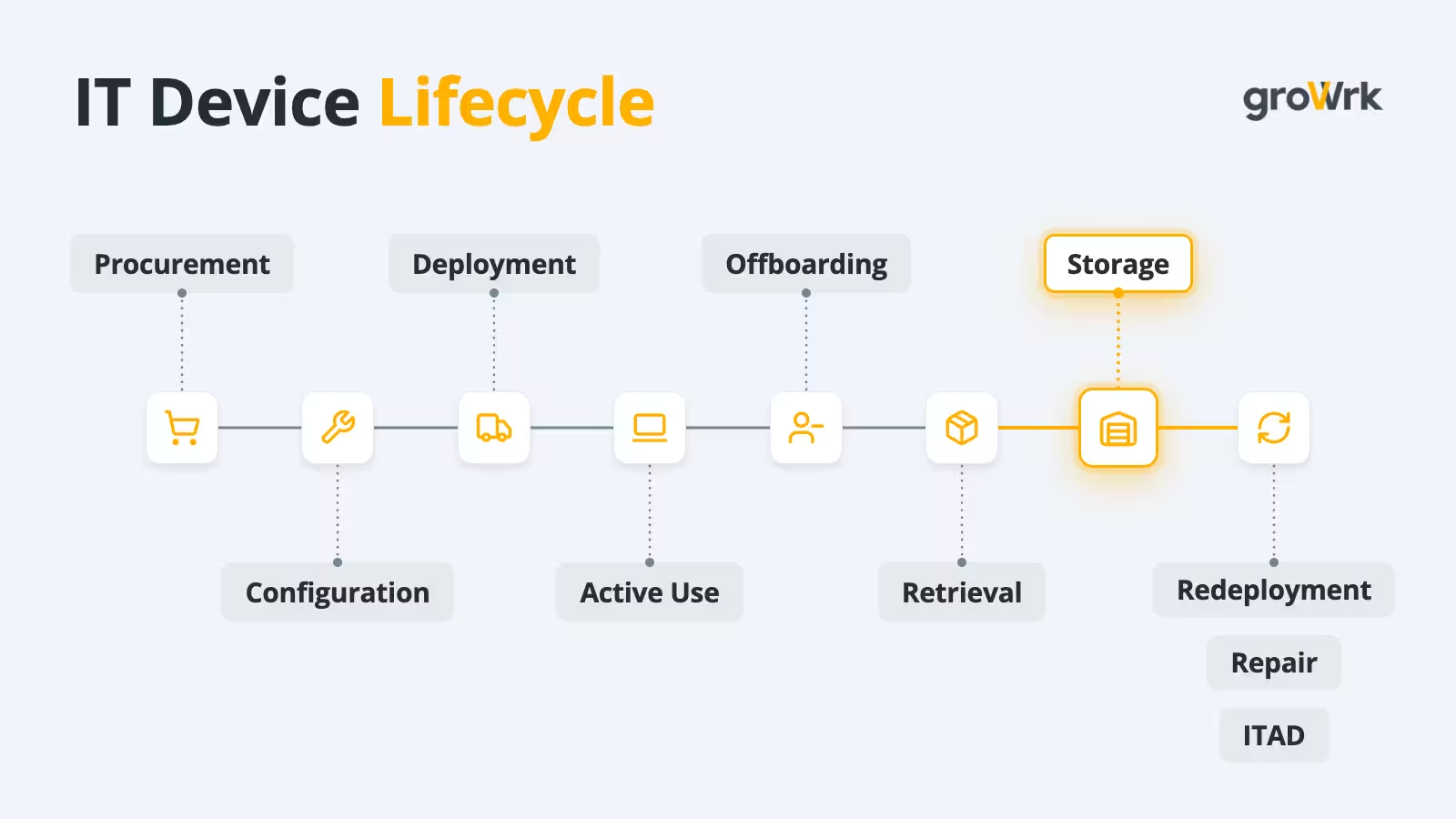
The stages can be broken down like this:
Notice that every stage has one question, except storage, which has three:
- Where is the device?
- What condition is it in?
- What happens next?
Think about a laptop from an offboarded employee when there is no storage. It will normally be returned to an IT manager and end up in a stack of boxes in their closet. , With every new laptop that arrives, they have to create a full catalog of those three answers but are mostly missing the last one, so they end up sitting until a new hire joins. From what we hear from our customers, IT managers have more important work than shipping and cataloging laptops.
That's where storage starts to become a problem at scale.
Why IT Asset Storage Becomes a Problem at Scale
The challenge isn't usually finding another shelf. It is maintaining visibility and control once devices stop sitting directly with employees.
1. Devices Get Scattered Across Locations
Returned devices rarely stay in one central place. They might be sitting in the office closet, the employee’s home, a local IT room, a repair center, or at a third-party warehouse.
As the number of locations grows, so does the effort required to keep track of them. One global IT support team, for example, was chasing device retrievals across seven regions with no single view of where each one ended up.
The more places devices sit, the harder it is to know where each one is and what state it's in.
2. Inventory Records Stop Telling the Full Story
The same problem carries over into inventory records.
A spreadsheet might say:
MacBook Pro – Available
But available for what?
The record does not necessarily tell you whether the laptop has been physically located, inspected, sanitized, repaired, charged, or equipped with the accessories needed for its next user.
The physical device can change state while the record stays the same. It can move to a repair center, lose an accessory, sit in storage for months while its battery drains and its updates fall behind.
With a handful of devices, someone can check. Across hundreds of devices in several locations, the gap between what the record says and what's actually on the shelf becomes hard to close.
3. Idle Devices Become Invisible Capital
That creates a bigger financial problem.
A laptop that sits unused is still a company asset. But when its location, condition, and status are unclear, IT cannot easily treat it as usable inventory.
Everyone knows what a laptop costs to buy. Far fewer teams know what it costs to leave one sitting idle.
The result is a pool of hardware that is technically owned but functionally unavailable. And when teams cannot see that inventory, they are more likely to solve the next hardware need with another purchase.
4. Geography Makes the Storage Decision Harder
For distributed teams, there is another question: where should a recovered device be stored?
A company might retrieve a laptop in Germany and need it for a new employee in France. Keeping it in Germany may make the next deployment easier. Moving it to a central warehouse may create another shipment. Holding inventory in several regions may reduce delivery time but make the fleet harder to control.
Where inventory sits affects how quickly and efficiently it can be used again.
5. Poor Visibility Can Lead to Duplicate Purchases
This is where the problems connect.
When IT cannot see which devices are sitting idle, where they are, or whether they are ready for redeployment, a new purchase can look like the simplest option.
So, the real storage problem is not space. It is visibility. Once devices are spread across closets, homes, repair centers, and warehouses, the next question becomes: where do they actually live between employees?
Where Laptops Actually Live Between Hires
When an employee leaves, their returned laptop usually stays in one of four places until it's reassigned or retired: an IT team member's home, an office storage room, a rented self-storage unit, or a managed IT asset storage provider.
Small teams with an office can often manage on-site. Remote and distributed teams generally need storage that tracks each device's location and condition.
None of these options is inherently wrong. The right choice depends on scale and how often devices need to move. An office closet can be practical for a small local inventory when someone can manage the devices. The same setup becomes harder to control when equipment is spread across locations or needs to be redeployed frequently.
That is what separates basic physical storage from a managed IT asset storage process.
IT Asset Storage vs. an IT Closet or General Warehouse
Physical space is only one part of storing IT equipment. The bigger difference is what happens after the device enters storage, and whether its location, condition, ownership, security status, and next action remain visible.
That control starts when a retrieved device enters storage. Before it can move to its next lifecycle stage, it needs to be identified, checked, recorded, and routed appropriately.
So what happens when a device is retrieved and arrives at storage?
What Happens After IT Asset Retrieval?
IT asset retrieval gets the physical device back. For distributed teams, remote laptop retrieval also needs to account for packaging, tracking, custody, inspection, sanitization, and the device's next lifecycle state.
Getting a device back is only the first step. It still needs to be checked, recorded, and routed before it is ready for what comes next. These five steps take it from “returned” to controlled.
Step 1: Receive and Verify
Start by confirming that the device received is the one recorded in the asset system and that nothing important is missing. Confirm:
- Device identity and serial number
- Assigned employee
- Accessories
- Physical condition
- Date received
The goal is to make sure the physical device matches the asset record.
Step 2: Update the Asset Record
Move the device through a defined status: Assigned → Retrieved → In Storage
This creates a reliable lifecycle state. Atlassian and IBM both describe IT asset management as tracking assets from deployment to disposal.
Step 3: Assess Condition
Next, determine whether the device is ready for its next use or needs work before it can move forward. Check:
- Functional status
- Physical damage
- Battery condition
- Missing accessories
- Repair needs
- Device age
- Warranty status
A device being marked “returned” does not mean it is ready for redeployment. The condition check determines what needs to happen before it can move forward.
Step 4: Handle Data Securely
Before a device moves to reuse, resale, or disposal, it should follow the organization's approved data-sanitization process.
That process should account for the sensitivity of the information stored on the device and the organization's requirements. NIST SP 800-88 Rev. 2, published in September 2025, guides establishing a media-sanitization program and selecting appropriate sanitization techniques based on information sensitivity and other organizational requirements.
This is also an important part of IT asset disposition services, where data handling, custody, processing, and the device's outcome need to remain connected. The process should also preserve the records needed to show what happened to the device. A defensible certificate of data destruction names the device by serial number, states the erasure standard used, records the date and the operator, and sits within a documented chain of custody from collection to final outcome.
Step 5: Decide the Next Lifecycle State
Once the device has been checked and processed, it needs a defined next step rather than sitting in storage without a clear status. The device can move to:
- Ready for redeployment
- Repair
- Hold
- Resale
- Recycling / ITAD
The important part is that the device does not simply become “stored” indefinitely.
Storage is not the destination. It’s a controlled transition state.
And that process becomes especially important when devices are being returned faster than they can be put back into use. That's why it helps to know when companies need IT asset storage in the first place.
When Do Companies Need IT Asset Storage?
A returned device does not always have a clear next destination. It may be waiting for a new employee, a hardware refresh, an office move, expansion into a new country, or a decision about its future.
IT asset storage gives the device a controlled place to stay while that next step is determined.
1. Remote Employee Offboarding
A remote employee may have no office to return the laptop to. Once the device is retrieved, it still needs a controlled destination until it can be checked in, assessed, and prepared for its next use. A defined employee offboarding workflow helps connect the return process to that next lifecycle step.
2. During a Hardware Refresh Cycle
The same gap can appear during a hardware refresh cycle. New devices may already be deployed while older equipment is still waiting for a decision.
Storage gives the outgoing fleet a controlled place to stay while each device is assessed for reuse or retirement.
3. Spare-Device Inventory
Storage also supports companies that intentionally keep devices between assignments. A spare pool may cover:
- New hires
- Contractors
- Temporary workers
- Device failures
- Regional hiring
- Short-term assignments
But a spare device only has value if IT knows what is available, where it is, and whether it is ready to deploy.
4. Office Moves and Closures
An office move or closure creates another temporary gap. Equipment needs to leave the existing location without disappearing from the asset record.
Storage provides an intermediate location while the company determines where each device should go next.
5. Global Workforce Expansion
That intermediate location becomes even more important when employees are spread across countries. A company hiring in a new country may not want every device to travel from a central headquarters. Global IT procurement also involves decisions about where equipment is sourced and how it reaches employees in different regions.
Storing equipment closer to future employees can reduce unnecessary cross-border movement and give IT more options for redeployment. Buyers raised customs and duty in 6.1% of buyer-led calls, according to GroWrk Call Intelligence.
6. Legal and Security Holds
Sometimes there is no immediate next step. A returned device may need to remain untouched because of a legal requirement, investigation, retention requirement, insurance claim, or internal review.
In that case, storage becomes a controlled hold state, with a defined status and release conditions before the device can move to sanitization, redeployment, or disposal.
The longer a usable device remains in that state without clear visibility or a next action, the more value can sit idle.
The Real Cost of Idle Devices
Storage fees are just part of the cost. The bigger issue is what happens to a device's value while it sits unused.
- Depreciation. A stored laptop loses value as it ages. Under IRS rules, computers are typically depreciated over five years, so every month a device sits idle is a month of its useful life its next user won't get. When a device no longer has a viable path to reuse, timely IT equipment disposal decisions help recover what value is left.
- Re-shipping across borders. A life sciences company, for example, ships Asia-bound devices to the US first and then re-ships them onward. That creates two international logistics legs, plus customs handling, where a more local storage location could reduce unnecessary movement.
- Devices that never come back. YouGov research found that 27% of surveyed organizations lose at least 10% of their technology assets when employees leave. A device that never returns cannot be redeployed, resold, or recovered, turning an otherwise usable asset into a replacement cost.
→ Every device that sits idle, moves unnecessarily, or never returns is value the company can't put back to work.
How IT Asset Storage Supports Faster Redeployment
Poor storage creates a familiar sequence:
Retrieve → lose visibility → device sits → new hire arrives → buy another laptop
Controlled storage creates a different one:
Retrieve → inspect → sanitize → inventory → store → match to demand → redeploy
What separates the two is whether the company can connect available hardware to upcoming demand. A stored laptop that can't be located, assessed, or prepared quickly isn't really available when the next employee needs it.
That makes time-to-deployable more useful than storage cost alone. It measures how quickly an inactive device can be made ready for its next user.
Not every returned device will be suitable for redeployment.
The goal is to keep each device visible and moving toward its next lifecycle state.
When IT can locate usable hardware and put it back into service, they can make better use of what they already own instead of buying another device simply because existing inventory is hard to access.
The next question is what an IT asset storage setup needs to provide to make that possible.
What to Look for in an IT Asset Storage Provider
If storage is becoming a recurring operational task, look beyond the number of shelves available. Look for a process that keeps the physical asset connected to its digital record.
- In-country storage: Devices shouldn't cross a border just to be stored and then cross another border to reach their next employee. Regional or in-country storage can reduce unnecessary movement and simplify redeployment. This matters particularly when evaluating laptop retrieval services for distributed teams, because the return destination affects what happens to the device afterward.
- Intake and condition grading: The provider should inspect and record each device when it arrives. “Returned” isn't enough. You should know whether the device is ready for reuse, needs repair, or should move toward ITAD.
- Data-sanitization workflow: Devices should follow the organization's approved sanitization process before release for reuse, resale, or disposal, with holds handled according to the organization's requirements.
- Live inventory visibility: You should be able to see what's in storage without emailing anyone: where each device is, what condition it is in, whether it is ready for redeployment, and whether it is awaiting repair, a hold, or ITAD.
- Redeploy turnaround: Look for a stated timeline for moving an eligible device from stored inventory to ready for its next employee. Storage only creates value when devices can move back into circulation.
- Pricing shape: Understand whether pricing covers per-device monthly storage, intake fees, handling, storage duration, redeployment, transportation, or platform and subscription fees. The storage rate alone does not show the total operational cost.
- Physical logistics coverage: Storage works best when it connects to the rest of the physical device lifecycle, including retrieval, transportation, storage, and redeployment in the countries where your employees actually are.
The right storage setup should give IT control over the device from the moment it arrives through its next lifecycle step.
What IT Asset Storage Costs Across Providers
Pricing is the last item on that list, so here is how storage pricing is presented across providers.
Note: Pricing and storage information were checked against each provider’s publicly available website in October 2026.
With storage pricing compared, the final question is whether a provider can give IT the operational controls needed to keep every device visible, secure, and ready for its next lifecycle state.
IT Asset Storage Checklist
To pull everything above into one scannable list, a secure IT asset storage process should provide:
☐ Asset-level tracking
☐ Serial-number visibility
☐ Physical security
☐ Chain-of-custody records
☐ Condition assessment
☐ Data-sanitization workflow
☐ MDM/device-status visibility
☐ Location tracking
☐ Controlled access
☐ On-demand retrieval
☐ Redeployment workflow
☐ ITAD/disposal process
☐ Audit documentation
If several of these boxes are missing, the company may have physical storage without lifecycle control.
The checklist defines what good storage needs to control. For distributed teams, the next question is where those controls need to operate.
The Role of IT Asset Storage in Global Device Management and Distributed Teams
Employee A leaves in Germany → device retrieved → stored locally or regionally → Employee B joins elsewhere → device prepared → redeployed.
That raises the central question: Where should the device live between employees?
The answer affects three things:
- Redeployment speed. A device stored near the next hire has less distance to travel.
- Shipping cost. Fewer logistics legs can reduce unnecessary transportation.
- Customs exposure. Additional border crossings can introduce duties, documentation, and clearance requirements.
A centralized warehouse can consolidate inventory, while distributed storage can position devices closer to future demand. The right model depends on where employees are located, where devices are returned, how frequently assets move, and how much inventory each region needs.
Where GroWrk Fits
GroWrk connects storage to the physical device lifecycle, so a retrieved device doesn't disappear into an IT closet or an untracked warehouse.
GroWrk handles retrieval, storage, redeployment, and disposition across 150+ countries, with local warehousing that keeps inventory closer to distributed teams. Storage is available through the A La Carte plan and included in Flex.
→ Managing devices across countries? Request a Demo to see how GroWrk handles the physical device lifecycle.