



Remote management tools are the backbone of modern IT operations in 2026. As distributed work becomes the default, 64.4% of large companies (500+ employees) now operate on a hybrid model and another 18.6% are fully remote, according to Zoom’s Navigating the Future of Work. Yet many IT teams are still managing devices across time zones and continents with helpdesks built for a single office. When a laptop in São Paulo fails to enroll, or a contractor in Singapore offboards without returning hardware, the cracks in that approach become painfully clear.
This guide covers two distinct categories that most competitor roundups collapse into one. The first is collaboration and productivity tools, the software that helps distributed teams communicate, track work, and share files. The second, and often overlooked, is IT infrastructure tooling: remote monitoring and management (RMM) software, mobile device management (MDM) platforms, endpoint security solutions, and IT asset management systems. If your team manages devices across borders, both categories matter equally. We gave our recommendations based on experience managing the full device lifecycle for global enterprise customers.
Key takeaways
- Remote management is more than remote access. Effective stacks combine collaboration, RMM, MDM, and security, not just support tools.
- The real risk is fragmentation. Most failures come from disconnected systems, not missing features.
- Lifecycle costs outweigh tool costs. Procurement, shipping, support, and retrieval often exceed the price of the device itself.
- Global scale changes the problem. Managing devices across countries introduces logistical, compliance, and tax complexities that software alone can’t address.
- Reactive IT models don’t scale. Leading teams are shifting toward automated, intent-driven operations instead of ticket-based workflows.
- Visibility drives control. Real-time insight into device status and location is critical for cost, security, and compliance.
- The model is shifting from tools to systems. The most effective approach integrates software, logistics, and lifecycle management into a single operating model.
What are remote management tools?
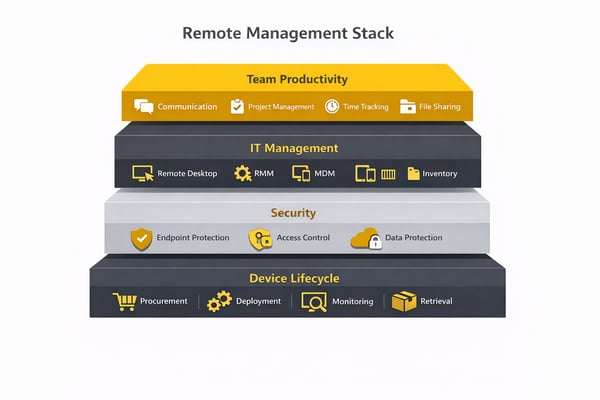
"Remote management tools" is a broad term that spans two fundamentally different needs: team management (the software that keeps distributed people connected and productive) and IT management (the infrastructure that keeps their devices secure, compliant, and running). Conflating the two leads to underbuilt tech stacks. Here are the 8 categories this guide covers:
- Communication & collaboration: Platforms that enable real-time messaging, video conferencing, and asynchronous communication across time zones.
- Project management: Tools that help distributed teams track tasks, deadlines, and accountability without relying on in-person check-ins.
- Time tracking: Software that gives managers visibility into hours worked and billable time across distributed teams, ensuring payroll accuracy and client billing.
- File sharing & cloud storage: Platforms that provide secure, location-independent access to documents, with co-editing and version control.
- Remote desktop & RMM: Tools that allow IT teams to access, monitor, and maintain endpoints remotely, from session-based support to continuous automated management.
- MDM & device management: Platforms for enrolling, configuring, securing, and wiping employee devices, especially critical in BYOD environments and Apple-heavy organizations.
- Employee monitoring: Software that provides productivity visibility and analytics for remote managers, balancing accountability with employee trust.
- Security & data protection: Tools that protect distributed endpoints, enforce access controls, and defend against credential compromise and data loss.
For a deeper look at the infrastructure side, see our guide to remote device management.
Communication & collaboration tools
Communication failures in remote teams rarely stem from a lack of tools, they stem from the wrong tools for the team's structure. Missed context in async threads, timezone delays that block decisions, and information siloed in DMs rather than shared channels are the failure modes these platforms are built to solve. Choosing the right one depends on your org's existing ecosystem and your team's size.
Microsoft Teams
Microsoft Teams is a chat, video conferencing, and collaboration hub built into the Microsoft 365 ecosystem. For organizations already running Exchange, SharePoint, or Azure AD, Teams is the natural convergence point for every remote communication need.
- Best for: Enterprise and mid-market organizations on Microsoft 365.
- Key features: Persistent channels and threads; HD video meetings up to 1,000 participants; deep SharePoint and OneDrive integration; Teams Phone for VoIP; compliance and eDiscovery tools for regulated industries.
- Platforms: Windows, macOS, iOS, Android, web.
- Pricing: Free tier available; Microsoft 365 Business Basic starts at $6/user/month.
- Limitation: Steep learning curve for non-Microsoft organizations; notification management is complex at scale.
Zoom
Zoom is the dominant video conferencing platform, known for reliability, cross-platform performance, and a near-zero onboarding curve. It has expanded beyond meetings to include Zoom Phone, Zoom Chat, and Zoom Rooms.
- Best for: Teams of any size that prioritize video quality and meeting reliability.
- Key features: HD video with AI noise suppression; breakout rooms; Zoom Whiteboard; webinar hosting; Zoom Phone for unified comms.
- Platforms: Windows, macOS, Linux, iOS, Android, web.
- Pricing: Free (40-min limit on group calls); Pro starts at $13.32/user/month.
- Limitation: Persistent chat is less mature than Teams or Slack; async collaboration features are add-ons.
Google Meet
Google Meet is Google's enterprise video conferencing product, tightly integrated with Google Calendar, Gmail, and Google Workspace. For organizations on Workspace, Meet is already included and requires no additional deployment.
- Best for: Google Workspace organizations; teams that live in Google Calendar.
- Key features: Direct Calendar integration for one-click meeting joins; real-time captions; noise cancellation; live stream support for up to 100,000 viewers (Enterprise).
- Platforms: Windows, macOS, iOS, Android, ChromeOS, web.
- Pricing: Included with Google Workspace (starting at $6/user/month); free tier available.
- Limitation: Limited features outside the Google ecosystem; persistent messaging requires Google Chat separately.
Slack
Slack is a popular messaging platform for technology companies and startups. Its channel-based structure, workflow automations, and 2,400+ integrations make it the communications hub for teams that move fast and build on APIs.
- Best for: Startups, tech companies, and developer teams; organizations with complex tool stacks.
- Key features: Channels, threads, and DMs; Workflow Builder for no-code automations; Slack Connect for cross-company collaboration; Huddles for lightweight audio/video.
- Platforms: Windows, macOS, Linux, iOS, Android, web.
- Pricing: Free (limited message history); Pro starts at $7.25/user/month.
- Limitation: Can become noisy at scale without strict channel governance; free tier's 90-day message history limit is a real constraint.
Google Chat
Google Chat is the persistent messaging layer within Google Workspace, positioned as the Slack alternative for organizations already on Google's platform. Spaces (formerly Rooms) function as persistent channels with threaded conversation.
- Best for: Google Workspace organizations that want integrated messaging without a separate Slack subscription.
- Key features: Spaces for persistent group channels; Google Docs, Sheets, and Drive integration; smart reply; Meet integration for video calls.
- Platforms: Windows, macOS, iOS, Android, ChromeOS, web.
- Pricing: Included with Google Workspace.
- Limitation: Significantly fewer third-party integrations than Slack; less mature for teams outside the Google ecosystem.
Communication & collaboration comparison:
|
Tool |
Free tier? |
Video + Chat? |
Best for |
Starting price |
|---|---|---|---|---|
|
Microsoft Teams |
Yes |
Yes |
Enterprise / Microsoft 365 orgs |
$6/user/mo |
|
Zoom |
Yes (40-min limit) |
Yes |
All team sizes |
$13.32/user/mo |
|
Google Meet |
Yes |
Meet only |
Google Workspace orgs |
Included in Workspace |
|
Slack |
Yes (limited history) |
Huddles only |
Tech / startup teams |
$7.25/user/mo |
|
Google Chat |
With Workspace |
Via Meet |
Google Workspace orgs |
Included in Workspace |
Project management tools
Project management tools are a key layer of remote management tools, helping IT teams and distributed teams track progress, manage users, and maintain operational efficiency across different locations. While they don’t provide remote access or remote desktop capabilities, they support remote work by giving full visibility into tasks, deadlines, and ownership. These management tools help streamline workflows, coordinate across operating systems, and integrate with platforms like Microsoft Teams, making them essential for technical support teams and IT professionals managing complex work arrangements at scale.
Asana
Asana is a task and project tracking platform designed for growing teams that need structured workflows without developer overhead. It supports multiple views (list, board, timeline, and calendar) and offers robust reporting for managers tracking team output across time zones.
- Best for: Growing ops, marketing, and cross-functional teams that need task tracking and reporting.
- Key features: Tasks, subtasks, and dependencies; timeline (Gantt) view; portfolio reporting; rules-based automation; 200+ integrations.
- Platforms: Windows, macOS, iOS, Android, web.
- Pricing: Free for up to 10 users; Starter at $10.99/user/month.
- Limitation: No native time tracking; can feel heavy for small teams with simple workflows.
Trello
Trello is a Kanban-based project management tool built for visual thinkers. Its simplicity is its strength, drag-and-drop cards across columns map intuitively to any workflow, with no setup overhead.
- Best for: Small teams, individual project tracking, and anyone who prefers visual Kanban boards.
- Key features: Drag-and-drop card management; Power-Ups for integrations; Butler automation engine; list, board, and calendar views.
- Platforms: Windows, macOS, iOS, Android, web.
- Pricing: Free; Standard at $5/user/month.
- Limitation: Limited reporting and dependency management compared to Asana or Jira; not suited for complex multi-team projects.
Jira
Jira is the industry-standard project management platform for software development teams. Its sprint planning, backlog management, and bug-tracking capabilities are unmatched, and tightly integrated with the broader Atlassian ecosystem (Confluence, Bitbucket).
- Best for: Software development teams using Agile or Scrum methodologies.
- Key features: Sprint planning and backlog grooming; bug and issue tracking; velocity and burndown charts; roadmaps; Confluence integration.
- Platforms: Windows, macOS, iOS, Android, web.
- Pricing: Free for up to 10 users; Standard at $8.15/user/month.
- Limitation: Overly complex for non-technical teams; significant configuration required to get value from advanced features.
Monday.com
Monday.com is a no-code work OS designed for mid-market operations teams. Its formula-based column types and workflow automations make it powerful for teams that need custom pipelines without engineering resources.
- Best for: Mid-market ops, HR, and sales teams that need flexible, no-code workflow automation.
- Key features: Customizable column types; 200+ integrations; dashboards and reporting; automations with conditional logic; CRM and dev modules.
- Platforms: Windows, macOS, iOS, Android, web.
- Pricing: Basic starts at $9/user/month (min 3 seats).
- Limitation: No meaningful free tier; costs scale quickly for larger teams.
Project management comparison:
|
Tool |
Free tier? |
Best for |
Gantt / Kanban? |
Starting price |
|---|---|---|---|---|
|
Asana |
Yes (up to 10 users) |
Cross-functional teams |
Both |
$10.99/user/mo |
|
Trello |
Yes |
Small teams / visual PM |
Kanban |
$5/user/mo |
|
Jira |
Yes (up to 10 users) |
Dev teams |
Both |
$8.15/user/mo |
|
Monday.com |
No |
Mid-market ops teams |
Both |
$9/user/mo |
Time tracking tools
Time tracking tools complement remote management tools by helping IT teams and managers track progress, manage users, and maintain visibility across remote computers, mobile devices, and distributed teams. Unlike remote desktop software or remote access software, which focus on secure remote access and remote sessions, time tracking tools provide insight into hours worked, project allocation, and productivity. For remote work environments, they improve operational efficiency, support business continuity, and help organizations manage billing, payroll, and performance across different locations.
Toggl Track
Toggl Track is one of the most widely adopted time tracking tools for remote and freelance teams. Its one-click timer, browser extension, and idle detection make time capture frictionless — critical for teams that resist manual logging.
- Best for: Freelancers, agencies, and small teams tracking billable hours across multiple projects.
- Key features: One-click timer with browser extension; idle detection and reminders; project and client reporting dashboards; Toggl Plan integration for project scheduling.
- Platforms: Windows, macOS, Linux, iOS, Android, web, browser extension.
- Pricing: Free for up to 5 users; Starter at $9/user/month.
- Limitation: No native invoicing in the free tier; payroll integrations require higher tiers.
Clockify
Clockify is the most popular free time-tracking tool, with a genuinely unlimited free tier across users and projects, making it the default choice for budget-conscious distributed teams.
- Best for: Teams that need time tracking at no cost; organizations tracking hours across contractors.
- Key features: Unlimited projects, users, and reports on the free tier; timesheet approval workflows; invoicing; GPS tracking for field teams.
- Platforms: Windows, macOS, Linux, iOS, Android, web, browser extension.
- Pricing: Free (unlimited users); Pro at $5.49/user/month.
- Limitation: Reporting depth is limited on the free tier; UI can feel less polished than Toggl or Harvest.
Harvest
Harvest combines time tracking with native invoicing, making it the go-to for service businesses that need to move from tracked hours to client invoice without switching tools.
- Best for: Agencies, consultancies, and professional services firms billing clients by the hour.
- Key features: Time and expense tracking; native invoicing and payment collection (Stripe, PayPal); budget alerts by project; Forecast integration for capacity planning.
- Platforms: Windows, macOS, iOS, Android, web, browser extension.
- Pricing: Free for 1 user / 2 projects; Pro at $11/user/month.
- Limitation: Expensive per-seat pricing for larger teams; limited employee monitoring or productivity features.
Buddy Punch
Buddy Punch is a time tracking and scheduling platform built for teams with shift-based work, particularly useful for remote and hybrid teams that need punch-in/out controls and overtime visibility.
- Best for: SMBs with hourly workers, field teams, or shift-based schedules.
- Key features: GPS-verified punch-in; facial recognition clock-in; schedule management and shift swapping; payroll integrations with ADP, Paychex, and QuickBooks.
- Platforms: iOS, Android, web.
- Pricing: Starts at $4.49/user/month.
- Limitation: Not designed for knowledge workers or project-based billing; fewer integrations than Toggl or Harvest.
Time tracking comparison:
|
Tool |
Free tier? |
Auto tracking? |
Invoicing? |
Starting price |
|---|---|---|---|---|
|
Toggl Track |
Yes (up to 5 users) |
Yes (idle detection) |
Paid tiers only |
$9/user/mo |
|
Clockify |
Yes (unlimited users) |
Yes |
Yes |
$5.49/user/mo |
|
Harvest |
Yes (1 user, 2 projects) |
No |
Yes (native) |
$11/user/mo |
|
Buddy Punch |
No |
GPS punch-in |
No |
$4.49/user/mo |
File sharing & cloud storage tools
File sharing and cloud storage tools are a foundational part of remote management tools, enabling secure access to data across remote computers, mobile devices, and distributed teams. As a cloud service, they allow users to remotely access, transfer files, and collaborate in real time without relying on remote desktop or remote sessions. With features like role based access controls, multi factor authentication, and advanced security protocols, these tools help IT teams protect data, manage sensitive data, and maintain compliance while ensuring cross platform access and operational efficiency in remote work environments.
Google Drive / Google Workspace
Google Drive is the cloud storage backbone of Google Workspace, offering real-time co-editing across Docs, Sheets, and Slides, making it the most collaborative file storage platform available. For distributed teams that draft together asynchronously, the live-cursor co-editing experience is difficult to match.
- Best for: Teams that co-edit documents frequently; Google Workspace organizations.
- Key features: Real-time co-editing; shared drives for team ownership; version history; admin console with access controls; SOC 2 and ISO 27001 certified.
- Platforms: Windows, macOS, iOS, Android, ChromeOS, web.
- Pricing: 15 GB free; Workspace Business Starter at $6/user/month (30 GB pooled storage).
- Limitation: Limited offline functionality; privacy concerns for regulated industries; storage pooling model can create billing surprises.
Dropbox
Dropbox is the original cloud storage platform, now expanded into a broader collaboration hub with Dropbox Paper, file request workflows, and team folders. Its sync reliability and desktop client performance remain best-in-class.
- Best for: Teams that need reliable file sync across mixed-OS environments; creative teams managing large media files.
- Key features: Reliable desktop sync; 180-day version history (Business Plus); selective sync; Dropbox Paper for collaborative docs; admin controls and audit logs.
- Platforms: Windows, macOS, Linux, iOS, Android, web.
- Pricing: Free (2 GB); Plus at $11.99/month; Business at $15/user/month.
- Limitation: No native co-editing for Office or Google Docs files; more expensive per GB than competitors.
Microsoft 365 / OneDrive
OneDrive is Microsoft's cloud storage layer, tightly integrated with SharePoint, Teams, and the full Office 365 suite. For organizations on Microsoft 365, OneDrive is the default document storage layer — and SharePoint provides team and department-level file collaboration at scale.
- Best for: Microsoft 365 organizations; enterprises with compliance requirements (HIPAA, FERPA).
- Key features: Real-time co-authoring in Word, Excel, PowerPoint; SharePoint team sites; version history; 1 TB storage per user; advanced compliance and DLP features.
- Platforms: Windows, macOS, iOS, Android, web.
- Pricing: Included with Microsoft 365 Business Basic at $6/user/month.
- Limitation: SharePoint configuration complexity; OneDrive sync client can be unreliable on macOS.
Box
Box is the enterprise-grade cloud content management platform, differentiated by its compliance certifications and fine-grained permission controls. It is the preferred file storage platform for regulated industries including healthcare, financial services, and government.
- Best for: Enterprise and regulated-industry teams with strict compliance requirements (HIPAA, FedRAMP, GDPR).
- Key features: Granular permissions and watermarking; Box Shield for threat detection; FedRAMP and HIPAA compliance; e-signature with Box Sign; 1,500+ integrations.
- Platforms: Windows, macOS, iOS, Android, web.
- Pricing: Business starts at $15/user/month.
- Limitation: Expensive for smaller teams; co-editing requires integration with Google Workspace or Microsoft 365, it is not native.
SharePoint
SharePoint is Microsoft's team-based document management and intranet platform. While OneDrive handles personal file storage, SharePoint powers department-level collaboration, structured document libraries, and internal knowledge bases at enterprise scale.
- Best for: Enterprises that need structured document libraries and internal wikis within the Microsoft ecosystem.
- Key features: Team sites and document libraries; metadata-based organization; Power Automate integration; SharePoint Pages for intranets; co-authoring via Office apps.
- Platforms: Windows, macOS, iOS, Android, web.
- Pricing: Included with Microsoft 365.
- Limitation: High setup and governance overhead; end-user adoption is notoriously difficult without IT-led training.
File sharing comparison:
|
Tool |
Free storage |
Co-editing? |
Admin controls? |
Starting price |
|---|---|---|---|---|
|
Google Drive |
15 GB |
Yes (native) |
Yes |
$6/user/mo (Workspace) |
|
Dropbox |
2 GB |
Limited |
Yes |
$15/user/mo |
|
OneDrive / M365 |
5 GB (personal) |
Yes (Office) |
Yes |
$6/user/mo |
|
Box |
No |
Via integrations |
Yes (advanced) |
$15/user/mo |
|
SharePoint |
N/A |
Yes (Office) |
Yes (complex) |
Included in M365 |
Remote desktop tools
Remote desktop tools enable IT staff or end users to access and control a computer remotely over a network connection. Unlike RMM platforms (covered in 7B), remote desktop tools are typically session-based, an IT technician connects to a device to troubleshoot an issue, then disconnects. They are the first-response tool for helpdesk support, not a continuous management platform.
TeamViewer
TeamViewer is the most widely recognized remote desktop platform globally, with strong cross-platform support and enterprise-grade security. Its unattended access capability makes it suitable for both on-demand support and remote server management.
- Best for: Enterprise IT teams and MSPs needing reliable cross-platform remote support.
- Key features: Unattended and attended remote access; file transfer; remote printing; two-factor authentication; end-to-end encryption; TeamViewer IoT for device management.
- Platforms: Windows, macOS, Linux, iOS, Android, ChromeOS.
- Pricing: Free for personal non-commercial use; Business starts at $24.90/month.
- Limitation: Aggressive commercial use detection in the free tier; expensive for high-volume MSP use cases.
AnyDesk
AnyDesk is a lightweight remote desktop client optimized for low-latency connections, making it particularly effective in regions with limited bandwidth. Its DeskRT codec is designed for smooth performance even on slow or congested networks.
- Best for: Teams supporting users in bandwidth-constrained regions; unattended access for SMBs.
- Key features: DeskRT low-latency codec; unattended access; file transfer; session recording; whiteboard; on-premise deployment option.
- Platforms: Windows, macOS, Linux, iOS, Android, ChromeOS, FreeBSD.
- Pricing: Free for personal use; Solo at $14.90/month.
- Limitation: Smaller ecosystem and integration library than TeamViewer; fewer enterprise security controls.
Splashtop
Splashtop is a remote access platform specifically designed for IT professionals and MSPs, offering high-performance streaming at a price point significantly below TeamViewer. It is widely adopted among managed service providers for its multi-tenant console.
- Best for: MSPs and IT pros managing multiple client endpoints; education institutions.
- Key features: High-definition streaming; multi-monitor support; unattended access; grouping and management console for MSPs; SSO and MFA.
- Platforms: Windows, macOS, Linux, iOS, Android, ChromeOS.
- Pricing: Business Access starts at $5/user/month; MSP plans available.
- Limitation: Less brand recognition than TeamViewer; fewer enterprise compliance certifications than some competitors.
RemotePC
RemotePC is a straightforward, affordable remote desktop solution aimed at small and medium businesses that need reliable access without enterprise-tier pricing. Its annual pricing model makes it cost-effective for teams with a fixed device count.
- Best for: SMBs managing a defined set of endpoints on a budget.
- Key features: Unlimited simultaneous connections; unattended and always-on access; file transfer and remote print; web browser access; whiteboard.
- Platforms: Windows, macOS, Linux, iOS, Android.
- Pricing: Team plan starts at $74.62/year for 2 computers.
- Limitation: UI is dated compared to AnyDesk or Splashtop; limited MSP multi-tenant capabilities.
Remote desktop tools comparison:
|
Tool |
Platforms |
Unattended access? |
Free tier? |
Starting price |
|---|---|---|---|---|
|
TeamViewer |
Win/Mac/Linux/iOS/Android/ChromeOS |
Yes |
Personal use only |
$24.90/mo |
|
AnyDesk |
Win/Mac/Linux/iOS/Android/ChromeOS |
Yes |
Personal use only |
$14.90/mo |
|
Splashtop |
Win/Mac/Linux/iOS/Android/ChromeOS |
Yes |
No |
$5/user/mo |
|
RemotePC |
Win/Mac/Linux/iOS/Android |
Yes |
No |
$74.62/yr (2 computers) |
Remote monitoring & management (RMM) software
%20software.png?width=600&height=400&name=RMM_Remote%20monitoring%20%26%20management%20(RMM)%20software.png)
RMM platforms are fundamentally different from remote desktop tools. Where remote desktop software requires a technician to initiate a session, RMM tools run continuously in the background, monitoring device health, automating patch deployment, enforcing security policies, and alerting IT teams to issues without requiring active user intervention. They are the operational backbone of managed service providers and enterprise IT departments managing distributed endpoints at scale.
NinjaOne
NinjaOne (formerly NinjaRMM) is a modern, cloud-native RMM platform known for its clean interface and strong automation capabilities. It has become one of the most popular RMM choices for SMBs and growing MSPs looking for a platform that scales without complexity.
- Best for: SMBs and MSPs managing up to several hundred endpoints; teams moving from legacy RMM platforms.
- Key features: Real-time device monitoring; automated patch management; scripting and automation engine; integrated remote access (Splashtop); ticketing integration.
- Platforms: Windows, macOS, Linux.
- Pricing: Per-endpoint pricing; free trial available. Contact for exact pricing.
- Limitation: PSA functionality requires integration; less suited for very large enterprise MSPs with complex multi-client needs.
Atera
Atera is an all-in-one RMM + PSA + remote access platform priced per technician rather than per endpoint, a model that makes it economically attractive for small IT teams managing large device fleets. Unlimited endpoints at a fixed per-tech cost is Atera's defining commercial differentiator.
- Best for: Small IT teams and solo MSPs managing many devices; organizations where per-endpoint pricing becomes expensive.
- Key features: RMM + PSA + helpdesk in one platform; AI-powered script generation; unlimited devices per technician; integrated remote access; billing and contract management.
- Platforms: Windows, macOS, Linux.
- Pricing: Per-technician pricing; starts at around $149/technician/month. Free trial available.
- Limitation: Reporting is less sophisticated than ConnectWise; the integration ecosystem is smaller than that of larger platforms.
ConnectWise Automate
ConnectWise Automate is an enterprise-grade RMM platform designed for large MSPs and IT departments managing thousands of endpoints. Its depth of automation and integration with the ConnectWise PSA ecosystem makes it the dominant choice at enterprise scale.
- Best for: Large MSPs and enterprise IT departments managing 1,000+ endpoints.
- Key features: Advanced scripting and automation; deep ConnectWise Manage (PSA) integration; network discovery; patch management; robust reporting and SLA management.
- Platforms: Windows, macOS, Linux.
- Pricing: Custom pricing; contact ConnectWise for a quote.
- Limitation: Steep learning curve; significant configuration overhead; not suitable for small teams without dedicated IT staff.
Datto RMM
Datto RMM is a cloud-native RMM platform built specifically for MSPs, with tight integration into Datto's backup and business continuity ecosystem. Its strength is in environments where backup and recovery are as important as endpoint monitoring.
- Best for: MSPs already using Datto Backup; IT teams where backup integration is a priority.
- Key features: Cloud-native architecture; deep Datto Backup integration; policy-based automation; ComStore for community-shared scripts; multi-tenant management.
- Platforms: Windows, macOS, Linux.
- Pricing: Custom MSP pricing; contact Datto.
- Limitation: Best value only if combined with Datto Backup; less competitive as a standalone RMM against NinjaOne or Atera.
GroWrk
GroWrk occupies a distinct position in the remote IT management landscape: it is not a traditional RMM, but for companies managing device procurement, deployment, and retrieval across globally distributed teams, it solves a problem that IT asset lifecycle management software alone cannot address. GroWrk operates across 150+ countries, combining IT asset lifecycle management (procurement from local suppliers, zero-touch configuration, MDM enforcement, and end-of-life retrieval) with the device management infrastructure that distributed teams need.
- Best for: Companies with employees across 5+ countries; organizations managing device procurement and retrieval alongside MDM.
- Key features: Global device procurement from local suppliers; zero-touch configuration and deployment; MDM integration (Windows, Mac, iOS, Android); secure device retrieval; IT asset tracking dashboard.
- Platforms: Windows, macOS, iOS, Android.
- Pricing: Per device / per user; free trial available. Contact GroWrk for pricing.
- Limitation: Not a replacement for a full RMM platform; best positioned as the IT logistics layer that complements NinjaOne, Atera, or Intune.
RMM software comparison:
|
Tool |
Type |
Platforms |
Free trial? |
Pricing model |
Best for |
|---|---|---|---|---|---|
|
NinjaOne |
RMM |
Win / Mac / Linux |
Yes |
Per endpoint |
SMBs, MSPs |
|
Atera |
RMM + PSA |
Win / Mac / Linux |
Yes |
Per technician |
Small IT teams |
|
ConnectWise Automate |
RMM + PSA |
Win / Mac / Linux |
Yes |
Custom |
Large MSPs |
|
Datto RMM |
RMM |
Win / Mac / Linux |
Yes |
Custom (MSP) |
MSPs w/ Datto Backup |
|
GroWrk |
IT Asset + MDM |
Win / Mac / iOS / Android |
Yes |
Per device / user |
Global distributed teams |
Mobile device management (MDM) software
%20software.png?width=600&height=400&name=RMM_Mobile%20device%20management%20(MDM)%20software.png)
MDM software gives IT teams centralized control over employee devices, enrolling them, configuring settings, enforcing security policies, and remotely wiping them if lost or stolen. Crucially, MDM can operate before an employee even touches a device: zero-touch enrollment allows companies to ship a laptop directly from a supplier and have it automatically configured when the employee powers it on for the first time. The distinction from RMM is important: MDM manages device configuration and policies; RMM monitors system health and automates patching. Organizations with mobile-heavy or BYOD workforces often need both.
Jamf
Jamf is the gold standard for Apple device management. It is the MDM platform of choice for organizations with large fleets of Macs, iPhones, and iPads — particularly in enterprise and education environments that need granular Apple-specific policy enforcement.
- Best for: Apple-heavy enterprises and education institutions managing Macs, iPhones, and iPads.
- Key features: Zero-touch enrollment via Apple Business Manager; automated device configuration; app distribution; remote lock/wipe; compliance reporting; Jamf Connect for identity management.
- Platforms: macOS, iOS, iPadOS, tvOS.
- Pricing: Jamf Now starts at $4/device/month; Jamf Pro pricing is custom. Free trial available.
- Limitation: Apple-only; not suitable for mixed Windows/Mac environments without pairing with a separate Windows MDM solution.
Microsoft Intune
Microsoft Intune is the enterprise MDM and MAM (mobile application management) platform within the Microsoft 365 ecosystem. For Windows-centric organizations, Intune is the default choice — and it increasingly supports macOS, iOS, and Android for mixed-environment management.
- Best for: Microsoft 365 organizations managing primarily Windows devices; hybrid Windows/mobile environments.
- Key features: Windows Autopilot for zero-touch deployment; conditional access policies; app protection for BYOD; Azure AD integration; compliance reporting; remote wipe.
- Platforms: Windows, macOS, iOS, Android.
- Pricing: Included in Microsoft 365 Business Premium ($22/user/month); standalone at $8/user/month.
- Limitation: Mac management is less mature than Jamf; complex to configure without dedicated IT staff familiar with the Microsoft admin ecosystem.
Kandji
Kandji is a modern Mac and iOS MDM platform built for the era of automated device management. Its library of pre-built compliance parameters and automation blueprints dramatically reduces the configuration overhead that has historically made Apple MDM complex.
- Best for: Tech companies and fast-growing startups with Apple-first device fleets.
- Key features: Blueprints for device configuration; 150+ pre-built compliance parameters; one-click remediation; App Library for automated installs; zero-touch enrollment via Apple Business Manager.
- Platforms: macOS, iOS, iPadOS, tvOS.
- Pricing: Starts at $4/device/month for Kandji Liftoff; Enterprise pricing custom.
- Limitation: Apple-only like Jamf; newer platform with a smaller professional community and fewer third-party integrations.
MDM software comparison:
|
Tool |
Platform focus |
Zero-touch enrollment? |
BYOD support? |
Starting price |
|---|---|---|---|---|
|
Jamf |
Apple only |
Yes (Apple Business Mgr) |
Yes |
$4/device/mo |
|
Microsoft Intune |
Windows-first; cross-platform |
Yes (Autopilot) |
Yes |
$8/user/mo |
|
Kandji |
Apple only |
Yes (Apple Business Mgr) |
Yes |
$4/device/mo |
Employee monitoring tools
Employee monitoring software gives remote managers visibility into how distributed teams spend their working hours. The most effective implementations use these tools for team analytics and productivity coaching rather than granular surveillance, a framing that matters both ethically and practically: employees who feel surveilled, not supported, disengage. A brief legal note: if your team spans multiple jurisdictions, local monitoring laws vary significantly. GDPR (EU), CCPA (California), and state-level regulations may require employee disclosure, consent, or place limits on what data can be collected. Consult legal counsel before deploying monitoring tools across international teams.
Hubstaff
Hubstaff is one of the most widely adopted monitoring and time-tracking platforms for remote teams, combining time tracking with activity levels, GPS, screenshots, and payroll integration in a single tool.
- Best for: Remote and field teams that need time tracking, productivity monitoring, and payroll in one platform.
- Key features: Automated time tracking with activity levels; optional screenshots; GPS tracking for field workers; payroll and contractor payment integration; project budgets.
- Platforms: Windows, macOS, Linux, iOS, Android, ChromeOS.
- Pricing: Starter at $4.99/user/month.
- Limitation: Screenshot monitoring can erode team trust if not deployed transparently; activity-level metrics can penalize deep-focus work.
ActivTrak
ActivTrak focuses on behavioral analytics rather than surveillance, positioning itself as a workforce productivity intelligence platform. Its dashboards surface team productivity patterns, burnout risk signals, and focus time, which are useful for managers who want data without the micromanagement optics.
- Best for: Teams that want productivity analytics without screenshot-heavy surveillance; managers measuring output over activity.
- Key features: Website and application usage tracking; focus time and distraction analytics; team productivity benchmarks; workload balance reports; anomaly detection.
- Platforms: Windows, macOS, ChromeOS, web.
- Pricing: Free for up to 3 users; Essentials at $10/user/month.
- Limitation: No GPS tracking; limited payroll integration compared to Hubstaff.
Teramind
Teramind is the most comprehensive employee monitoring platform in this category, covering everything from app usage and website tracking to keystroke logging, email monitoring, and insider threat detection. It is designed for security-conscious organizations with compliance requirements.
- Best for: Enterprises with insider threat concerns; regulated industries requiring detailed audit trails.
- Key features: Screen recording and keystroke logging; email and print monitoring; behavior-based rules and alerts; DLP policy enforcement; on-premise or cloud deployment.
- Platforms: Windows, macOS, web (cloud).
- Pricing: Starter at $11.25/user/month.
- Limitation: The depth of monitoring (keystroke logging, email capture) is intrusive by design; requires careful legal review and transparent employee disclosure before deployment.
DeskTime
DeskTime is a lightweight productivity tracking tool that automatically categorizes app and website usage as productive, unproductive, or neutral, giving managers a simple productivity score without the complexity of enterprise monitoring platforms.
- Best for: SMBs and teams that want simple, automated visibility into productivity without extensive configuration.
- Key features: Automatic app and URL categorization; productivity scoring; absence and shift management; optional screenshot monitoring; project tracking.
- Platforms: Windows, macOS, Linux, iOS, Android.
- Pricing: Free for 1 user; Pro at $6.42/user/month.
- Limitation: Productivity scoring relies on categorization rules that require manual tuning; not suitable for teams with compliance or insider-threat requirements.
Employee monitoring comparison:
|
Tool |
Screen recording? |
App tracking? |
Payroll integration? |
Starting price |
|---|---|---|---|---|
|
Hubstaff |
Optional |
Yes |
Yes |
$4.99/user/mo |
|
ActivTrak |
No |
Yes |
No |
$10/user/mo |
|
Teramind |
Yes |
Yes |
No |
$11.25/user/mo |
|
DeskTime |
Optional |
Yes |
No |
$6.42/user/mo |
Security & data protection tools
Securing a distributed workforce requires a different threat model than securing a perimeter-based office network. Remote employees connect from home networks, coffee shops, and co-working spaces, often on personal devices. The tools below address the four most critical security needs for distributed IT teams: password management, endpoint protection, zero-trust network access, and secure file collaboration.
1Password / Bitwarden
Password management is the security baseline for any remote team. Weak or reused credentials are the leading cause of account compromise. 1Password (enterprise-focused) and Bitwarden (open-source alternative) both provide secure credential vaults, team sharing, and admin controls.
- Best for: Any distributed team handling credentials for SaaS tools, admin accounts, and client systems.
- Key features: Encrypted password vault; secure team sharing; admin console with access controls; SSO integration; breach monitoring; travel mode (1Password).
- Platforms: Windows, macOS, Linux, iOS, Android, web, browser extensions.
- Pricing: 1Password Teams at $19.95/month (up to 10 users); Bitwarden Teams at $3/user/month.
- Limitation: 1Password is significantly more expensive than Bitwarden; Bitwarden's enterprise features require self-hosted deployment or a premium plan.
CrowdStrike Falcon
CrowdStrike Falcon is the leading cloud-native endpoint security platform, using AI-powered threat detection to protect distributed endpoints against malware, ransomware, and fileless attacks. It is the enterprise standard for remote endpoint protection.
- Best for: Enterprise and mid-market organizations needing advanced endpoint protection across distributed devices.
- Key features: AI-powered threat detection and prevention; behavioral analytics; EDR (endpoint detection and response); threat intelligence; remote device isolation; zero-trust integration.
- Platforms: Windows, macOS, Linux, iOS, Android.
- Pricing: Falcon Go starts at $59.99/device/year; Enterprise pricing is custom.
- Limitation: Premium pricing; requires security expertise to configure advanced policies and interpret EDR alerts.
Cloudflare Access
Cloudflare Access is a zero-trust network access (ZTNA) solution that replaces traditional VPNs with identity-aware, per-application access policies. Instead of granting employees broad network access, Access evaluates every connection against identity, device posture, and location, and grants access only to the specific application requested.
- Best for: Organizations replacing legacy VPN infrastructure; teams with contractor or third-party access needs.
- Key features: Per-application zero-trust access policies; identity provider integration (Okta, Azure AD, Google); device posture checks; audit logs for every access event; browser-rendered access for non-managed devices.
- Platforms: Web-based; any device with a browser.
- Pricing: Free for up to 50 users; Zero Trust Teams at $7/user/month.
- Limitation: Requires integration with an identity provider; not a replacement for endpoint security, ZTNA and EDR address different threat surfaces.
Egnyte
Egnyte is a secure file collaboration platform built for regulated industries, combining cloud storage with governance, compliance, and data protection controls. Unlike general-purpose storage (Google Drive, Dropbox), Egnyte is designed from the ground up for organizations with HIPAA, GDPR, or financial compliance requirements.
- Best for: Healthcare, financial services, and legal organizations needing secure file collaboration with compliance controls.
- Key features: Granular access controls and audit trails; ransomware detection and file recovery; HIPAA, GDPR, and FINRA compliance; desktop sync and mobile access; DLP policies.
- Platforms: Windows, macOS, iOS, Android, web.
- Pricing: Business plan starts at $20/user/month.
- Limitation: Higher cost than general-purpose storage; overkill for teams without regulatory compliance requirements.
Security & data protection comparison:
|
Tool |
Endpoint protection? |
Zero-trust? |
Compliance certs |
Starting price |
|---|---|---|---|---|
|
1Password |
No |
No |
SOC 2 Type II |
$19.95/mo (team) |
|
Bitwarden |
No |
No |
SOC 2 Type II |
$3/user/mo |
|
CrowdStrike Falcon |
Yes (advanced) |
Partial (integrations) |
SOC 2, FedRAMP |
$59.99/device/yr |
|
Cloudflare Access |
No |
Yes |
SOC 2, ISO 27001 |
$7/user/mo |
|
Egnyte |
No |
No |
HIPAA, GDPR, FINRA |
$20/user/mo |
How to choose the right remote management tool
Tool selection for remote IT management comes down to two variables more than any other: team size and OS environment. A solo IT admin managing 40 MacBooks at a 50-person startup has different requirements than an MSP managing 3,000 Windows endpoints across 60 clients. The decision matrix below cuts through the generic advice.
|
Your situation |
Primary tool type to prioritize |
Recommendation |
|---|---|---|
|
Small team (<50 employees), mixed OS |
All-in-one RMM with built-in remote access |
Atera or NinjaOne + GroWrk for device lifecycle |
|
Mac-heavy organization |
MDM (Apple-specific) + Slack for comms |
Jamf or Kandji for MDM; add GroWrk if procuring Apple devices globally |
|
MSP (managing multiple clients) |
Enterprise RMM: ConnectWise, Datto, or NinjaOne |
GroWrk for the device procurement and retrieval layer |
|
Distributed team across 10+ countries |
MDM + IT asset management + global logistics |
GroWrk, primary recommendation for this profile |
|
Enterprise (500+ employees, Windows-heavy) |
Microsoft Intune + ConnectWise + Microsoft 365 |
Add GroWrk for international procurement layer |
A note on stack overlap: most organizations end up with tools from multiple categories. Choosing that mix well also requires strong IT vendor management best practices. An RMM for patch management, an MDM for mobile policies, a communication platform, and a project management tool are not redundant, they address genuinely different layers of the remote operations stack.
For deeper analysis of how these pieces fit together in practice, GroWrk’s remote work and IT trends blog covers architectures and playbooks used by distributed teams at scale. The goal is not to minimize the number of tools, but to eliminate the gaps between them. That is the core of effective IT cost optimization for distributed teams.
Managing the full device lifecycle with GroWrk
For teams operating across multiple countries, the tool selection question extends beyond software into IT procurement, and includes how you provide equipment for remote workers, who will procure, ship, configure, and eventually retrieve the devices that run it.
RMM and MDM platforms are powerful once a device is in an employee's hands and enrolled. But the step before enrollment (getting the right device to the right person in São Paulo or Singapore, configured to company policy, in under a week) is a logistics problem that software alone doesn't solve. Delays here increase the cost of onboarding a new employee long before IT ever opens a support ticket.
The IT lifecycle gap is where GroWrk operates. Most remote management tools assume the hard work of device procurement and deployment is already done. GroWrk handles what comes before and after: managing IT assets globally by sourcing devices from local suppliers in 150+ countries to avoid import delays and taxes, applying zero-touch configuration before shipping, enforcing MDM policies on enrollment, and executing secure retrieval and data wipe when employees offboard, all tracked through a single IT asset dashboard, while executing secure retrieval and data wipe through a structured IT asset disposal workflow.
On the device management side, GroWrk's built-in MDM capabilities cover remote lock and wipe, application management, and security policy enforcement across Windows, macOS, iOS, and Android, without requiring a separate MDM vendor for organizations that need global logistics alongside device control.
Companies like Upwork have used GroWrk to simplify laptop logistics and inventory management across 30+ countries, onboarding over 230 employees while saving more than two hours of IT time per shift.
For global distributed teams, where an IT ticket can mean coordinating a device return across three continents, GroWrk is built for the operational reality that most IT tools are not.
Book a demo to see how GroWrk manages the full device lifecycle for distributed teams, from procurement to retirement, and review customer feedback on GroWrk’s platform to understand how other teams use it in production.
Frequently Asked Questions
What is the difference between RMM and MDM software?
RMM (Remote Monitoring and Management) tools monitor the health of endpoint devices, automate patch deployment, and alert IT teams to hardware or software issues, running continuously in the background across all managed computers. MDM (Mobile Device Management) tools, by contrast, manage device configuration, security policies, and app access, and are especially important for mobile devices and BYOD environments. The two are complementary: RMM keeps devices healthy, MDM keeps them compliant. Many modern platforms, including NinjaOne and GroWrk, offer capabilities that overlap between both categories.
What are the best remote management tools for small businesses?
Small businesses with limited IT resources get the most value from tools with low configuration overhead and predictable pricing. Atera's per-technician RMM pricing is particularly attractive; you pay one fixed rate regardless of how many endpoints you manage. For time tracking, Clockify's free tier covers unlimited users and projects at no cost. Google Workspace handles communication and file collaboration in one subscription. If your small team ships devices to remote employees, GroWrk simplifies procurement and setup without requiring a dedicated IT logistics team.
Do I need an RMM or MDM tool, or both?
A practical rule of thumb: if you manage 10 or more computers, you need an RMM tool to automate patch management and monitor device health at scale. If your team uses smartphones or tablets for work, or if you operate a BYOD environment, you need MDM to enforce security policies and protect company data on personal devices. Most organizations with 50+ employees and a distributed workforce need both. NinjaOne offers RMM with MDM-adjacent capabilities; GroWrk combines MDM with the device procurement and logistics that traditional MDM tools don't address.
What remote management tools work best for Mac teams?
Apple's device management framework (Apple MDM protocol) is significantly different from Windows Group Policy, which is why Apple-specific MDM tools exist and why general-purpose RMM platforms have historically offered weaker support for Macs. Jamf Pro is the enterprise standard for Apple fleets. It integrates directly with Apple Business Manager for zero-touch enrollment. Kandji is the modern alternative, popular with tech startups for its automation blueprints and cleaner interface. For communication, Slack is the default for most Apple-first tech teams. If you're procuring Apple devices internationally, GroWrk sources locally in 150+ countries, avoiding the import costs and delivery delays of shipping from the US or UK.
What is the best free remote desktop tool?
Three options are genuinely free, with no significant feature restrictions. AnyDesk's free tier covers personal and non-commercial use with full remote access functionality, the most capable free option for individual IT practitioners. Chrome Remote Desktop (from Google) is entirely browser-based, completely free, and requires no installation beyond a Chrome extension, ideal for quick support sessions. TeamViewer Free covers personal, non-commercial use but aggressively detects commercial use and can terminate sessions. For business use, all three free tiers have restrictions: paid plans from Splashtop ($5/user/month) or AnyDesk Solo ($14.90/month) are the most cost-effective starting points.
How do remote management tools improve security for distributed teams?
Three specific mechanisms make remote management tools a core part of any distributed security strategy. First, remote wipe: when a laptop is lost or an employee offboards, MDM and RMM tools allow IT to remotely lock or wipe the device within minutes, preventing data exposure from unrecovered hardware. Second, patch automation: RMM tools can automatically deploy OS and application patches across all managed endpoints, closing vulnerabilities faster than any manual update process. Third, centralized access control: when an employee leaves, IT can revoke credentials, disable device access, and enforce account lockout from a single console, without physical access to the device. These controls work best when backed by a clear equipment policy that defines ownership, usage, monitoring, and return expectations. GroWrk's MDM capabilities include remote wipe and offboarding workflows specifically designed for globally distributed teams.