



When your team spans 12 countries and a laptop goes missing in Singapore, most computer inventory management tools fall short. They confirm the device existed and was assigned, but they can’t trigger retrieval, flag compliance risks, or verify whether it’s been wiped. As remote work scales and the IT asset management market is projected to reach $3.1B by 2031, these gaps are becoming harder to ignore. For distributed IT teams, the difference between “tracking” and “managing” lies in where devices disappear, and audits break down.
This guide focuses on tools built for remote and distributed environments. Rather than covering every option, it highlights 10 platforms that meaningfully support teams managing hardware they rarely or never handle in person. These tools were evaluated across six criteria: deployment model, lifecycle tracking depth, integrations, remote support, reporting, and pricing transparency.
Because this category overlaps with ITSM, MDM, network discovery, and device lifecycle management, we’ve narrowed the scope to tools that help answer three core questions: what do we have, where is it, and what state is it in?
Key takeaways
- Visibility is not enough. The best tools do more than log devices. They help IT teams act on asset status across the full lifecycle.
- Remote teams need a different model. Tools built for office networks break down quickly in distributed environments.
- Lifecycle depth matters more than feature volume. Knowing a device exists is less useful than knowing where it is, who has it, and what needs to happen next.
- Integrations determine accuracy at scale. HRIS and MDM connections are what keep inventory aligned with real-world changes.
- Operational gaps are often logistics gaps. For global teams, shipping, retrieval, and redeployment are part of inventory management, not separate problems.
- The right platform depends on your operating model. The best choice is the one that fits how your team actually deploys, supports, and recovers devices.
What is computer inventory management software?
%201.02.16%20a.%20m..png?width=600&height=308&name=Captura%20de%20pantalla%202024-04-17%20a%20la(s)%201.02.16%20a.%20m..png)
Computer inventory management software tracks the hardware assets an organization owns, such as laptops, desktops, servers, peripherals, and mobile devices, across their full lifecycle from procurement through decommission. A robust computer inventory management system also tracks the hardware asset lifecycle, network inventory, and network assets, including all connected devices within the organization's infrastructure. It answers three core questions: what devices exist, who has them, and what condition they are in.
The category confusion is deliberate; vendors in all four adjacent spaces (network discovery, ITAM, MDM, and lifecycle management) market themselves as ‘inventory software.’ The table below cuts through it.
|
Category |
What it does |
How it works |
Best for |
|---|---|---|---|
|
Network Discovery |
Scans networks to find what devices exist |
Agentless, network-dependent |
On-prem IT teams with office infrastructure |
|
IT Asset Management (ITAM) |
Tracks devices throughout their lifecycle |
Agent-based or manual |
Any org needing compliance-ready asset records |
|
MDM (Mobile Device Management) |
Remotely controls and enforces policies on devices |
Agent required |
Teams managing security and compliance on endpoints |
|
Device Lifecycle Management |
Manages procurement, deployment, and retrieval end-to-end |
Cloud-native, often with a logistics layer |
Distributed and remote-first companies |
It is also important to understand what computer inventory software does not do. Inventory platforms track devices and maintain records of their lifecycle, ownership, and configuration. They typically do not provide full remote control or policy enforcement, capabilities that are typically provided by MDM platforms like Jamf or Microsoft Intune. Many IT teams use both tools together: the inventory system maintains visibility into hardware assets, while the MDM platform enforces security policies and device configurations.
The distinction that matters most for distributed teams: network discovery tools require the device to be on the same network as the scanner. For a laptop in an employee’s home office in Brazil, agentless network scanning finds nothing. IT device inventory software for remote teams must use agent-based discovery, lightweight software installed on each endpoint that reports back regardless of location.
What does it actually do? (functional breakdown)
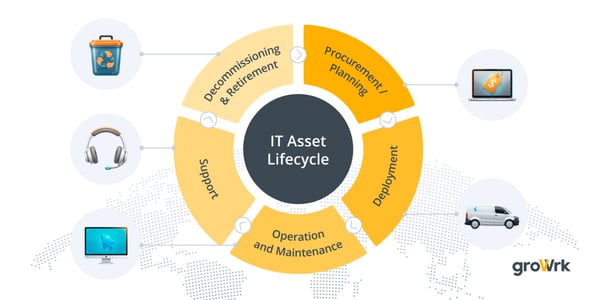
Modern computer inventory tracking software captures far more than a serial number and a name. The best platforms track:
- Automated asset discovery: identifying what devices exist on your network (or agent-reported, for remote devices) even if IT never manually logged them
- Ability to automatically discover and log new devices as they connect to the network, with automatically scanning for real-time data collection and inventory accuracy
- Lifecycle status: whether a laptop assigned to a contractor in Brazil is 3 years old and due for replacement, or still under warranty
- Assignment and ownership: who has what device, in which location, since when, and under what contract
- Software inventory: which devices are running unlicensed or outdated software that creates compliance risk
- Offboarding retrieval: triggering a device return workflow when an employee leaves, automatically flagging assets that haven’t been returned (see our case study on recovering a laptop from a remote location).
Modern inventory management software offers key features such as a central dashboard that aggregates all device, hardware, and software information for unified management. These tools provide basic reporting to help users efficiently view and manage inventory data, and include a user-friendly interface that simplifies device discovery, asset tracking, and integration. They also enable tracking of key metrics and performance metrics, supporting proactive asset management and system health monitoring. These solutions are designed to handle a vast array of devices and asset types.
Who uses it: IT teams at companies with 50+ endpoints, MSPs managing hardware for multiple clients, and remote-first companies where device visibility is inherently more complex than it is in a centralized office.
Effective computer inventory management makes it easier to track, monitor, and log system updates to demonstrate compliance with common industry standards and guidelines. Access to detailed device information in real time enables IT teams to handle incidents with speed and precision.
How to choose the right computer inventory management software
The selection frameworks on most comparison articles treat “best inventory software” as a universal question. It isn’t. For distributed teams, several filters eliminate most options before you even compare features. It’s crucial to choose tools designed for your specific industry or operational needs, as this ensures the software addresses the unique challenges you face. Modern computer inventory management software also reduces manual data entry and supports day-to-day operations, especially for teams managing assets across multiple locations or in the field.
1. On-prem vs. Cloud-native
On-prem tools like ManageEngine AssetExplorer (in its default configuration) or classic Lansweeper require a server on the same network as the devices being scanned. This works for centralized offices. It fails completely for remote teams; this is where remote asset management comes in. The first question to ask any vendor: Does the software require network proximity to the devices it manages? If yes, cross it off the list unless you’re managing an on-prem environment.
A cloud based platform, on the other hand, offers flexibility, remote access, and centralized management, making it ideal for distributed teams and organizations needing real-time asset tracking from anywhere.
2. Agent-based vs. Agentless discovery
Agentless tools scan the network and report back what they find. They’re faster to deploy and require no software on endpoints — but they only see devices on the local network. Agent-based tools install lightweight software on each device, which phones home on a schedule regardless of where the device is. For remote teams, agent-based is the only viable discovery method. This eliminates purely agentless tools for distributed use cases.
A robust computer inventory management system should allow organizations to choose the right discovery methods and data sources for their environment, as selecting appropriate options is essential for successful implementation.
3. Does it track lifecycle, or just existence?
Many tools tell you a device exists. Fewer track whether it’s been deployed, retrieved, re-imaged, repaired, or disposed of. For a distributed team managing 500 laptops across 30 countries, the gap between “tracking” and “lifecycle management” is the difference between knowing you have 500 devices and knowing where 480 of them actually are after 3 years; this is the essence of IT asset lifecycle management. Asset lifecycle tracking should also include monitoring purchase dates to help plan replacements and manage warranties effectively. Look for tools that support procurement-to-decommission workflows, not just asset records.
4. Global logistics integration
Can the software trigger a device shipment to a new hire? Can it initiate a return from an offboarding employee in a country where you have no office? Tools that track but can't act require a separate logistics layer, which creates the same data-gap problems you're trying to solve. A small number of platforms (GroWrk, Deel IT) combine inventory management with physical device logistics. For teams with significant global distribution, this integration is worth a premium. For practical advice on equipping new offices abroad, see our guide to global device procurement.
5. HRIS and MDM integrations
The moment an employee is hired, a device assignment should be triggered. The moment they leave, a retrieval workflow should start. Inventory software that doesn't sync with your HRIS (BambooHR, Workday, HiBob) creates an ongoing manual reconciliation burden. Similarly, tools that integrate with MDM systems (Jamf, Intune, Kandji) can pair visibility with control — so you know not just that the device exists, but whether it's compliant.
6. Compliance and reporting
SOC 2, ISO 27001, and similar frameworks require auditable asset inventories: time-stamped records showing who had what device, when, and in what configuration. Not all inventory tools produce audit-ready exports. Ask vendors specifically what compliance reports are available out of the box and whether they support custom report templates. Audit-ready, customizable reporting and alerts are essential features for compliance and proactive management.
Decision table: feature requirements by scenario:
|
Feature |
Why it matters for remote teams |
Tools that do it well |
|---|---|---|
|
Remote agent-based discovery |
Devices never touch a shared office network; agentless tools can’t see them |
NinjaOne, GroWrk, Lansweeper Cloud |
|
HRIS integration (auto-assign on hire) |
Manual assignment creates gaps between HR onboarding and IT provisioning |
GroWrk, Freshservice, NinjaOne |
|
Global logistics and retrieval |
Tracking is useless if you can’t get devices back when employees leave |
GroWrk, Deel IT |
|
Compliance reporting (SOC 2, ISO 27001) |
Auditors need time-stamped, exportable asset records |
ManageEngine AE, Freshservice, NinjaOne |
|
Budget under $50/user/month |
Enterprise tools price out lean IT teams |
Spiceworks (free), Atera, EZO |
Effective inventory management solutions report fewer asset-related incidents and help organizations make smarter and faster decisions.
How we selected these tools
The 10 tools in this guide were selected from an initial field of 23 platforms reviewed against the following criteria. Tools that did not meet a minimum threshold on the first two criteria were excluded.
- Deployment model compatibility with distributed teams: tools requiring on-prem-only installation were excluded unless they had a verified cloud or hybrid option
- Lifecycle tracking depth: tools that only provide static asset records without deployment/retrieval workflows were downweighted
- Integration ecosystem: specifically HRIS, MDM, and ticketing system connectivity
- Reporting capabilities: compliance-grade audit exports and scheduling
- Pricing transparency: tools with no publicly available pricing were noted; tools with misleading pricing structures were flagged. Pricing for computer inventory management software is not fixed—cost depends on factors such as the number of assets you need to manage and the features required.
- User review: G2 and Capterra ratings were considered where available, with additional weight given to platforms that show consistently positive feedback and recent user reviews.
Data sources: vendor documentation, product demos conducted by GroWrk’s IT operations team, G2/Capterra review analysis, and direct customer interviews. Pricing is verified as of March 2026 with direct links to vendor pricing pages. Each quarter, we re-verify pricing directly on vendor sites, check for changes in G2/Capterra ratings of more than 0.2 points, and update the tool list if new platforms have reached sufficient market adoption.
Tools excluded from this list: UpKeep (facilities management, not IT inventory), SysAid (ITSM-only with weak inventory module), Ivanti Neurons (enterprise contracts only, poor accessibility for mid-market), Workwize (limited geographic reach), Firstbase (limited transparency on features and pricing), and Allwhere (North America only). Narrowing to 10 tools reflects genuine curation, not laziness; more tools mean more template content, not more value.
Common implementation challenges for computer inventory management software include moving existing data into the new system, getting your team comfortable with the new platform, and ensuring compatibility with other tools.
The 10 best computer inventory management software tools for 2026
Quick reference: all 10 tools compared:
|
Software |
Best for |
Deployment |
Key strength |
Starting price |
|---|---|---|---|---|
|
NinjaOne |
Mid-market IT teams |
Cloud |
RMM + inventory in one platform |
From $3/device/mo |
|
Lansweeper |
Hybrid/on-prem networks |
On-prem/Cloud |
Agentless discovery at scale |
Free tier + paid |
|
ManageEngine AE |
Compliance-heavy orgs |
On-prem/Cloud |
CMDB + license management |
From $995/yr |
|
Freshservice |
SMB to mid-market |
Cloud |
ITSM + inventory combined |
From $19/agent/mo |
|
Atera |
MSPs & lean IT teams |
Cloud |
Unlimited endpoints per technician |
From $99/tech/mo |
|
Asset Panda |
SMBs with physical assets |
Cloud |
Mobile-first barcode scanning |
Custom |
|
EZO (EZOfficeInventory) |
Shared equipment teams |
Cloud |
Check-in/check-out workflows |
From $40/mo |
|
Deel IT |
Companies wanting managed logistics |
Managed service |
Global device procurement + retrieval |
Custom |
|
Spiceworks Inventory |
Small on-prem IT teams |
On-prem |
Free forever for on-prem networks |
Free |
|
GroWrk |
Distributed/global teams |
Cloud |
End-to-end lifecycle + logistics |
Custom |
1. NinjaOne: Best RMM + inventory platform for mid-market IT teams
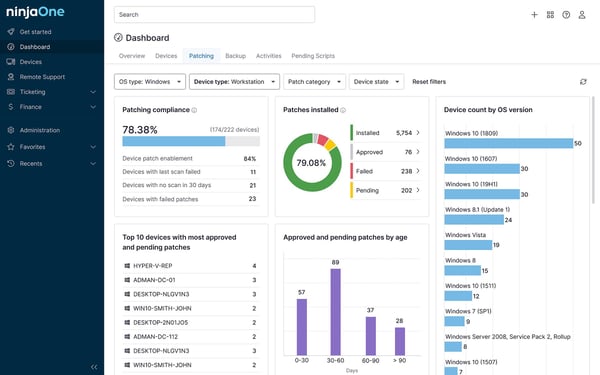
NinjaOne started as a remote monitoring and management (RMM) tool and added IT asset management on top, which gives it a meaningful advantage over pure-inventory platforms: it combines visibility with the ability to act, as detailed in our NinjaOne IT management software review covering endpoint monitoring, automation, and patching. IT teams that want to know what devices exist and remotely troubleshoot, patch, and manage them from a single dashboard will find NinjaOne significantly more capable than a standalone inventory tool. NinjaOne also offers robust patch management, enabling automated monitoring, reporting, and compliance with software updates and security patches across your computer inventory.
Its endpoint agent is lightweight and cross-platform (Windows, Mac, Linux), and its autodiscovery features automatically surface detailed hardware specs, software inventory, and network information. The asset inventory module captures warranty status, device history, and custom fields, useful for compliance-oriented teams that need audit-ready records.
Ideal for: Internal IT teams at companies with 200–2,000 devices who want RMM capabilities alongside inventory management, particularly in hybrid (partially remote, partially office-based) environments.
Genuine differentiator: The combination of endpoint management and inventory in one agent. Teams using separate RMM and ITAM tools pay for duplicate agents and duplicate data; NinjaOne collapses both into a single pane of glass. Key features of computer inventory management software, as seen in NinjaOne, include real-time asset tracking, automated tracking and reporting, comprehensive data on hardware and software lifecycles, and barcode/RFID scanning for accuracy.
Limitations: Does not handle physical device logistics. If you need to ship devices to remote hires or retrieve hardware from offboarding employees, you’ll need a separate process or a logistics partner.
Pricing: Typically $3–6 per device/month, depending on the modules selected. Verify at ninjaone.com/pricing.
G2 review: 4.7/5
2. Lansweeper: Best agentless discovery for on-prem and hybrid environments
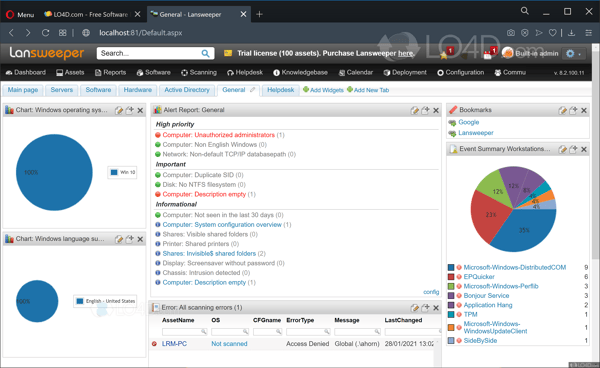
Lansweeper’s superpower is agentless discovery; it maps every device on a network without installing anything on the endpoints. Point it at a network range, and it surfaces hardware details, installed software, running services, and configuration data across Windows, Mac, Linux, and network devices (switches, routers, printers) simultaneously. Its hardware inventory management features enable automated inventory discovery, providing IT teams with a comprehensive and up-to-date view of all hardware assets. For IT teams managing large on-prem or hybrid environments where network proximity is reliable, it’s one of the most complete discovery engines available.
Lansweeper Cloud (launched 2022) extends the platform beyond the local network using a cloud connector and optional agent, making it more viable for hybrid setups. The reporting engine is particularly strong, with hundreds of pre-built reports covering compliance, software licensing, hardware age, and warranty status, plus a SQL-based custom report builder for teams with specific needs.
Ideal for: IT teams managing 200–2,000+ on-prem or hybrid devices who want comprehensive network visibility without agent deployment overhead. Strong fit for teams with complex network environments (multiple subnets, varied OS mix, network infrastructure assets).
Genuine differentiator: Breadth of agentless discovery. Lansweeper identifies device types that agent-based tools miss: printers, network switches, IoT devices, and IP phones, giving IT teams a complete picture of what’s on their network.
Limitations: Agentless scanning requires network access to the target devices. Fully remote employees on home networks are invisible to agentless scanning. Lansweeper Cloud addresses this partially, but remote-first teams will find agent-based tools more complete for their use case. PRTG, for example, automatically detects every hardware, software, and virtual component within a selected IP address range, creating a central asset inventory for more comprehensive hardware inventory management.
Pricing: Free tier available (up to 100 assets). Paid plans start around $219/month for the cloud version. Verify at lansweeper.com/pricing.
G2 review: 4.4/5
3. ManageEngine AssetExplorer: Best for compliance-heavy environments
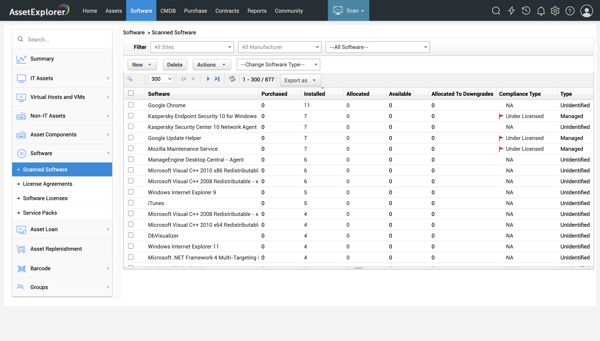
ManageEngine AssetExplorer is the IT asset management module within Zoho’s broader ManageEngine ecosystem, and its depth shows. It handles CMDB (Configuration Management Database) functions alongside traditional hardware inventory, tracking not just devices but the relationships between them, the software licenses running on them, and the contracts and warranties attached to them. For organizations where compliance is a primary driver (healthcare, finance, government), this CMDB depth is difficult to replicate with lighter tools. AssetExplorer helps organizations control costs and optimize resources by providing centralized management that enables efficient allocation and reallocation of hardware assets, reducing unnecessary expenses and improving resource utilization.
The platform integrates natively with ManageEngine’s other modules (ServiceDesk Plus, Patch Manager Plus, and Desktop Central) for teams already in the ManageEngine ecosystem. Software license management is notably strong: it tracks license compliance across the full install base and flags over-deployment risks before they become audit findings.
Ideal for: Mid-market to enterprise IT teams where ITIL-aligned processes, software license compliance, and CMDB functionality are required. Strong fit for teams already using other ManageEngine products.
Genuine differentiator: License compliance management at scale. For organizations managing hundreds of software titles across thousands of devices, AssetExplorer’s license reconciliation and compliance reporting is more capable than any other tool in this list.
Limitations: Interface design reflects its age, and the UX is functional but dated compared to cloud-native tools. ManageEngine Asset Explorer can be deployed on-premises or as a SaaS solution. The on-prem deployment model requires infrastructure overhead; the cloud version mitigates this but is priced higher.
Pricing: Starts at $995/year for up to 250 nodes (on-prem). Cloud pricing varies. Verify at https://store.manageengine.com/asset-explorer/.
G2 review: 4.3/5
4. Freshservice: Best for teams wanting inventory and ITSM in one tool
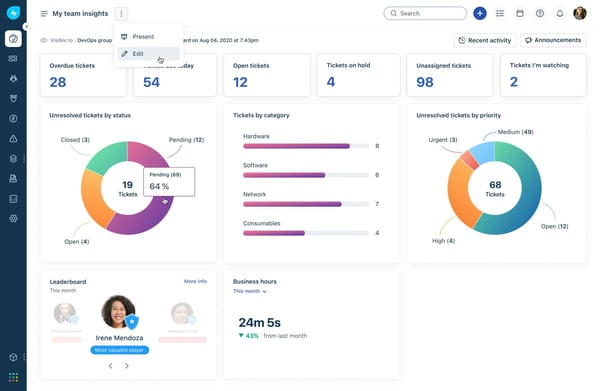
Freshservice takes the opposite approach from standalone inventory tools: it starts with full ITSM (incident management, change management, service catalog, approvals) and adds a robust asset management module on top. For IT teams managing both the help desk and hardware, having both on a single platform eliminates the manual effort of cross-referencing a separate CMDB every time a ticket involves an asset.
Its discovery agent is cross-platform and captures hardware specs, installed software, and network information. Freshservice provides a centralized asset inventory, giving IT teams clear hardware and software inventory visibility across the organization. The CMDB maps relationships between assets and services, which is useful for change management (understanding what downstream systems are affected when a server is patched). The service catalog can include hardware requests, making device procurement a self-service workflow for employees.
Ideal for: SMBs and mid-market IT teams (50–1,000 employees) that want to consolidate help desk and asset management into a single tool. Particularly strong for teams implementing ITIL processes for the first time.
Genuine differentiator: The ITSM-ITAM integration. When an employee submits a hardware issue ticket, the agent automatically pulls up the asset record, warranty status, and history, saving IT time spent looking this up manually.
Limitations: The asset management module is less deep than dedicated ITAM tools. For teams with sophisticated compliance or license management requirements, ManageEngine or Lansweeper offer more capabilities in those specific areas. Alternatively, SolarWinds Service Desk is a cloud-based, AI-powered IT Service Management platform that includes a built-in IT Asset Management module.
Pricing: Starts at $19/agent/month (Starter plan, includes basic asset management). IT Asset Management features require the Pro or Enterprise plan. Verify at freshservice.com/pricing.
G2 review: 4.6/5
5. Atera: Best for MSPs and lean IT teams managing many endpoints
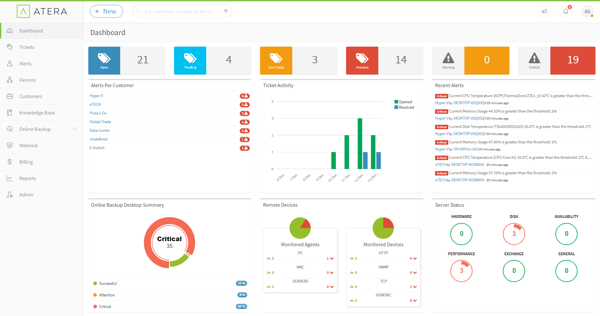
Atera is priced differently from every other tool in this list: flat per-technician pricing with unlimited endpoints. For MSPs managing dozens of client environments, or lean IT teams responsible for hundreds of devices per person, this pricing model makes Atera significantly more economical than per-device pricing as the endpoint count grows.
The platform combines RMM, remote access, help desk, and IT asset management into a single tool designed specifically for IT professionals who wear multiple hats. Asset discovery is agent-based, and automatic inventory populates as agents are deployed. Hardware details, software inventory, patch status, and network information are captured without manual input. Atera gives IT teams complete control over their asset inventory, making it easier to track and manage all devices from a centralized dashboard.
Ideal for: MSPs and small-to-mid IT teams where cost per device would make per-device pricing prohibitive. Particularly well-suited to teams managing 300+ endpoints with 1–5 IT technicians.
Genuine differentiator: The unlimited-endpoints pricing model. At scale, Atera can be significantly more cost-effective than per-device alternatives while delivering comparable inventory and RMM functionality.
Limitations: Less depth in CMDB and compliance reporting than ManageEngine or NinjaOne. For organizations with formal ITIL requirements or complex license compliance needs, the enterprise-grade features aren’t there yet. Note that SysAid offers two tiered solutions—Help Desk (Standard) and ITSM (Pro)—both of which include built-in Asset Management functionalities, which may be preferable for organizations seeking integrated asset management.
Pricing: Starts at $99/technician/month (Pro plan) with unlimited endpoints. Verify at atera.com/pricing.
G2 review: 4.6/5
6. Asset Panda: Best mobile-first auditing for SMBs
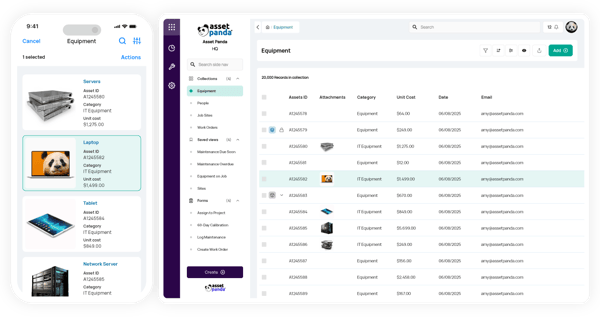
Asset Panda is purpose-built for physical asset auditing, the kind of work where someone walks the office (or warehouse, or school) with a phone, scans barcodes, and updates records in real time. Asset Panda is a cloud-based platform, allowing users to access and manage asset data remotely and in real time, which improves operational accessibility and centralized management. It’s not the strongest tool for automated endpoint discovery, but for organizations that conduct periodic manual asset audits and need a mobile-friendly interface for recording what they find, it’s significantly better than spreadsheets or generic asset-tracking tools.
The platform is highly customizable; custom fields, custom workflows, and custom reports can be configured without developer involvement. Barcode and QR code scanning via the mobile app makes check-in/check-out workflows fast for environments where devices are shared or rotated (training rooms, lab equipment, loaner laptops).
Ideal for: SMBs with 50–500 physical assets that need organized records, mobile auditing capabilities, and check-in/check-out tracking. Education, healthcare, and field services are common sectors. Asset Panda focuses on Asset Lifecycle Management, making it particularly well-suited for small and medium-sized businesses.
Genuine differentiator: The mobile-first approach for physical auditing. For teams that still do regular hands-on asset verification, the barcode scanning and mobile workflows are more intuitive than any other tool in this list.
Limitations: Limited automated endpoint discovery. Asset Panda relies heavily on manual data entry or import rather than agent-based or network-based auto-discovery. For large or fully remote environments, the manual approach doesn’t scale.
Pricing: Custom pricing based on asset count. Verify at assetpanda.com/pricing.
G2 review: 4.2/5
7. EZO (EZOfficeInventory): Best for check-In/check-Out and shared equipment
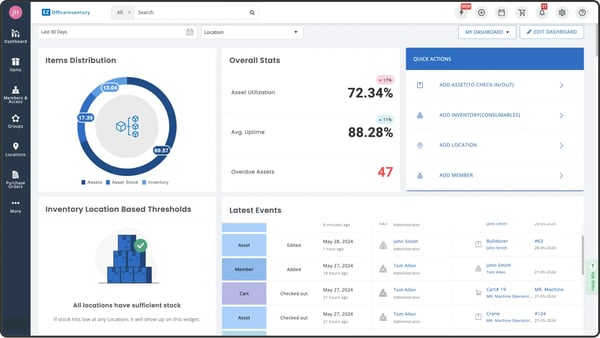
EZO’s original product (EZOfficeInventory) was designed for shared equipment workflows: the kind of environment where cameras, AV gear, laptops, or lab equipment are checked out by employees and returned on a schedule. That use case gives it unusually strong reservation, check-out, and overdue-notification features that general-purpose ITAM tools handle poorly. EZO also includes barcode scanners and supports barcoding and mobile scanning, which are essential features in computer inventory management software to reduce manual typing errors.
The platform has expanded into broader IT asset management, adding software inventory and MDM tool integrations, but its strongest differentiator remains the check-out workflow. For organizations with mixed asset types, some permanently assigned, some shared, EZO handles both in a single platform.
Ideal for: Organizations managing a mix of permanently assigned and shared equipment, particularly those with physical check-out workflows, equipment reservations, or usage tracking needs.
Genuine differentiator: The reservation and check-out system. No other tool in this list handles “who has this piece of equipment right now and when do they need to return it” as cleanly as EZO.
Limitations: Less suited to fully automated, agent-based inventory management. Teams that want real-time endpoint discovery and compliance reporting will find EZO’s capabilities in those areas lighter than NinjaOne or ManageEngine.
Pricing: Starts at $40/month (up to 75 assets). Verify at https://ezo.io/ezofficeinventory/pricing/
G2 review: 4.4/5
8. Deel IT: Best for companies that want managed logistics over SaaS
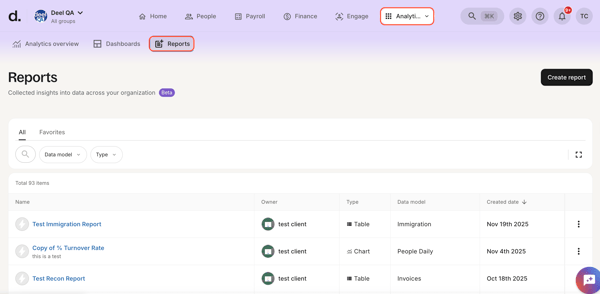
Deel IT is less “software you operate” and more “service you buy.” Rather than giving IT teams a platform to manage device logistics themselves, Deel IT handles the physical operations: procurement, global shipping to new hires, device storage between assignments, and retrieval from offboarding employees. The inventory tracking is a byproduct of the managed service, not the primary product. Deel IT manages the entire lifecycle of company devices, from acquisition to end-of-life.
For companies scaling internationally quickly and not wanting to build internal logistics capabilities, Deel IT offers a way to outsource the operational complexity entirely. The trade-off is less control and customization than managing your own inventory platform.
Ideal for: Fast-growing companies (50–500 employees) hiring globally who want device logistics handled end-to-end without building internal IT ops capacity. Works especially well for companies already using Deel for payroll and contractor management.
Genuine differentiator: Zero internal logistics infrastructure required. If your IT team’s goal is “every new hire gets a laptop on day one without us doing anything,” Deel IT is the most direct path to that outcome.
Limitations: Less flexibility than running your own ITAM platform. Custom workflows, deep reporting, and integration with existing ITSM tools are harder to achieve in a managed-service model. Also, geographic coverage varies by country; verify availability for your key locations before committing. Note: Ply is designed specifically for contractors and focuses on managing truck stock and simplifying job costing, which may be a better fit for contractor-heavy businesses.
Pricing: Custom. Verify at letsdeel.com/it.
G2 review: 4.7/5
9. Spiceworks Inventory: Best free option for small on-prem IT teams
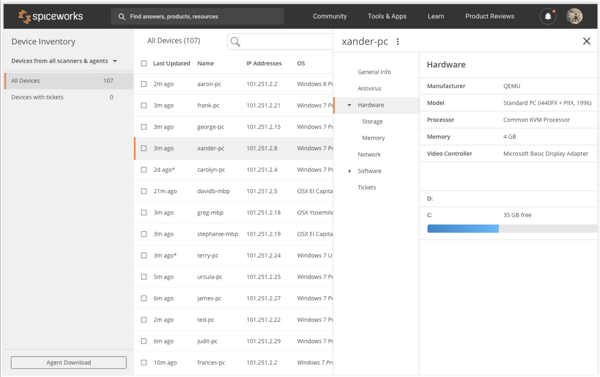
Spiceworks remains the most widely used free IT inventory tool, and for small on-prem environments, it still earns its place. The network scanner discovers Windows, Mac, and Linux devices on the local network and populates hardware specs, installed software, and system information without configuration overhead. Spiceworks also provides basic reporting features, allowing users to generate fundamental inventory reports for easier management and visibility. For an IT team managing 50–200 devices in one or two office locations with no budget for inventory software, Spiceworks is a legitimate starting point.
The tradeoff is the ad-supported model: the Spiceworks interface shows ads from IT vendors, and the data Spiceworks collects from your environment informs those ads. Privacy-conscious teams should weigh this carefully. The UI is dated, community support is the primary support channel, and the product has had limited active development in recent years.
Ideal for: Small IT teams (1–3 people) managing 50–200 on-prem devices with limited or no budget for inventory software. Also useful as a starting point before outgrowing it and moving to a paid tool.
Genuine differentiator: Free. Completely free forever for the on-prem version. There is no other tool on this list at that price.
Limitations: Ad-supported, which means your environment data feeds Spiceworks’ advertising network. No remote team support, agentless scanning only works on the local network. Limited to on-prem environments. Not suitable for compliance-oriented or growing organizations. Snipe-IT, by contrast, is a free and open-source IT Asset Management solution designed to help IT teams track hardware, software licenses, and accessories.
Pricing: Free (ad-supported). Verify at spiceworks.com.
G2 review: 4.1/5
10. GroWrk: Best end-to-end lifecycle platform for distributed teams
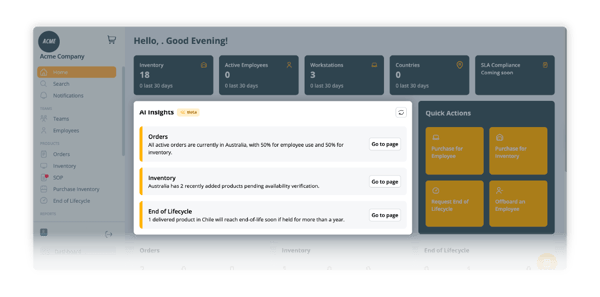
GroWrk’s IT asset management platform for distributed work solves a problem that pure inventory tools ignore: what happens after you know where a device is. While most platforms stop at tracking, GroWrk combines a full asset inventory with physical device logistics: procurement, global shipping, storage, retrieval, and decommission, in a single platform. Its central dashboard provides a unified interface for managing all assets, aggregating device, hardware, and software information in one place.
For a company with employees across Latin America, Europe, and Southeast Asia, that means a new hire in Colombia gets a laptop on day one without IT manually coordinating a shipment, and an offboarding employee in Germany has a retrieval workflow triggered automatically. GroWrk enhances operational efficiency for distributed teams by streamlining processes, reducing administrative overhead, and improving IT asset management through global IT asset management with procurement, delivery, retrieval, and storage across 150+ countries.
The inventory layer is cloud-native and agent-based, meaning it tracks devices regardless of whether they’re on a corporate network. The HRIS integrations (BambooHR, Workday, HiBob, and others) create automatic lifecycle triggers at hire and termination, closing the gap that causes most ghost inventory problems. MDM integrations with Jamf, Intune, and Kandji pair visibility with device control.
Ideal for: Remote-first and globally distributed companies managing multiple devices across various countries that need both visibility and physical logistics handled in one place.
Genuine differentiator: The logistics layer. No other tool in this list handles international device shipping, customs, storage, and retrieval at scale. As shown in GroWrk’s laptop logistics and inventory management case study for a fully remote workforce, if your team is growing globally and you’re currently stitching together an inventory tool with a manual logistics process, GroWrk replaces both.
Limitations: Not the right fit for companies with fully centralized, office-based device management; the logistics capabilities are underutilized in those environments, and the pricing reflects the full-service model. Note that ServiceNow IT Asset Management provides asset managers with full visibility into their hardware, software, and SaaS portfolios.
Pricing: Custom. Contact GroWrk for a scoped quote based on team size and geographic distribution. Independent GroWrk reviews highlight its full lifecycle device management, rapid deployment, and 24/7 support. Verify pricing at growrk.com/pricing.
G2 review: 4.4/5

How to implement computer inventory management for a distributed team
Most IT teams that struggle with computer inventory management don’t have a tool problem; they have a process problem, and deploying new software on top of a broken process produces better-organized confusion. Before implementing computer inventory management software, it is crucial to define the scope and objectives to ensure the project meets your organization’s needs.
Standardizing asset data and naming conventions from the start helps ensure consistency and accuracy across your inventory.
Here’s the implementation sequence that works:
- Define the scope and objectives for your IT Inventory Management software project.
- Standardize asset data and naming conventions.
- Validate and clean initial inventory data to eliminate errors and duplicates.
- Assign ownership and operational processes to ensure accountability.
- Roll out IT Inventory Management software gradually to avoid incomplete inventories and inconsistent data.
- Provide proper training to all team members for successful adoption.
- Track the right metrics and measure ongoing performance to keep the inventory accurate and useful over time.
Implementing IT Inventory Management software requires clear steps, defined responsibilities, and ongoing measurement. A structured rollout and proper training are essential to avoid low adoption and ensure long-term success.
Step 1: Audit your current asset state
Before deploying any software, know what you have. A 3-step manual audit: start with HR headcount (how many people are currently employed), cross-reference against device assignment records (what devices are logged as assigned), then do a physical verification with anyone who can check desks and storage rooms. The gap between those three numbers is your ghost inventory problem. Acknowledge it, it's painful, but it's the baseline you'll measure improvement against.
Step 2: Choose your discovery method
Agent-based for remote teams. Agentless for on-prem networks. The decision is mostly made by your environment. If your team is distributed, install agents on all devices before or alongside deployment. If you’re on-prem, agentless scanning (Lansweeper, Spiceworks) is faster to stand up. Hybrid environments need both.
Modern computer inventory management software often includes automatically scanning capabilities, enabling automated inventory discovery that supports multiple discovery methods to automatically identify and register IT assets with minimal manual effort.
Step 3: Define your lifecycle stages
Before configuring the tool, agree on which lifecycle stages you’re tracking: procurement, deployment, in use, under repair, offboarding, and decommissioning are the standard six. Asset lifecycle tracking is essential, as it covers assets throughout their lifecycle, including acquisition, deployment, maintenance, and retirement, with secure IT asset disposal practices. The software needs to know these stages to route devices correctly. If you skip this, you’ll end up with an inventory of devices but no visibility into their state.
Step 4: Integrate with HRIS and MDM
New hire trigger → device assigned. Termination trigger → retrieval initiated. This is where manual inventory breaks down at scale. When IT relies on someone from HR or a manager to notify them that an employee is leaving, devices fall through the cracks. Seamless integration with key IT systems, such as your HRIS and MDM, enhances operational efficiency by keeping information synchronized and reducing manual efforts. The integration between your HRIS and your inventory platform is the automation that closes the loop.
Step 5: Establish an audit cadence
Software doesn't eliminate the need for periodic human verification. Set a quarterly full inventory audit, configure automated alerts for devices not seen for 30+ days, and do an annual lifecycle review to flag aging hardware. Give these concrete timelines and assign ownership.
|
GroWrk note: The biggest source of ghost inventory (devices that appear in records but no longer exist in practice) is often the gap between HR offboarding and IT device retrieval. When retrieval isn’t triggered automatically, devices can remain with former employees long after they leave the company. In GroWrk's onboarding audits, the median new customer has 11% of listed assets unaccounted for (devices still assigned to former employees or logged as deployed but never returned) |
|---|
Choosing the right computer inventory software for your team
If you can answer 'yes' to three questions: does your software see devices that aren't on a corporate network, does it trigger a retrieval when an employee leaves, and does it produce a report your auditor would accept, you have the right tool. Most teams answer no to at least one. For distributed companies, device tracking is only part of the challenge. Procurement, shipping, configuration, support, and retrieval are often handled through disconnected tools and vendors, which creates inventory blind spots and operational friction over time.
The most effective approach connects inventory visibility with the physical lifecycle of devices. When procurement, deployment, support, and recovery are managed as a single process, it's an IT procurement strategy that enables teams to gain accurate visibility and avoid the gaps that lead to lost equipment, delayed onboarding, and compliance risk.
GroWrk was built for this distributed environment. Instead of treating inventory as a standalone tracking system, it connects asset visibility with global logistics and lifecycle management so IT teams can manage devices from procurement through retrieval in one platform.
GroWrk manages device lifecycles across 150+ countries for companies at any scale, ranging from 50 to 5,000 employees, building on its end-to-end IT equipment solutions for distributed teams.
If you're evaluating your current process, start with a simple question: could your IT team confidently identify the location and status of every company device worldwide today? If not, there may be gaps in the lifecycle workflows behind your inventory system.
Learn more in our IT asset lifecycle management case studies showing how GroWrk transforms IT operations for global teams, explore ongoing remote work and IT asset management best practices on the GroWrk blog, or talk with a GroWrk specialist to evaluate your current setup.
Frequently Asked Questions
What is computer inventory management software?
Computer inventory management software tracks the hardware assets an organization owns, such as laptops, desktops, servers, and peripherals, across their full lifecycle from procurement to decommission. It captures who has each device, its condition, and what software is running on it. A computer inventory management system provides hardware and software inventory visibility, delivering detailed insights into physical devices and installed software. Unlike network monitoring tools (which track uptime and performance) or MDM systems (which control device configurations), inventory software answers the operational question: what do we have, where it is, and what state it is in?
How is computer inventory software different from MDM?
MDM (Mobile Device Management) tools like Jamf or Intune remotely manage and enforce policies on devices, push software updates, enforce encryption, and wipe devices. Inventory software tracks what devices exist, who has them, and their lifecycle status. A hardware inventory management tool is also important for keeping track of encryption settings, monitoring security updates, and ensuring devices comply with industry rules. The distinction matters because you can know everything about a device’s existence and ownership without being able to control it, and vice versa. The best platforms for distributed teams do both, but most tools only do one. Many IT teams use an inventory tool alongside an MDM system rather than looking for a single tool that handles both equally well.
What's the best free computer inventory software?
Spiceworks Inventory is the most capable free option for on-prem networks. It’s agentless, covers Windows/Mac/Linux devices, and includes hardware and software discovery at no cost. Free tools like Spiceworks typically offer basic reporting features, allowing users to manage and view their inventory data efficiently. The tradeoffs: it’s ad-supported (your environment data feeds Spiceworks’ advertising network), doesn’t support remote teams (agentless scanning requires network proximity), and has limited active development. For distributed teams, free tools hit a ceiling quickly; the cost of manual reconciliation and ghost inventory typically exceeds the cost of a paid tool within 6–12 months of growth.
Another notable free option is Snipe-IT, a free and open-source IT Asset Management solution designed to help IT teams track hardware and software licenses.
How do I track computers for remote employees?
Agent-based discovery is the only reliable method for remote devices. Install a lightweight endpoint agent on each device during provisioning; it reports hardware details, software inventory, and status back to the platform regardless of what network the device is on. Modern computer inventory management software can also automatically discover and log new devices as they connect to your network, streamlining asset tracking and reducing manual effort. Pair this with HRIS integration so device assignments are triggered automatically at hire, and retrieval workflows start automatically at offboarding. GroWrk’s platform handles this end-to-end, including the physical logistics of delivering devices to remote employees and returning them, and our guide to streamlining remote employee equipment returns and device recoveries breaks down the operational and compliance steps involved.
How often should IT teams audit their computer inventory?
Automated continuous monitoring (via agents) should run constantly. Beyond that: quarterly spot-check audits, automated alerts for devices not seen for 30+ days, and an annual full-lifecycle review to flag hardware that has aged past the replacement threshold (typically 3–4 years for laptops). The quarterly and annual reviews serve a different purpose than continuous monitoring; they catch process gaps that automation misses, like devices that were transferred informally between employees without being logged.
What does computer inventory management software cost?
Pricing varies significantly by tier. The cost depends on factors such as the number of assets you need to manage and the features required. In 2026, entry-level plans for inventory management software typically range from $50 to $150 per month. Free: Spiceworks (ad-supported, on-prem only). SMB/mid-market: $20–60/user/month or $3–6/device/month covers most of the tools in this list (NinjaOne, Freshservice, Atera). Enterprise and managed-service models (ManageEngine, GroWrk, Deel IT) use custom pricing based on scope. Total cost of ownership matters more than sticker price: a $5/device/month tool that requires 20 hours/month of manual reconciliation may cost more than a $15/device/month tool that automates that reconciliation entirely.