
Table of contents

Top 9 IT Strategy Examples in 2026: Real Frameworks That Actually Work


Three in the morning, and I'm staring at my phone trying to make sense of what our CTO is saying. He's talking fast, too fast, something about ransomware and locked databases and "we're completely screwed."

I remember thinking he was overreacting. He wasn't.

By 6 AM, we knew the damage: $2.3 million. Our entire customer database locked down. And our backup strategy? That's generous. We had backups. They were just... also encrypted. Because apparently, we'd been backing up to network drives that the ransomware could reach. Looking back, we were idiots. Expensive idiots.

The board meeting that afternoon was brutal. I had to explain how a company our size, with our revenue, had basically no disaster recovery plan worth mentioning. We survived, barely. A lot of companies don't.

And here's the thing: we weren't unique. Gartner's 2025 research shows 63% of organizations have now implemented strategic IT frameworks specifically to prevent the kind of catastrophic failure we experienced. The question isn't whether you need an IT strategy anymore. It's which one you choose, and whether you implement it before or after your own 3 AM wake-up call.

This guide covers the nine IT strategies that actually work in 2025. Not theory. Not consultant-speak. Real frameworks that real companies use to avoid becoming cautionary tales.

TL;DR: Quick Strategy Comparison

Don't have time for 8,000 words? Here's the speed version:

Cloud-First Infrastructure means you stop buying servers and start renting compute power. Scales infinitely, gets you out of the data center business, and makes geographic expansion trivial (5/5 scalability).

Digital Transformation & Automation is fancy talk for "make robots do the boring stuff." Your IT team stops resetting passwords and starts building competitive advantages. Expect 40-60% efficiency gains if you do it right.

Zero Trust Security assumes everyone's trying to hack you, even your own employees. Sounds paranoid, feels paranoid, but cuts breach impact by 70%. Worth the authentication headaches.

IT Asset Lifecycle Management stops you from buying laptops you already own (yes, this happens). Track everything from purchase to recycling, cut costs 20-30%.

Hybrid Work Enablement is how you hire the best people anywhere without maintaining offices everywhere. Reduces real estate costs, expands talent pool, requires actual strategy (not just "everyone gets Zoom").

AIOps predicts server failures before they happen. Like having a psychic on your IT team, except it actually works. Cuts incident response times in half.

Sustainable IT keeps investors and customers happy while reducing energy bills. ESG isn't optional anymore. Get ahead of it.

Vendor Management consolidates your 47 different IT vendors into something manageable. Saves 15-30% through volume discounts and not paying retail like suckers.

Managed Services means someone else keeps the lights on while your team does interesting work. Convert fixed IT costs to variable, scale without hiring.

These it strategy examples represent the most effective types of it strategies organizations are implementing right now to solve real business problems.

Still here? Good. We're going deeper.

Comparison Table: Top 9 IT Strategies at a Glance

Strategy Best For Business Alignment Scalability Implementation Complexity Cost-Effectiveness Risk Management
Cloud-First Infrastructure Global Scalability 5/5 5/5 4/5 4/5 4/5
Digital Transformation & Automation Efficiency Gains 5/5 5/5 3/5 5/5 4/5
Zero Trust Security Breach Prevention 5/5 5/5 3/5 4/5 5/5
IT Asset Lifecycle Management Cost Optimization 5/5 5/5 4/5 5/5 5/5
Hybrid Work Enablement Talent Access 5/5 5/5 4/5 5/5 4/5
AIOps Predictive Capabilities 5/5 5/5 3/5 4/5 4/5
Sustainable IT ESG Compliance 4/5 4/5 3/5 4/5 4/5
Vendor Management Cost Savings 5/5 5/5 4/5 5/5 5/5
Managed Services Focus Enhancement 5/5 5/5 3/5 4/5 4/5

These ratings are based on typical mid-market companies. Your mileage will vary dramatically based on size, industry, and how badly your current setup is broken.

Criteria Breakdown: How We Evaluated Each Strategy

Every IT strategy in this guide was evaluated against five critical factors that determine real-world success. Here's what we measured:

Alignment with Business Objectives (1-5 scale): Does the strategy directly support revenue growth, cost reduction, or competitive advantage? We dismissed anything that looked good on paper but failed to move business metrics.

Scalability & Flexibility (1-5 scale): Can this approach grow with your organization without requiring complete rebuilds? Geographic expansion, workforce changes, and technology shifts shouldn't break your strategy.

Implementation Complexity (1-5 scale): What resources, expertise, and time does execution actually require? Lower scores mean significant organizational change management. Higher scores indicate more straightforward deployment paths.

Cost-Effectiveness (1-5 scale): We examined both upfront investment and ongoing operational costs. Strong ROI through efficiency gains, reduced overhead, or competitive advantages justified the expenditure.

Risk Management & Security (1-5 scale): How comprehensively does the strategy address cybersecurity, compliance, data privacy, and business continuity? In 2025's threat environment, this isn't negotiable.

Before committing to any information technology strategy, ask yourself these questions:

What specific problem are you solving? Infrastructure modernization, digital transformation, remote work enablement, cost optimization, and competitive differentiation all require different approaches.

What's your current IT maturity level? Your existing capabilities determine which strategies are realistic starting points versus aspirational goals.

What's your realistic timeline? Some strategies deliver quick wins within quarters. Others require multi-year commitments before showing results.

Do you have executive buy-in? Successful IT strategies require C-suite support and cross-functional collaboration. Without it, you're wasting time.

What's your organization's risk tolerance? Innovative strategies offer competitive advantages but carry higher implementation risks. Conservative approaches provide stability but may leave you behind competitors.

Understanding these evaluation criteria helps you assess which it strategy plan makes sense for your organization right now. A strategic it plan example should always map directly to measurable business outcomes, not technology for technology's sake.

Cloud-First Infrastructure Strategy

Best Known for Global Scalability

I visited a data center in 2019. Rows of blinking servers, freezing cold air, deafening noise. The operations manager told me proudly they'd just spent $3 million upgrading their infrastructure. I asked what happens if they need to scale up 50% next quarter. He laughed. "We'd need six months and another $2 million."

That's the world cloud-first infrastructure killed.

Now? Companies like GroWrk manage distributed teams across 150+ countries without owning a single server. Need to scale? Click a button. New market? Spin up infrastructure in an afternoon. The data center visit I took would be like touring a typewriter factory today: technically impressive but fundamentally obsolete.

This isn't about moving files to Dropbox. It's about fundamentally rethinking how your entire IT infrastructure operates.

Cloud-first strategies prioritize cloud-based solutions over on-premises infrastructure for new initiatives and modernization efforts. When you need to spin up a new application or expand into a new market, your default answer is cloud deployment, not another server rack.

Cloud-first infrastructure represents a strategic shift from traditional on-premises data centers to cloud-based solutions as the default deployment model. Using GroWrk's platform as a practical example of technology strategy examples, this approach makes it possible for organizations to manage global operations without physical infrastructure constraints, supporting remote teams across 150+ countries through centralized cloud platforms. The it strategy examples we see most frequently involve organizations ditching expensive data center leases in favor of flexible, scalable cloud infrastructure that grows with business needs.

What Actually Matters with Cloud-First

You stop waiting for hardware. Remember when spinning up a new server meant a purchase order, a three-week wait, a loading dock delivery, and two days of racking and cabling? Cloud infrastructure deploys in minutes. I'm not exaggerating. Minutes. You can provision a server, configure it, and have it running production workloads before your coffee gets cold.

Geography becomes irrelevant. Opening an office in Singapore? Your infrastructure is already there. AWS, Azure, and GCP have data centers everywhere. You're not shipping servers or hiring local IT staff. You're clicking "deploy to ap-southeast-1" and moving on with your day.

Scaling happens automatically. Traffic spike because TechCrunch wrote about you? Your infrastructure scales up automatically. Quiet weekend? It scales down. You pay for what you use, not what you might theoretically need someday.

Real-time asset tracking gives you visibility into every laptop, monitor, and mobile device across your organization. You know exactly where everything is, who's using it, and when it needs replacement.

Automated lifecycle management handles everything from onboarding to disposition. When someone joins your team in Singapore, their equipment ships automatically. When they leave, retrieval happens without manual intervention.

Integration with existing HRIS, ITSM, and business systems means your cloud infrastructure talks to everything else. No more manual data entry between platforms.

AI-powered IT support and automation handles tier-1 requests without human intervention. Password resets, software installations, and basic troubleshooting happen automatically.

Centralized visibility across distributed infrastructure lets you see your entire IT environment from a single dashboard, whether assets are in San Francisco or Stockholm.

The rest (automated updates, disaster recovery, global CDN) is table stakes. The real value is speed and flexibility.

Why Cloud-First Actually Works

The geographic thing is huge, and nobody talks about it enough. I worked with a company that wanted to hire developers in Poland. Their on-prem infrastructure meant they'd need to set up VPN access, provision local servers, deal with data residency regulations... it was going to take months and cost six figures. They went cloud-first instead. Had developers productive in Warsaw within a week.

Time-to-market improvements are equally dramatic. I watched a startup go from idea to production-ready application in six weeks because they weren't waiting for infrastructure. Every competitor still running on-prem was at least three months behind. In fast-moving markets, that's the difference between success and irrelevance.

The disaster recovery stuff sounds boring until you need it. Then it's the only thing that matters. When AWS's us-east-1 region partially failed in 2021, properly architected cloud-first companies failed over to other regions automatically. On-prem companies? They were just down. No backup plan, no failover, just waiting for things to come back online and hoping their customers didn't leave permanently.

But here's what the cloud vendors don't emphasize: you can scale down too. Most companies over-provision on-prem infrastructure by 40-60% because they're planning for peak capacity. Cloud-first means you pay for average capacity, not peak. That's real money.

Remote and hybrid work models become seamless. Your infrastructure was built for distributed access from day one, not bolted on as an afterthought during a pandemic.

Automatic updates and patches happen without disrupting operations. Security vulnerabilities get closed before they become breaches.

The Stuff That Actually Goes Wrong

Internet dependency is real, and it bites harder than you'd think. I know a company that went all-in on cloud-first, then opened an office in a developing market with spotty connectivity. When internet went down (which happened weekly) nobody could work. At all. Not even locally stored files because everything was in cloud storage. They ended up maintaining a hybrid model just for that office. Cloud-first works great until your ISP doesn't.

Vendor lock-in is worse than people admit. I watched a company try to migrate off AWS after going deep on Lambda, DynamoDB, and a dozen other AWS-specific services. Eighteen months and $4 million later, they gave up. Once you're architected around one cloud provider's proprietary services, you're basically married to them. The switching costs are astronomical. Plan accordingly.

The cost thing is tricky. Cloud is cheaper than on-prem... until it isn't. I've seen cloud bills spiral out of control because nobody was monitoring spending. One company left test environments running 24/7 and burned $40K monthly on resources nobody was using. Cloud makes it easy to spend money accidentally. You need governance, monitoring, and someone who understands the billing model. Otherwise, your "cost savings" turn into budget overruns.

And migration? It's brutal. Moving legacy applications to cloud isn't lift-and-shift like vendors claim. Most apps need re-architecture. That means months of development work, extensive testing, and inevitable bugs. Budget 2-3x whatever timeline you first estimate.

Regulatory compliance challenges emerge in certain industries. Healthcare and financial services face strict data residency requirements that cloud providers can't always meet.

Criteria Evaluation

Alignment with Business Objectives: 5/5

Cloud-first infrastructure directly supports business agility, remote work capabilities, and global scalability while reducing capital expenditure on physical infrastructure. Every business objective around growth and efficiency gets easier.

Scalability & Flexibility: 5/5

Cloud infrastructure scales on-demand, supporting everything from startup growth to enterprise expansion across multiple geographies. You're never constrained by physical capacity.

Implementation Complexity: 4/5

While migration requires planning, modern cloud platforms and managed services significantly reduce technical barriers compared to building equivalent on-premises infrastructure.

Cost-Effectiveness: 4/5

Converting CapEx to OpEx eliminates maintenance costs and reduces waste, though it requires careful optimization to prevent cloud sprawl from destroying your budget.

Risk Management & Security: 4/5

Major cloud providers offer enterprise-grade security that most organizations couldn't build themselves, though you must properly configure controls and manage access.

Community Reviews and Expert Recommendations

Forrester's 2024 numbers show companies cutting infrastructure costs by 40-60% in year one after going cloud-first. That's real money, not consulting-speak. The flexibility to scale resources up or down based on actual demand eliminates the traditional pattern of over-provisioning for peak capacity.

However, Gartner warns that 80% of organizations underestimate cloud migration complexity, particularly around legacy application modernization. Success requires executive commitment to multi-year transformation, not quick fixes.

Security professionals emphasize that cloud-first doesn't mean security-last. Proper implementation of identity and access management, encryption, and monitoring is more critical in cloud environments where the traditional network perimeter no longer exists.

Source: Forrester Research, "The Total Economic Impact of Cloud-First Infrastructure," 2024; Gartner, "Cloud Migration Pitfalls and How to Avoid Them," 2024

Pricing

GroWrk offers custom enterprise pricing based on number of assets, geographic scope, and service level requirements. The platform's cost structure typically delivers ROI within 6-12 months through reduced overhead and improved efficiency.

Get detailed pricing information at GroWrk's IT asset management page.

Digital Transformation & Automation Strategy

Best Known for Efficiency Gains

Everyone thinks digital transformation means buying software. It doesn't.

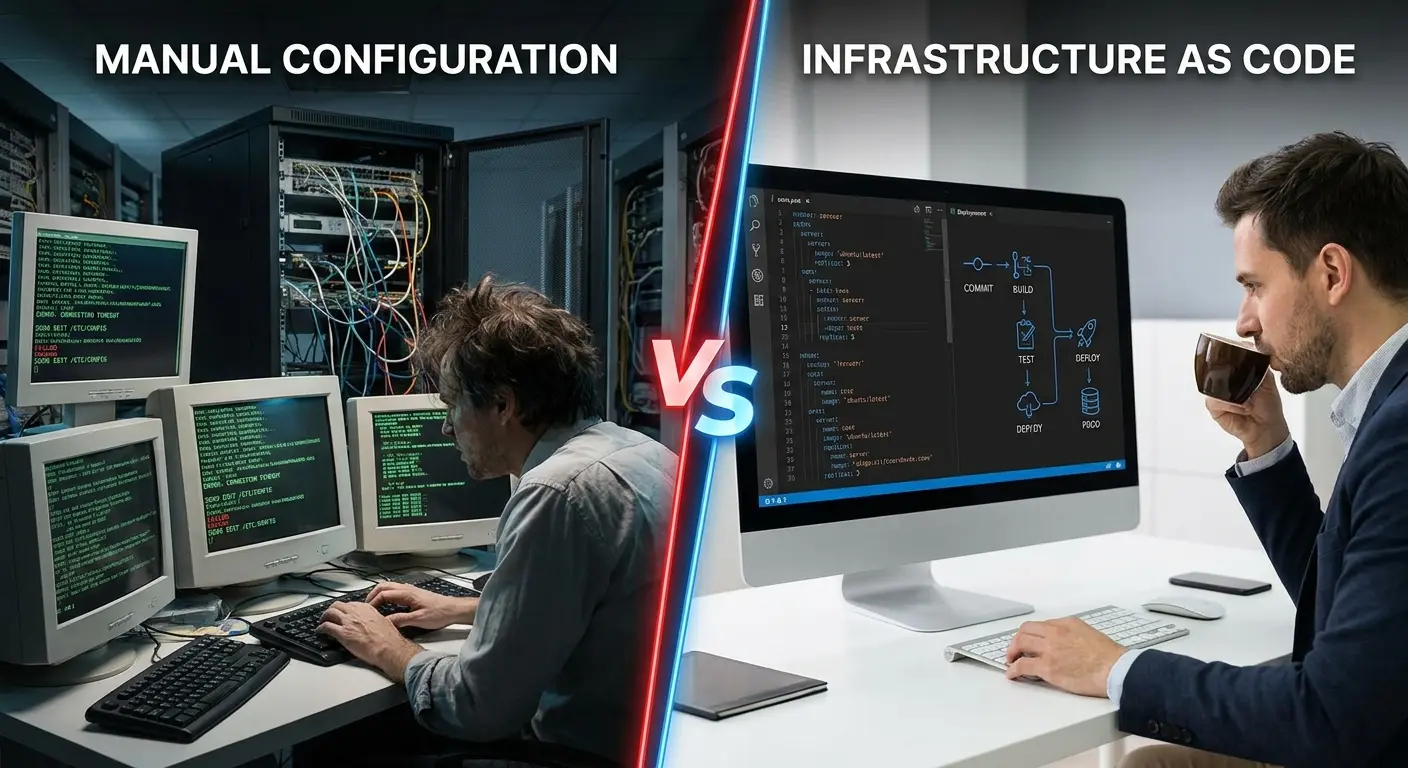
Digital transformation is the systematic replacement of manual, paper-based workflows with intelligent, automated systems that improve speed, accuracy, and decision-making. When implemented properly, it fundamentally changes how work gets done.

GroWrk's infrastructure automation demonstrates this principle in action. Instead of IT teams manually configuring devices, tracking assets in spreadsheets, and processing support support tickets one by one, automation handles repetitive tasks while humans focus on strategic problem-solving.

Digital transformation strategies use automation, AI, and modern technologies to reimagine business processes from manual operations to intelligent systems. This approach moves organizations beyond incremental improvements to fundamental workflow redesign, delivering measurable efficiency gains and freeing IT resources for strategic initiatives rather than routine maintenance tasks. The examples of it strategy we see succeeding share one common trait: they eliminate human effort from repetitive, low-value activities and redirect that energy toward innovation.

What Digital Transformation Actually Requires

Robotic Process Automation (RPA) handles repetitive tasks that don't require human judgment. Data entry, file transfers, system updates, and report generation happen automatically on schedule.

AI and machine learning provide intelligent decision support. Instead of executing tasks blindly, systems learn patterns and make recommendations based on historical data.

Workflow orchestration connects disparate systems into cohesive processes. When an employee joins, their accounts get created, equipment ships, and access permissions configure automatically across all platforms.

Self-service portals let employees and customers solve problems without opening tickets. Password resets, software requests, and status checks happen instantly through intuitive interfaces.

Automated compliance and reporting eliminate manual audit preparation. Your systems continuously collect evidence of compliance, generating reports on demand.

Integration platforms bridge legacy and modern systems. You don't need to replace everything at once. Middleware connects old and new, creating unified workflows.

Why Organizations Invest Here

Manual effort and human error drop dramatically. Tasks that took hours happen in minutes with perfect consistency. Typos, forgotten steps, and inconsistent execution become problems of the past.

IT staff get freed for strategic initiatives instead of spending 60% of their time on routine maintenance and support tickets. They can focus on innovation, security, and business enablement.

Process consistency and quality improve across the board. Every task executes exactly the same way every time, following best practices without deviation.

Operations continue 24/7 without human intervention. Systems don't sleep, take vacations, or call in sick. Critical processes keep running regardless of time zones or holidays.

Detailed audit trails and analytics provide unprecedented visibility. You know exactly what happened, when, and why. Troubleshooting becomes faster because you have complete process histories.

Service delivery times accelerate significantly. What used to take days or weeks now completes in hours or minutes. Customer satisfaction improves because things work faster.

The Reality Check

Significant upfront investment in tools and training creates initial resistance. You're spending money before seeing returns, which makes CFOs nervous.

Employee resistance to change can derail implementation. People fear automation will eliminate their jobs or make their skills obsolete. Change management becomes as important as technical implementation.

Ongoing maintenance and updates require dedicated resources. Automated systems aren't set-and-forget. They need monitoring, tuning, and occasional fixing when processes change.

Fragility emerges if systems aren't properly designed. Over-automation without human oversight creates brittle processes that break spectacularly when encountering unexpected scenarios.

Job function elimination creates organizational challenges. Some positions become redundant, requiring retraining or restructuring that's politically and emotionally difficult.

Criteria Evaluation

Alignment with Business Objectives: 5/5

Automation directly drives efficiency, reduces operational costs, and frees up IT resources for innovation. Every dollar spent on automation typically returns $3-5 in efficiency gains.

Scalability & Flexibility: 5/5

Automated processes scale infinitely without proportional resource increases. Handling 10x the volume doesn't require 10x the staff.

Implementation Complexity: 3/5

Success requires process mapping, tool selection, integration work, and significant change management. You can't buy automation software and expect magic.

Cost-Effectiveness: 5/5

High initial investment delivers substantial long-term ROI through labor savings and error reduction. Payback periods typically range from 12-24 months.

Risk Management & Security: 4/5

Automation reduces human error but requires careful security controls in automated workflows. Compromised automation can cause damage at scale.

Community Reviews and Expert Recommendations

McKinsey's research shows organizations implementing comprehensive automation strategies achieve 40-60% efficiency improvements in targeted processes within 18 months. However, the same research reveals that 70% of automation initiatives fail to scale beyond pilot projects due to inadequate change management.

IT leaders emphasize starting with high-volume, low-complexity processes for quick wins that build organizational confidence. Trying to automate complex, exception-heavy processes first often leads to frustration and abandoned initiatives.

Source: McKinsey & Company, "The State of AI and Automation in 2024," 2024

Pricing

Digital transformation costs vary widely based on scope. Departmental automation projects start around $50,000, while enterprise-wide transformations can exceed several million dollars. GroWrk's automation capabilities are included in their platform pricing.

Learn more about automation approaches at GroWrk's infrastructure automation blog.

Zero Trust Security Architecture Strategy

Best Known for Breach Prevention

A healthcare company I consulted for in 2023 had just passed their HIPAA audit with flying colors. The IT director was practically glowing during our meeting. "We're buttoned up," he told me. "Compliant across the board."

Two weeks later, a contract worker walked out with 50,000 patient records on a USB drive.

The problem? Once you were inside their network, you could access basically everything. The contractor had legitimate credentials. The network trusted those credentials. Nobody questioned why a temp worker was downloading the entire patient database at 11 PM on a Friday.

Zero Trust would've stopped that cold.

The core idea sounds paranoid: "never trust, always verify." Doesn't matter if you're inside the network, outside the network, CEO or intern. Every access request gets verified. Every time. No exceptions.

It sounds extreme until you realize that 34% of companies experienced insider attacks in 2024 (Cybersecurity Insiders). The old model (hard perimeter, soft interior) is dead. It died the moment everyone started working from coffee shops and accessing corporate resources from personal devices.

GroWrk's identity and access management approach for remote teams demonstrates Zero Trust principles in practice. When employees work from coffee shops in 150+ countries, you can't rely on network perimeter security. Every device, every user, every access request gets verified continuously.

Zero Trust security architecture eliminates the concept of trusted internal networks, requiring continuous verification for every access request regardless of origin. This strategy has become essential for organizations with remote workforces and cloud-based infrastructure, where traditional perimeter-based security models fail to address modern threat vectors including insider attacks and lateral movement. When developing your it strategy plan, Zero Trust should be a foundational component, not an afterthought bolted onto existing security frameworks.

What Zero Trust Actually Requires

Here's what matters, and I mean really matters:

Multi-factor authentication everywhere. And I mean everywhere. Not just for VPN access. Not just for admins. Every login, every time. Yes, users will complain. They'll say it's inconvenient. It is. It's also the minimum viable security in 2025. Username and password alone is like locking your front door but leaving all your windows open.

Least-privilege access that actually means something. Most companies claim they do this. They don't. Real least-privilege means your CFO can't access the codebase. Your developers can't see HR records. Your marketing team can't pull customer payment data. People get exactly what they need for their current task, nothing more. This requires discipline most organizations don't have.

Micro-segmentation that isolates everything. When someone compromises one system, they should be trapped in a tiny box with nowhere to go. No lateral movement. No exploring the network. No accessing other systems. This is the hardest part to implement because it requires re-architecting your entire network.

Continuous monitoring and verification don't stop after initial login. Systems constantly reassess trust levels based on behavior, location, device health, and access patterns.

Identity and access management (IAM) systems become the central control point. Every resource, every user, every device gets a verified identity tied to granular permissions that adjust dynamically.

Device compliance checking before access ensures endpoints meet security standards. Outdated software, missing patches, or compromised devices get blocked automatically.

Encrypted communications across all channels protect data in transit. Even internal network traffic gets encrypted because you can't trust the network itself.

Why Zero Trust Works

Breach impact gets significantly reduced through containment. When attackers compromise one account or system, micro-segmentation prevents lateral movement. They're stuck in a tiny box instead of roaming freely.

Remote and hybrid work models get secured properly. Zero Trust was built for distributed access, not retrofitted after everyone started working from home.

Detailed visibility into access patterns helps security teams spot anomalies. You know who accessed what, when, and from where. Unusual patterns trigger alerts before damage occurs.

Modern compliance requirements get met automatically. GDPR, HIPAA, SOC 2, and other frameworks require access controls that Zero Trust provides natively.

Attack surface area shrinks dramatically. Every resource requires explicit authorization, eliminating the "soft, chewy center" problem where internal systems trust each other blindly.

Threat adaptation happens continuously. Zero Trust architectures evolve with new threats because they don't assume safety based on location.

The Challenges You'll Face

User experience can suffer with additional authentication steps. People get frustrated when they need to verify their identity multiple times per day. Balancing security with usability requires careful design.

Comprehensive identity management infrastructure becomes mandatory. You can't implement Zero Trust with spreadsheets and manual processes. IAM platforms, directory services, and policy engines are required.

Initial access may slow while verification occurs. That fraction-of-a-second delay adds up across thousands of access requests daily.

Ongoing policy refinement and tuning demands dedicated resources. Zero Trust isn't set-and-forget. Policies need constant adjustment as business needs change.

Cultural change meets resistance. Users and administrators accustomed to implicit trust push back against continuous verification.

Zero Trust Implementation Horror Story

Quick story before we move on. A financial services company decided to implement Zero Trust in 2022. They hired consultants, bought all the right tools, and rolled it out over a weekend. By Monday morning, nobody could work.

The authentication system couldn't handle the load. 3,000 employees trying to log in simultaneously crashed the identity provider. When it came back up, the micro-segmentation rules were misconfigured. Developers couldn't access development servers, the finance team couldn't reach the ERP system, and customer service couldn't pull up customer records.

It took three days to restore normal operations. In those three days, they lost $2 million in productivity, missed critical customer deadlines, and had their CIO resign. The technology was fine. The implementation was catastrophic.

The lesson? Zero Trust requires testing at scale, gradual rollout , and extensive planning. Weekend deployments of fundamental security changes are how companies end up in case studies about what not to do.

Criteria Evaluation

Alignment with Business Objectives: 5/5

Zero Trust is essential for protecting business assets, maintaining customer trust, and ensuring regulatory compliance. Data breaches cost organizations an average of $4.45 million in 2024.

Scalability & Flexibility: 5/5

Zero Trust adapts seamlessly to remote work, BYOD, cloud services, and third-party access scenarios without architectural changes.

Implementation Complexity: 3/5

Success requires comprehensive identity management, network segmentation, and cultural shift from implicit trust. This isn't a weekend project.

Cost-Effectiveness: 4/5

Preventing costly breaches and downtime justifies implementation investment, though upfront costs are significant.

Risk Management & Security: 5/5

Zero Trust represents current best practice for security in distributed, cloud-based environments. It's the gold standard.

Community Reviews and Expert Recommendations

Research from arXiv's 2025 systematic literature review on Zero Trust Architecture shows dramatic paradigm shifts in how organizations secure infrastructure. The study analyzed 91 peer-reviewed articles, revealing that Zero Trust implementations reduce breach impact by up to 70% through containment and micro-segmentation.

Security professionals emphasize that Zero Trust is a journey, not a destination. Forrester's maturity model shows most organizations take 2-3 years to fully implement Zero Trust principles across their environment.

The challenge isn't technical capability. It's organizational commitment to changing how security works fundamentally.

Source: arXiv, "Zero Trust Architecture: A Comprehensive Survey," 2025; Forrester Research, "Zero Trust Maturity Model," 2024

Pricing

Enterprise Zero Trust solutions range from $5-15 per user/month for basic IAM to comprehensive platforms costing $500,000+ annually for large organizations. Implementation costs often exceed software licensing.

Explore Zero Trust implementation at GroWrk's IAM blog.

IT Asset Lifecycle Management Strategy

Best Known for Cost Optimization

We were hemorrhaging money on IT assets without realizing it. Devices sat in closets for years after employees left. We bought new equipment when perfectly good hardware was gathering dust in another office. Our CFO nearly had a stroke when the audit revealed $2.1 million in untracked assets.

That audit changed everything.

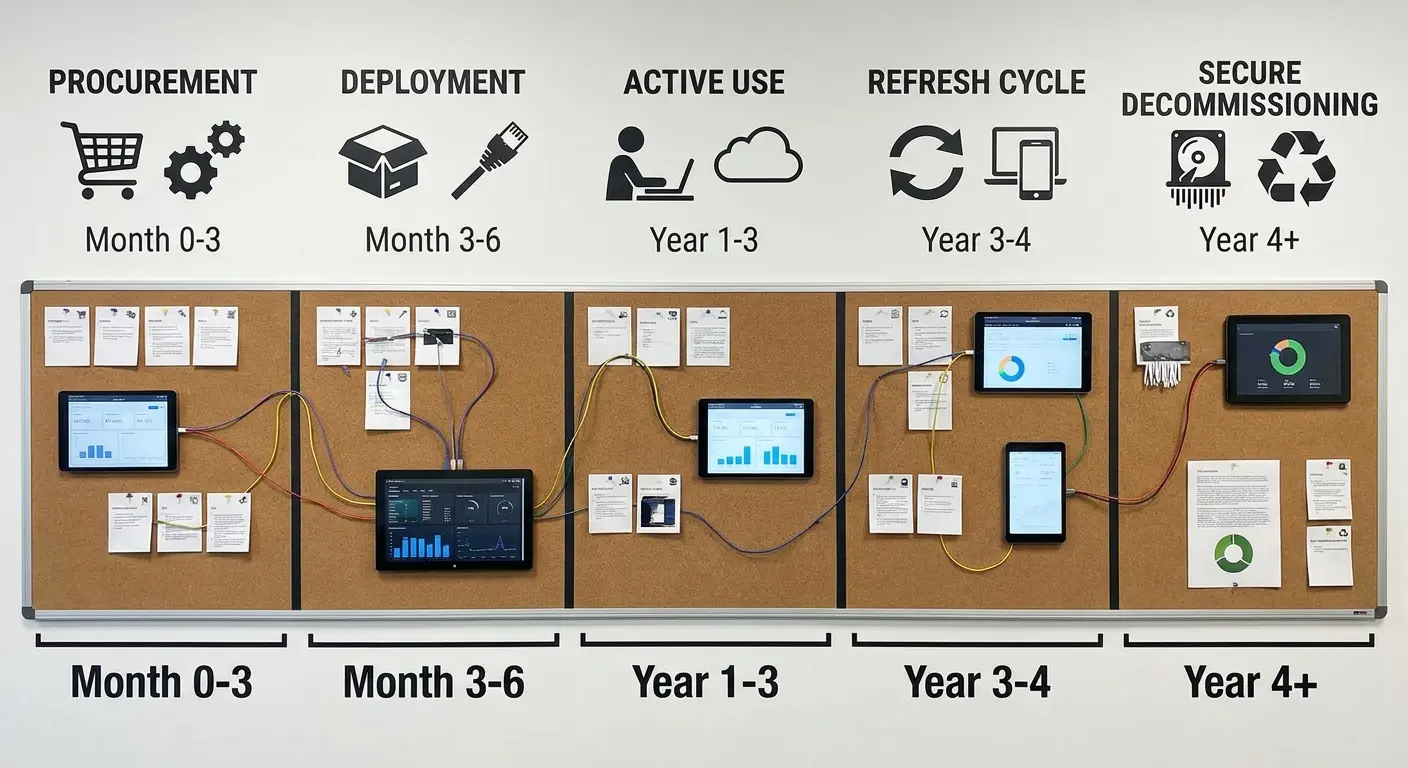
Comprehensive IT asset lifecycle management (ITALM) strategies govern assets from procurement through disposal, maximizing value and minimizing risk. GroWrk's approach demonstrates end-to-end lifecycle management for globally distributed teams, handling everything from initial purchase to certified recycling.

IT Asset Lifecycle Management provides systematic governance of technology assets from procurement through disposal, optimizing costs and reducing risks across the entire asset lifespan. This information technology strategy example addresses common problems like asset sprawl, unnecessary purchases, compliance failures, and environmental waste through structured processes for acquisition, deployment, maintenance, and disposition. Your it strategy plan should include lifecycle management as a core component, not an administrative afterthought.

Key Features Across the Lifecycle

Strategic procurement and vendor management consolidate purchasing power. Instead of 47 different people buying laptops at retail prices, centralized procurement negotiates volume discounts and standardizes configurations.

Automated deployment and configuration get devices into users' hands faster. Pre-configured images, automated software installation, and streamlined shipping eliminate weeks of manual setup.

Real-time asset tracking and inventory provide complete visibility. You know exactly what you own, where it is, who's using it, and its current condition.

Maintenance and support coordination extends asset life. Scheduled maintenance, warranty tracking, and repair management prevent premature replacement.

Refresh cycle planning and budgeting eliminate surprise capital expenditures. You know exactly when devices need replacement and can budget accordingly.

Secure data sanitization and disposal protect sensitive information. Proper wiping procedures and certified destruction prevent data breaches from discarded equipment.

Sustainability and recycling programs support ESG goals. Certified e-waste recycling, component harvesting, and responsible disposal reduce environmental impact.

Depreciation tracking and financial reporting provide accurate asset valuation. Your balance sheet reflects reality instead of fiction.

Why Lifecycle Management Pays Off

Total cost of ownership drops 20-30% through strategic management. Fewer unnecessary purchases, longer useful life, and better resale value add up quickly.

Asset loss and unauthorized usage disappear. Real-time tracking prevents equipment from walking out the door or sitting forgotten in storage.

Compliance with licensing and regulations becomes automatic. You know exactly what software is installed where, preventing audit failures and fines.

Sustainability initiatives get measurable results. You can prove environmental responsibility with data on recycling rates and extended asset life.

Financial reporting becomes accurate. No more guessing at asset values or scrambling during audits.

Useful asset life extends through proper maintenance. Equipment that would've failed prematurely keeps running because you're maintaining it.

Data-driven refresh decisions replace guesswork. Analytics show exactly when replacement makes financial sense versus continued maintenance.

The Reality of Implementation

Discipline and process adherence become mandatory. Lifecycle management only works if people follow the processes instead of working around them.

Initial setup demands time and resources. Cataloging existing assets, establishing processes, and implementing systems requires significant upfront investment.

Previously hidden asset sprawl gets revealed. You'll discover problems you didn't know existed, which can be politically uncomfortable.

Integration with multiple systems becomes necessary. Your lifecycle management platform needs to talk to procurement, finance, HR, and IT service management.

Ongoing management overhead requires dedicated staff. Someone needs to monitor the system, update records, and enforce policies consistently.

Criteria Evaluation

Alignment with Business Objectives: 5/5

Lifecycle management optimizes IT spending, ensures compliance, supports sustainability goals, and maintains productivity through proper asset management.

Scalability & Flexibility: 5/5

Lifecycle principles adapt to organizational growth, geographic expansion, and changing technology requirements without fundamental redesign.

Implementation Complexity: 4/5

Success requires process definition and tooling but builds on existing procurement and asset management functions rather than creating entirely new capabilities.

Cost-Effectiveness: 5/5

Lifecycle management maximizes asset value, reduces waste, prevents unnecessary purchases, and optimizes refresh cycles. ROI typically exceeds 200% within three years.

Risk Management & Security: 5/5

Proper lifecycle management ensures secure data sanitization, compliance with disposal regulations, and audit readiness.

Community Reviews and Expert Recommendations

Gartner research shows organizations with mature IT asset management practices reduce total cost of ownership by 25-30% compared to ad-hoc approaches. The key is treating asset management as a strategic function, not an administrative afterthought.

CFOs particularly appreciate the financial visibility lifecycle management provides. Accurate depreciation, predictable refresh budgets, and elimination of surprise expenditures make financial planning significantly easier.

Source: Gartner, "IT Asset Management Best Practices," 2024

Pricing

GroWrk offers comprehensive lifecycle management with custom pricing based on asset volume and geographic scope. The platform typically delivers ROI within the first year through reduced waste and optimized procurement.

Learn more at GroWrk's lifecycle management blog.

Hybrid Work Technology Enablement Strategy

Best Known for Talent Access

Remember March 2020? Everyone scrambling to buy webcams? IT teams cobbling together VPN access for people who'd never worked remotely? Conference rooms sitting empty while Zoom became a verb?

That was five years ago.

The pandemic forced everyone into remote work overnight. Most organizations hoped it was temporary. It wasn't. Hybrid work isn't the future anymore. It's how work happens now. Organizations that treat it as a strategic advantage instead of a necessary evil are winning the talent war.

Hybrid work strategies provide technology infrastructure and policies that let employees work effectively from anywhere. GroWrk specializes in equipping and supporting distributed teams with the hardware, software, and logistics needed for seamless hybrid operations across 150+ countries.

Hybrid work technology enablement strategies provide the infrastructure and policies necessary for employees to work effectively regardless of location. This approach has evolved from emergency pandemic response to strategic business advantage, opening up access to global talent pools while reducing real estate costs and improving employee satisfaction through flexibility. When examining types of it strategy, hybrid work enablement stands out as one of the few that simultaneously reduces costs, improves recruitment, and increases productivity. Your it strategy template should account for distributed work as the default, not the exception.

Key Features Enabling Hybrid Success

Global device procurement and shipping eliminate geographic barriers. Need to hire someone in Argentina? Their equipment arrives within days, fully configured and ready to use.

Remote device management (MDM/RMM) provides IT control without physical access. Software updates, security patches, and troubleshooting happen remotely.

Virtual collaboration platforms replace in-person meetings. Video conferencing, digital whiteboarding, and asynchronous communication tools keep teams connected across time zones.

Cloud-based productivity tools ensure everyone works from the same data. No more emailing files back and forth or wondering which version is current.

Secure remote access (VPN/ZTNA) protects corporate resources. Employees access internal systems safely from home networks, coffee shops, or co-working spaces.

IT support regardless of location means help desk services work the same whether you're in headquarters or halfway around the world.

Equipment retrieval and redistribution handle logistics when people move or leave. Devices get recovered, wiped, and redeployed efficiently.

Compliance with local regulations navigates the complex web of employment law, data protection, and customs requirements across countries.

Why Hybrid Work Wins

Access to global talent pools transforms recruitment. You're no longer limited to people within commuting distance of your offices. The best person for the job could be anywhere.

I watched a startup struggle to hire senior engineers in San Francisco. Competition was brutal, salaries were astronomical, and they kept losing candidates to bigger companies. They went fully remote, started hiring globally, and found incredible talent in Eastern Europe and Latin America at 60% of Bay Area costs. Better people, lower expenses, happier employees.

Employee work-life balance improves measurably. Eliminating commutes, supporting flexible schedules, and accommodating family needs increases satisfaction and retention.

Real estate and overhead costs drop significantly. You need less office space when people aren't there every day. Utilities, maintenance, and facilities costs shrink proportionally.

Business continuity during disruptions becomes automatic. Weather events, local emergencies, or infrastructure failures don't shut down operations when your workforce is distributed.

Productivity increases for many roles. Numerous studies show knowledge workers accomplish more in quiet home environments than noisy open offices.

Environmental benefits from reduced commuting support sustainability goals. Fewer cars on roads mean lower carbon emissions.

Competitive advantage in talent acquisition emerges quickly. Top candidates increasingly prioritize flexibility. Organizations offering hybrid work attract better applicants.

The Challenges You'll Encounter

Maintaining company culture becomes harder. Spontaneous hallway conversations, casual mentorship, and cultural osmosis don't happen naturally in hybrid environments.

Communication gaps emerge between remote and office workers. Information shared at the water cooler doesn't reach remote employees automatically.

Investment in collaboration tools becomes mandatory. You can't cheap out on video conferencing, project management, and communication platforms.

Equity issues between remote and office workers require active management. Proximity bias is real. Managers unconsciously favor people they see daily.

Leadership styles must adapt fundamentally. Managing distributed teams requires different skills than managing co-located ones.

Time zone coordination complexity increases with global distribution. Scheduling meetings when half the team is asleep becomes a constant challenge.

Criteria Evaluation

Alignment with Business Objectives: 5/5

Hybrid work opens up talent acquisition globally, reduces real estate costs, and improves employee satisfaction and retention. These directly impact bottom-line results.

Scalability & Flexibility: 5/5

Hybrid infrastructure supports any combination of remote, hybrid, and office-based workers across geographies without architectural changes.

Implementation Complexity: 4/5

Success requires coordination across IT, HR, facilities, and management but builds on existing technologies rather than requiring entirely new systems.

Cost-Effectiveness: 5/5

Real estate savings alone often justify hybrid work investments. Add productivity gains and expanded talent access, and ROI becomes compelling.

Risk Management & Security: 4/5

Distributed endpoints require robust security, but modern tools like Zero Trust and MDM make this manageable.

Community Reviews and Expert Recommendations

Stanford research on hybrid work shows productivity gains of 5-10% for knowledge workers with proper infrastructure. However, the same research reveals that poorly implemented hybrid models can decrease productivity by similar amounts.

HR leaders emphasize that technology is only half the equation. Clear policies, manager training, and intentional culture-building are equally important.

Source: Stanford Institute for Economic Policy Research, "The Impact of Hybrid Work on Productivity," 2024

Pricing

GroWrk's hybrid work solutions are priced per employee based on equipment needs, support level, and geographic distribution. Typical costs range from $100-300 per employee monthly, delivering ROI through real estate savings and productivity gains.

Explore hybrid work solutions at GroWrk's hybrid work blog.

AI-Powered IT Operations (AIOps) Strategy

Best Known for Predictive Capabilities

Our monitoring system generated 10,000 alerts daily. Nobody could possibly review them all, so we ignored most of them. Then we missed the one alert that mattered, and our primary database crashed during peak hours. $400,000 in lost revenue because signal was drowning in noise.

I didn't believe in AIOps until that happened.

AIOps strategies apply artificial intelligence and machine learning to IT operations, making it possible to do predictive maintenance, automated incident response, and intelligent decision support. GroWrk's implementation demonstrates AI enhancing IT support efficiency and user experience through intelligent automation.

AI-Powered IT Operations (AIOps) applies machine learning and artificial intelligence to IT operations management, transforming reactive incident response into predictive prevention. This strategy analyzes massive volumes of operational data to identify patterns, predict failures, automate remediation, and provide intelligent decision support that human operators couldn't achieve manually. Building an it strategy plan without considering AIOps means accepting that your team will always be firefighting instead of preventing fires. An effective it strategic plan template should incorporate AI-driven operations as a core capability, not a future enhancement.

Key Features Driving AIOps Value

Predictive analytics for failure prevention identify issues before they impact users. Machine learning models spot patterns indicating impending failures, triggering preventive action.

Automated incident detection and triage eliminate alert fatigue. AI filters thousands of alerts, identifying the few that matter and routing them appropriately.

Intelligent chatbots for tier-1 support handle routine requests without human intervention. Password resets, software installation guidance, and status checks happen instantly through conversational interfaces.

Pattern recognition across disparate data sources connects dots humans miss. AI correlates events across monitoring systems, logs, and user reports to identify root causes.

Automated remediation for common issues fixes problems without tickets. When AI recognizes a known issue, it executes the fix automatically.

Capacity planning and optimization predict resource needs. AI analyzes usage patterns to recommend infrastructure scaling before performance degrades.

Anomaly detection in real-time spots unusual behavior immediately. Deviations from normal patterns trigger alerts before they escalate into incidents.

Natural language processing for tickets routes requests accurately. AI understands ticket content and assigns to the right team without manual review.

Why AIOps Transforms Operations

Mean time to resolution (MTTR) drops dramatically. What took hours to diagnose and fix now takes minutes because AI identifies root causes instantly.

I talked to an IT director last month who implemented AIOps six months ago. Before: average incident resolution time was 4.5 hours. After: 47 minutes. Same team, same infrastructure, just AI handling the detective work.

Incident prevention happens before users notice problems. Predictive analytics spot issues in development and trigger fixes proactively.

Routine requests get handled automatically. Tier-1 support scales infinitely through chatbots and automation.

Support coverage runs 24/7 affordably. AI doesn't sleep, take breaks, or need vacation time. It's basically the employee your CFO dreams about, minus the whole "being human" thing.

IT staff focus on complex problem-solving instead of repetitive tasks. Humans handle the interesting challenges while AI manages the routine.

Root cause analysis accuracy improves significantly. AI considers far more variables and correlations than human analysts can process.

Support scales without proportional headcount. Doubling your user base doesn't require doubling your support team.

The Limitations You'll Face

Significant historical data for training becomes mandatory. AI models need months or years of operational data to learn patterns effectively. New environments lack this foundation.

Incorrect decisions without oversight can cause damage. AI doesn't understand business context. It follows patterns, which sometimes leads to wrong conclusions.

Initial implementation complexity creates barriers. Integrating AIOps platforms with existing monitoring, ticketing, and infrastructure management tools requires extensive configuration.

Ongoing model training and refinement demands expertise. AI models drift over time as environments change. Data scientists or ML engineers need to retrain and tune models continuously.

Over-reliance on automation creates vulnerabilities. When AI handles everything, human operators lose skills and situational awareness needed during AI failures.

Context for unusual situations gets missed. AI excels at pattern matching but struggles with novel scenarios that fall outside training data.

Criteria Evaluation

Alignment with Business Objectives: 5/5

AIOps reduces downtime, improves user experience, and frees up IT to focus on strategic initiatives rather than firefighting. Uptime directly impacts revenue.

Scalability & Flexibility: 5/5

AI scales to handle increasing data volumes and complexity without proportional resource increases. Adding users or systems doesn't break the model.

Implementation Complexity: 3/5

Success requires quality data, integration work, and time for AI models to learn patterns effectively. This isn't plug-and-play technology.

Cost-Effectiveness: 4/5

Significant ROI through reduced incidents and faster resolution justifies investment, but licensing costs and implementation services add up quickly.

Risk Management & Security: 4/5

AIOps improves threat detection and incident response but requires careful governance of AI decision-making to prevent automated mistakes.

Community Reviews and Expert Recommendations

Gartner predicts that by 2025, 30% of large enterprises will have implemented AIOps platforms, up from less than 5% in 2020. Organizations report 40-50% reductions in mean time to resolution after successful implementation.

IT operations leaders warn against expecting immediate results. AI models need 3-6 months of data collection and training before delivering meaningful value. Rushing deployment leads to poor accuracy and lost confidence.

Source: Gartner, "Market Guide for AIOps Platforms," 2024

Pricing

AIOps platforms range from $10,000-$500,000+ annually depending on infrastructure scale and feature set. GroWrk's AI-powered support capabilities are included in their platform pricing.

Learn about AI implementation at GroWrk's AI support blog.

Sustainable IT & Green Technology Strategy

Best Known for ESG Compliance

Your CFO doesn't care about polar bears. But they care about investor pressure.

Our investors started asking uncomfortable questions about carbon footprint. Customers wanted to know our environmental policies. Employees, especially younger ones, cared deeply about sustainability. We realized ESG wasn't optional anymore if we wanted to attract capital, customers, and talent.

Sustainable IT strategies minimize environmental impact through energy-efficient infrastructure, responsible asset disposal, extended device lifecycles, and carbon-conscious technology choices. This approach addresses growing stakeholder demands for corporate environmental responsibility.

Sustainable IT strategies address environmental impact through energy efficiency, responsible disposal, and lifecycle optimization. This approach has evolved from nice-to-have corporate social responsibility to business necessity as investors, customers, and employees increasingly demand measurable environmental commitments backed by transparent reporting and verifiable results. Your it strategic roadmap should integrate sustainability from the beginning, not tack it on later when stakeholders start asking questions.

Key Features of Sustainable IT

Energy-efficient hardware selection prioritizes performance-per-watt. Newer processors, solid-state drives, and efficient power supplies reduce electricity consumption significantly.

Data center optimization and renewable energy reduce operational carbon footprint. Efficient cooling, server consolidation, and renewable energy purchasing agreements cut emissions.

Extended device refresh cycles keep equipment in service longer. Instead of replacing laptops every three years, proper maintenance extends useful life to four or five years.

Certified e-waste recycling and disposal prevent environmental contamination. Responsible recycling partners properly handle toxic materials and harvest reusable components.

Carbon footprint measurement and reporting provide transparency. You can't improve what you don't measure. Tracking emissions makes it possible to set reduction targets and monitor progress.

Circular economy principles emphasize repair, reuse, and recycling over disposal. Equipment gets refurbished and redeployed instead of landfilled.

Virtualization reduces hardware needs. Running multiple virtual servers on one physical machine cuts equipment requirements dramatically.

Sustainable procurement policies favor vendors with strong environmental practices. Purchasing decisions consider lifecycle environmental impact, not just price.

Why Sustainability Matters

Energy costs and carbon footprint drop measurably. Efficient equipment uses 30-50% less electricity, directly reducing utility bills and emissions.

Investor and customer ESG expectations get met. Institutional investors increasingly screen for environmental performance. B2B customers require sustainability disclosures.

Asset useful life extension reduces replacement costs. Keeping devices in service longer delays capital expenditures while reducing waste.

Brand reputation and competitive positioning improve. Sustainability leadership differentiates you from competitors and attracts conscious consumers.

Environmental regulation compliance becomes proactive. Getting ahead of regulations prevents scrambling when requirements tighten.

Environmentally-conscious talent gets attracted. Younger workers particularly prioritize employers with genuine sustainability commitments.

Circular economy initiatives create new revenue streams. Refurbishment and resale programs recover value from retired equipment.

The Trade-offs

Higher upfront costs for efficient equipment create budget pressure. Energy-efficient servers, monitors, and laptops typically cost 10-20% more initially.

Tracking and reporting infrastructure requires investment. Carbon accounting software, data collection systems, and reporting processes add overhead.

Rapid technology refresh cycles conflict with sustainability. Security requirements sometimes demand newer equipment that extended lifecycles can't support.

Limited vendor options for certified sustainable products restrict choices. Not every manufacturer offers environmentally certified alternatives.

Extended support for aging equipment increases maintenance costs. Older devices break more frequently and require more IT attention.

ROI timelines extend beyond typical budget cycles. Energy savings accumulate over years, not quarters, making justification harder.

Unpopular Opinion: Sustainable IT Is Mostly Theater

Look, I care about the environment. But we need to be honest about sustainable IT strategies. For most companies, it's greenwashing. They buy carbon offsets, publish sustainability reports, and pat themselves on the back while their actual environmental impact barely budges.

The math doesn't work. Extending laptop lifecycles by one year saves maybe 200kg CO2 per device. Your CEO's private jet to that conference? 2,000kg CO2. One flight. The sustainability initiatives that actually matter (like moving to renewable-powered data centers) require investments most companies won't make.

I'm not saying ignore sustainability. I'm saying be honest about what moves the needle versus what's performative. If your sustainable IT strategy doesn't include data center energy sources and cloud provider selection, you're rearranging deck chairs.

Criteria Evaluation

Alignment with Business Objectives: 4/5

Sustainable IT supports ESG goals, reduces costs, and meets stakeholder expectations, though it may not directly drive revenue growth.

Scalability & Flexibility: 4/5

Sustainability principles apply across organizational sizes, though implementation approaches vary based on scale and resources.

Implementation Complexity: 3/5

Success requires measuring current impact, setting targets, and changing procurement and disposal practices across the organization.

Cost-Effectiveness: 4/5

Energy savings and extended asset life offset initial investments. ROI improves as energy costs rise and regulations tighten.

Risk Management & Security: 4/5

Sustainable IT reduces regulatory risk and reputational exposure while supporting compliance with environmental regulations.

Community Reviews and Expert Recommendations

Research from the Carbon Trust shows IT operations typically account for 2-3% of global carbon emissions, with data centers consuming 1% of global electricity. Organizations implementing sustainable IT strategies reduce their technology carbon footprint by 20-40% within three years.

Sustainability officers emphasize that greenwashing gets caught quickly. Stakeholders demand verifiable data and third-party certifications, not marketing claims.

Source: Carbon Trust, "IT Sector Carbon Footprint Report," 2024

Pricing

Incremental costs vary by approach. Energy-efficient equipment may cost 10-20% more upfront, but certified disposal and carbon offsetting programs are increasingly affordable. GroWrk's sustainable IT services include certified recycling and lifecycle optimization.

Explore sustainability approaches at GroWrk's sustainable IT blog.

IT Vendor Management & Procurement Optimization Strategy

Best Known for Cost Savings

We had 47 different vendors providing IT services and equipment. Nobody knew who had contracts with whom. We were paying retail prices because we had no purchasing power. Duplicate services cost us $380,000 annually. Our procurement process was chaos.

Strategic vendor management optimizes the entire IT procurement process, from vendor selection through contract management and performance monitoring. GroWrk's managed procurement services demonstrate how organizations can use global purchasing power and expertise.

Strategic vendor management and procurement optimization consolidate purchasing power, standardize processes, and improve service quality through systematic vendor evaluation, contract negotiation, and performance monitoring. This approach transforms ad-hoc buying into strategic sourcing that delivers measurable cost savings while reducing supply chain risks and improving service levels.

Key Features of Strategic Vendor Management

Centralized vendor relationship management consolidates touchpoints. Instead of dozens of people managing vendor relationships independently, a dedicated team coordinates all interactions.

Strategic sourcing and competitive bidding ensure best value. Formal RFP processes, vendor evaluation criteria, and structured negotiations replace informal purchasing.

Volume discount negotiation takes advantage of consolidated spending. Combining purchases across departments and locations creates negotiating power individual buyers lack.

Contract lifecycle management tracks agreements from negotiation through renewal. Automated alerts prevent unfavorable auto-renewals and missed renegotiation opportunities.

Vendor performance monitoring and SLAs hold suppliers accountable. Regular scorecards track delivery times, quality metrics, and responsiveness.

Global procurement capabilities navigate international complexity. Customs, import regulations, and local requirements get handled by experts.

Supply chain risk mitigation prevents disruptions. Vendor diversification, backup suppliers, and inventory management reduce single-point failures.

Automated purchase order workflows eliminate manual processing. Requisitions flow through approval chains automatically, accelerating procurement cycles.

Spend analytics and optimization identify savings opportunities. Detailed reporting reveals spending patterns, duplicate purchases, and consolidation possibilities.

Why Procurement Optimization Pays

Procurement costs drop 15-30% through strategic sourcing. Volume discounts, competitive bidding, and contract optimization deliver immediate savings.

Take the manufacturing company I worked with last year. They were spending $1.2 million annually on IT equipment and services across 47 vendors. After consolidating to 12 strategic partners and implementing proper contract management, that dropped to $890K. Same stuff, $310K savings. Pure bottom-line impact.

Consistent quality and service levels emerge from standardization. Approved vendor lists and performance monitoring ensure reliable results.

Procurement cycles accelerate significantly. Automated workflows and pre-negotiated contracts reduce time from request to delivery.

Spending transparency makes better decisions possible. Real-time dashboards show exactly where money goes and identify optimization opportunities.

Supply chain disruptions get mitigated proactively. Diversified vendor base and risk monitoring prevent single-supplier failures from crippling operations.

Vendor expertise and innovation become accessible. Strategic partnerships with key vendors provide early access to new technologies and capabilities.

Administrative overhead decreases through automation. Purchase order processing, invoice matching, and payment workflows require less manual effort.

Procurement policy compliance improves. Centralized management and automated workflows prevent maverick spending and policy violations.

The Challenges

Flexibility for urgent needs may decrease. Standardized processes and approved vendor lists can slow emergency purchases.

Vendor consolidation faces internal resistance. Departments with preferred suppliers push back against centralized vendor management.

Initial vendor evaluation is time-intensive. Thorough assessment of capabilities, financial stability, and cultural fit requires significant upfront effort.

Dependency on key vendors creates risk. Consolidating spending with fewer suppliers increases exposure if relationships deteriorate.

Ongoing relationship management demands resources. Vendor scorecards, quarterly business reviews, and contract management require dedicated staff.

Internal resistance to standardization emerges. Users accustomed to choosing their own vendors resist approved supplier lists.

Criteria Evaluation

Alignment with Business Objectives: 5/5

Vendor management directly reduces costs, improves service quality, mitigates supply chain risks, and accelerates delivery. CFOs love measurable savings.

Scalability & Flexibility: 5/5

Strategic procurement adapts to changing business needs, geographic expansion, and market conditions without fundamental redesign.

Implementation Complexity: 4/5

Success requires vendor assessment, contract negotiation, and process standardization but builds on existing procurement functions.

Cost-Effectiveness: 5/5

Immediate savings through volume discounts, reduced maverick spending, and optimized contracts deliver rapid ROI.

Risk Management & Security: 5/5

Vendor management reduces risks through due diligence, SLAs, performance monitoring, and diversification strategies.

Community Reviews and Expert Recommendations

Deloitte research shows organizations with mature vendor management practices achieve 15-30% procurement cost reductions while improving service quality. The key is treating vendor management as strategic partnership, not cost cutting.

Procurement leaders emphasize starting with spend analysis to identify quick wins. Consolidating high-volume, low-complexity purchases delivers fast results that build organizational support.

Source: Deloitte, "Global Procurement Survey," 2024

Pricing

GroWrk's managed procurement is typically included in comprehensive IT asset management services with pricing based on transaction volume and complexity. Standalone procurement optimization services range from $50,000-500,000 annually depending on spend under management.

Learn about procurement optimization at GroWrk's procurement blog.

IT Infrastructure Outsourcing & Managed Services Strategy

Best Known for Focus Enhancement

Our IT team spent 80% of their time keeping lights on and 20% on strategic initiatives. We needed them building competitive advantages, not resetting passwords and patching servers. Outsourcing infrastructure operations freed them to move the business forward.

IT infrastructure outsourcing strategies delegate specific IT functions or entire operations to specialized service providers, making it possible for organizations to access expertise, reduce costs, and focus internal resources on strategic initiatives.

IT infrastructure outsourcing transfers technology operations to specialized providers, converting fixed costs to variable expenses while accessing expertise that would be expensive to build internally. This strategy ranges from selective outsourcing of specific functions to comprehensive managed services covering entire IT operations, giving organizations the ability to focus resources on core business competencies.

Key Features of Managed Services

Infrastructure monitoring and support provide continuous coverage around the clock. Providers watch systems constantly, responding to issues before they impact users.

Specialized expertise across technologies gives you access to skills you can't afford to hire. Need a Kubernetes expert for three months? Managed service providers have them on staff.

Predictable monthly costs replace variable expenses. Fixed fees cover agreed services, making budgeting easier and eliminating surprise expenditures.

Rapid access to emerging technologies accelerates innovation. Providers invest in new platforms and tools that would take you months to evaluate and deploy.

Service level agreements (SLAs) guarantee performance. Contractual commitments to uptime, response times, and resolution speeds hold providers accountable.

Disaster recovery and business continuity capabilities come built-in. Providers maintain redundant infrastructure and tested recovery procedures.

Help desk and end-user support scale with your organization. Adding users doesn't require hiring support staff.

Security monitoring and incident response provide protection continuously. Security operations centers watch for threats without breaks.

Patch management and updates happen automatically. Providers handle routine maintenance without disrupting operations.

Why Organizations Outsource

Access to specialized skills without hiring eliminates recruitment challenges. You get expertise immediately instead of spending months finding and onboarding staff.

Capital expenditure requirements drop significantly. Providers own infrastructure, eliminating your need for data center investments.

Operational costs become predictable. Monthly fees replace variable expenses for staff, equipment, and maintenance.

Core business competencies get full attention. Your team focuses on what differentiates you instead of commodity IT operations.

Resource scaling matches demand. Need more capacity for seasonal peaks? Providers scale up temporarily without permanent headcount increases.

Technology risks get transferred. Providers assume responsibility for infrastructure failures, security breaches, and technology obsolescence.

Service availability and reliability improve. Professional providers typically deliver better uptime than organizations can achieve internally.

New technology implementation accelerates. Providers bring experience deploying emerging platforms and tools.

The Risks

Internal IT knowledge erodes over time. When providers handle everything, your team loses understanding of how systems work.

External provider dependency creates vulnerability. Your operations depend on their performance and stability.

Control over IT operations decreases. You influence through contracts and SLAs rather than direct management.

Contract lock-in risks emerge. Switching providers after years of outsourcing is expensive and disruptive.

Cultural fit challenges surface. Provider staff may not understand your business culture or priorities.

Data security and compliance concerns intensify. Providers access sensitive information, requiring careful vetting and contracts.

Hidden costs lurk in contract details. Scope changes, volume overages, and special requests add up quickly.

Transition complexity and risk can't be ignored. Moving operations to providers requires careful planning and execution.

Outsourcing Failure Story

A financial services company decided to outsource their entire IT infrastructure in 2021. They signed a five-year contract with a major managed services provider, transferred all their systems, and let go of most of their internal IT team.

Six months in, problems started. The provider's support team didn't understand their business processes. Response times were slower than promised. Custom integrations broke, and fixes took weeks instead of days. By year two, they were paying massive overage fees for services that should've been included.

They wanted out. But the contract penalties were astronomical, and they'd lost the internal expertise needed to bring operations back in-house. They're still stuck with that provider, three years later, hemorrhaging money and getting mediocre service.

The lesson? Outsourcing isn't fire-and-forget. You need strong governance, clear SLAs, and enough internal expertise to manage the relationship effectively.

Criteria Evaluation

Alignment with Business Objectives: 5/5

Outsourcing makes it possible to focus on core business while accessing specialized IT expertise and reducing overhead. This directly supports strategic goals.

Scalability & Flexibility: 5/5

Managed services quickly scale resources up or down based on business needs without hiring/firing cycles or capital investments.

Implementation Complexity: 3/5

Success requires careful provider selection, transition planning, and ongoing governance. Rushing leads to failed outsourcing relationships.

Cost-Effectiveness: 4/5

Converting fixed IT costs to variable reduces overhead and improves cost predictability, though careful contract management prevents overruns.

Risk Management & Security: 4/5

Outsourcing transfers certain risks to providers but requires strong SLAs, oversight, and security controls.

Community Reviews and Expert Recommendations

ISG research shows organizations outsourcing IT infrastructure reduce operational costs by 20-40% while improving service levels. However, Gartner warns that 50% of outsourcing relationships fail to meet expectations due to poor provider selection or inadequate governance.

CIOs emphasize defining clear success metrics and governance processes before signing contracts. Outsourcing relationships succeed or fail based on expectations management and ongoing communication.

Source: ISG, "IT Outsourcing Trends Report," 2024; Gartner, "Avoiding Outsourcing Pitfalls," 2024

Pricing

Managed services are typically priced per user ($50-200/user/month) or per device, with enterprise contracts ranging from $100,000 to millions annually depending on scope and service levels.

Explore outsourcing options at GroWrk's infrastructure outsourcing blog.

Notable Mentions Worth Considering

Mobile Device Management (MDM) Strategy

A focused strategy for securing and managing smartphones, tablets, and mobile endpoints across your organization. Particularly critical if you've got significant mobile workforces or BYOD policies.

MDM solutions provide remote configuration, security policy enforcement, app management, and device wiping capabilities. While essential for mobile security, this represents a subset of broader endpoint management strategies rather than a comprehensive IT approach. Best suited for organizations with high mobile device usage or strict compliance requirements around mobile data.

Learn more at GroWrk's MDM solutions blog.

IT Compliance & Risk Management Framework Strategy

A systematic approach to ensuring IT operations meet regulatory requirements (GDPR, HIPAA, SOC 2, ISO 27001) and managing technology-related risks. This strategy establishes governance frameworks, audit processes, policy enforcement, and continuous monitoring.

While critical for regulated industries and enterprise organizations, compliance strategies often support rather than drive business value. Organizations in healthcare, finance, and government sectors will find this essential, while less-regulated industries may implement compliance as a component of broader strategies.

Explore compliance frameworks at GroWrk's IT compliance blog.

DevOps & Continuous Integration/Continuous Deployment (CI/CD) Strategy

A software development and deployment strategy that breaks down silos between development and operations teams, making rapid, reliable software releases possible. DevOps emphasizes automation, collaboration, monitoring, and iterative improvement.

This approach dramatically accelerates time-to-market and improves software quality but requires significant cultural change and tooling investment. Most relevant for software companies and organizations with substantial custom application development, less applicable to organizations primarily using commercial off-the-shelf software.

Learn about automation at GroWrk's IT automation tools blog.

IT Cost Optimization & FinOps Strategy

A financial management strategy focused on maximizing IT value while minimizing waste through detailed cost tracking, chargeback models, and continuous optimization. FinOps (Financial Operations) brings financial accountability to cloud and IT spending, particularly important as cloud costs can spiral without governance.

This strategy implements showback/chargeback, rightsizing recommendations, reserved instance planning, and waste elimination. While valuable for all organizations, it's particularly critical for cloud-heavy environments where spending can grow unchecked.

Discover cost optimization at GroWrk's cost optimization blog.

Frequently Asked Questions

What's the difference between IT strategy and IT tactics?

Strategy is "we're going cloud-first." Tactics is "we're migrating the CRM to AWS next quarter."

Most companies skip strategy and jump straight to tactics. They see a competitor using Kubernetes, so they adopt Kubernetes. They read about Zero Trust, so they buy a Zero Trust product. Then they wonder why nothing improves.

Here's the test: Can you explain why you're doing something beyond "everyone else is doing it"? If not, you're doing tactics without strategy.

I watched a company spend $500K implementing a digital transformation initiative. I asked the CIO what business problem it solved. He couldn't answer. That's tactics masquerading as strategy.

How do I choose the right IT strategy for my organization?

Start by identifying your biggest pain points and business objectives. Are you struggling with security breaches? Zero Trust might be your priority. Trying to hire globally? Hybrid work enablement becomes critical. Bleeding money on IT costs? Focus on asset lifecycle management or vendor optimization.

Don't try implementing everything at once. Pick 1-2 strategies that address your most pressing challenges and deliver measurable business value. Success with initial strategies builds organizational confidence for broader transformation.

Can I implement multiple IT strategies simultaneously?

You can, but you probably shouldn't. Each strategy requires resources, executive attention, and organizational change management. Spreading yourself too thin leads to half-baked implementations that deliver no value.

Better to fully implement one strategy and demonstrate ROI before adding another. That said, some strategies complement each other naturally. Cloud-first infrastructure and hybrid work enablement work together. Zero Trust and managed services can be combined. Just be realistic about your capacity for change.

How long does IT strategy implementation typically take?

It varies wildly by strategy complexity and organizational readiness. Cloud migration for a small company might take 6-12 months. Enterprise-wide Zero Trust implementation could require 2-3 years. Digital transformation is often a 3-5 year journey.

Don't expect overnight results. Plan for quick wins within the first 90 days to build momentum, but set realistic expectations for full implementation. Organizations that rush IT strategy implementation usually fail. Those that plan properly and execute methodically succeed.

What's the biggest mistake organizations make with IT strategy?

Treating IT strategy as an IT problem instead of a business problem. Your CIO can't implement IT strategy alone. Successful strategies require executive sponsorship, cross-functional collaboration, and organizational commitment to change.

The second biggest mistake? Focusing on technology instead of outcomes. Buying the latest tools doesn't create strategy. Understanding what business problems you're solving and how technology makes solutions possible creates strategy. Tools are just the means to an end.

Should I hire consultants or do this ourselves?

Depends on whether you have the expertise and bandwidth internally. I'm biased (I've been the consultant) but here's my honest take:

Hire consultants if:

  • You've never done this before and the stakes are high
  • Your team is already underwater
  • You need specialized expertise you'll only use once
  • You need political cover (consultants make good scapegoats)

Do it yourself if:

  • You have people who've implemented this strategy before
  • You have time to learn and iterate
  • You want to build internal capability
  • Your budget is tight

The worst option? Hiring consultants, letting them do everything, then having zero internal knowledge when they leave. I've seen that movie. It ends badly.

If I Were Starting From Scratch Today

You're probably wondering which of these nine strategies to implement first. Here's what I'd do:

If you're under 100 employees: Start with hybrid work enablement and cloud-first infrastructure. You're small enough to move fast, and these two strategies make everything else possible. Skip the complex stuff like AIOps. You don't have enough data or scale to make it worthwhile yet.

If you're 100-500 employees: Add Zero Trust and asset lifecycle management to the above. You're big enough that security breaches and asset sprawl will hurt, but still small enough to implement these without massive change management nightmares.

If you're 500+ employees: Now you need everything. Prioritize based on your biggest pain point. Getting breached constantly? Zero Trust first. IT team drowning in tickets? Digital transformation and AIOps. Hemorrhaging money? Asset lifecycle and vendor management.

If you're in a regulated industry: Zero Trust and compliance frameworks aren't optional. Start there, even if you have other problems. Regulatory fines and breaches will kill you faster than inefficiency.

If you're cash-strapped: Focus on strategies with fastest ROI: vendor management and asset lifecycle. Both pay for themselves within a year through direct cost savings. Use those savings to fund other initiatives.

Final Thoughts: Building Your IT Strategy Roadmap

Look, you've just read 8,000 words about IT strategy. Most of it will be forgotten by tomorrow. That's fine. Here's what needs to stick:

Stop buying technology looking for problems. I can't count how many companies I've seen buy expensive tools because a vendor pitched them well, then spend years trying to justify the purchase. Start with the business problem. Find the strategy that solves it. Then pick tools. Not the other way around.

You can't do everything at once. I know you want to. Your CEO wants cloud-first, Zero Trust, AI-powered everything, and full automation by next quarter. It's not happening. Pick one, maybe two strategies. Execute them well. Show results. Then expand. Companies that try implementing everything simultaneously end up with nothing working properly.

This will take longer than you think. Whatever timeline you're imagining, double it. Maybe triple it. IT strategy isn't a weekend project. It's not even a quarter-long initiative. Real transformation takes years. Set realistic expectations now or face disappointment later.

Your biggest obstacle isn't technology. It's people. Getting executives to fund multi-year initiatives. Getting users to adopt new workflows. Getting middle managers to stop protecting their fiefdoms. I've seen brilliant technical strategies fail because nobody managed the human side. Budget as much time for change management as technical implementation.

Measure what matters. Define success metrics before implementation. Track progress religiously. Course-correct when results don't match expectations. Data-driven decision making separates successful strategies from failed initiatives.

The ransomware call I mentioned at the beginning? That was five years ago. We implemented three of these strategies since then: cloud-first infrastructure, Zero Trust security, and comprehensive asset lifecycle management. It took three years. Cost $4 million. Disrupted operations multiple times. People complained constantly.

Worth every penny and every headache. We haven't had a major incident since. Our infrastructure costs are down 35%. We can hire anywhere globally. And I sleep through the night now.

Your turn. What's your 3 AM wake-up call going to be? The disaster that forces your hand? Or the strategy you implement before disaster strikes?

Choose wisely.

The IT strategy examples we've covered represent proven approaches that organizations worldwide use to transform IT from cost center to competitive advantage. Whether you're implementing cloud-first infrastructure, Zero Trust security, or comprehensive IT asset management best practices, the principles remain the same: align with business objectives, execute methodically, and measure relentlessly.

GroWrk helps organizations execute these strategies through comprehensive IT asset management, global procurement, and lifecycle services. We've equipped distributed teams across 150+ countries, handling everything from device procurement to secure disposal. If you're struggling with managing hybrid teams, navigating global logistics, or optimizing your technology lifecycle, we've solved these problems hundreds of times.

Ready to transform your IT strategy from concept to reality? Schedule a consultation with GroWrk and discover how we can help you execute more effectively across your distributed workforce. Your IT strategy deserves infrastructure that works.

Carlos N. Escutia

Written by Carlos N. Escutia. Carlos is the Founder and CEO at GroWrk. He has spent the last 7 years building GroWrk into a platform that specializes in managing the entire IT device lifecycle.

The most dependable way to equip global teams at scale

Global logistics infrastructure and seamless technology to empower your global workforce. Set up devices in more than 150 countries with one powerful dashboard.

Request a demo
Growbot