Every DaaS vendor has the same pitch. Simpler IT, lower costs, happier teams. And yeah, that's all true if you're solving the right problem.
Most companies aren't.
They're treating DaaS like outsourced procurement. Ship laptops faster, pay monthly instead of upfront, let someone else handle the logistics. Done. Except that's not where the real problems are. The problems show up three weeks after you make an offer to a developer in São Paulo and she's still waiting for a laptop. They show up when an employee quits and you realize you have no idea how to get that $2,000 MacBook back from Argentina. They show up during an audit when you can't prove how customer data was wiped from 40 returned devices.
You're not buying device management. You're buying speed, compliance, and the ability to scale without your IT team losing their minds.
When people ask "what is device as a service," they're usually looking for a definition. Here's ours: it's a subscription model where you pay monthly fees for hardware, management, and support instead of buying devices outright. But that definition misses the entire point of why it matters.
Table of Contents
- The Procurement Trap: Why Speed Matters More Than Cost
- Device Lifecycle Blind Spots That Drain Your Budget Silently
- The Hidden Compliance Burden Nobody Warns You About
- Why Your DaaS Provider Might Be Making Your Security Worse
- Retrieval and Offboarding: The Chaos You're Not Measuring
- What Happens When Your Vendor Can't Scale With You
- Building Flexibility Into Contracts Nobody Reads
- The Real ROI Calculation You're Probably Missing
- How GroWrk Solves What Traditional DaaS Ignores
TL;DR
What you need to know:
Most DaaS conversations obsess over cost-per-device. Wrong metric. Procurement speed determines whether you can actually hire the people you need before they take other offers.
Device lifecycle management isn't about deployment. It's about the chaos of retrieval, refurbishment, and proving you wiped data properly when regulators come asking.
Your DaaS provider's security is probably inconsistent across regions. Different configs, different standards, same vulnerabilities.
Offboarding reveals whether your DaaS actually works. Most companies only discover it doesn't after someone leaves with a $3K laptop.
Vendor scalability isn't volume. It's whether they can maintain quality across 50 countries when you're growing 200% year over year.
Contract flexibility determines whether DaaS saves money or traps you paying for devices you don't need.
Real ROI includes IT hours saved, compliance risk avoided, and the cost of delayed onboarding. Most companies calculate none of this.
The Procurement Trap: Why Speed Matters More Than Cost
The laptop costs $1,500. Fine. But that three-week delay between making an offer to a candidate in Brazil and actually getting them a configured device? That's the actual problem.
Your real issue isn't the price. It's the delay that costs you talent. It costs you productivity. It costs you the confidence of new hires who wonder if they joined a company that can't execute basic operations.
Speed to deployment isn't a nice-to-have. It's the difference between closing a candidate and losing them while your IT team googles Brazilian customs forms. I've watched companies lose senior engineers over laptop delays. The engineers weren't being difficult. A two-week wait just told them everything they needed to know about how this company operates.
When you're competing for talent globally, your device as a service procurement speed is a direct reflection of your company's competence. DaaS should solve this. But most providers treat speed as secondary to cost optimization, which means you end up with cheap devices delivered slowly. You've optimized for the wrong variable.
When discussing procurement delays and international deployment challenges, understanding how to avoid delays in IT procurement becomes critical for companies trying to prevent common bottlenecks that slow down device delivery.

| Procurement Speed Impact | Traditional IT Purchase | Standard DaaS | Optimized DaaS |
|---|---|---|---|
| Time to Device Delivery | 15-30 days | 7-14 days | 48-72 hours |
| New Hire Productivity Loss | 3-4 weeks salary paid, minimal output | 1-2 weeks partial productivity | Full productivity from day one |
| IT Hours Per Deployment | 4-6 hours (ordering, tracking, configuring) | 2-3 hours (coordination, troubleshooting) | <30 minutes (automated workflow) |
| Candidate Experience Risk | High (signals operational problems) | Medium (acceptable but not impressive) | Low (professional, seamless) |
| Geographic Consistency | Highly variable by location | Inconsistent across regions | Uniform global standards |
The Offer-to-Productivity Timeline Nobody Tracks
Your recruiting team celebrates the signed offer letter. Your new hire marks their start date on the calendar.
Then reality hits.
IT needs to order the device. Procurement needs to approve the purchase. Shipping takes a week (or three, depending on the country). Configuration happens after arrival. You're looking at 15 to 30 days in most cases, sometimes longer for remote locations.
That's 15 to 30 days of salary paid to someone who can't actually do their job.
Even worse?
It's 15 to 30 days of a first impression that screams "we don't have our act together."
Traditional DaaS providers will tell you they've improved timelines. They haven't. They've just made a terrible process slightly less terrible. You need devices configured and delivered within 48 to 72 hours of an offer acceptance, regardless of whether your new hire is in Singapore, São Paulo, or Stockholm.
Most vendors can't do this consistently because they don't actually own local inventory and logistics networks. They're aggregating other providers, which adds handoff points and delays.
A Series B SaaS company hired a senior engineering manager in Buenos Aires with a start date three weeks out. Let's call him Marco. Their DaaS provider promised delivery "within 10 business days."
The device shipped from Miami, sat in customs for eight days due to incomplete paperwork, and arrived on day 16.
Wrong keyboard layout. US English instead of Latin American Spanish. Had to be returned.
The replacement arrived on day 24. Marco spent nearly a month unable to access code repositories or join architecture discussions. He called the CTO on day 23, frustrated. "Is this how things work here?"
Two months later, his LinkedIn status changed to "Open to opportunities." The CTO saw it and knew exactly why.
Device as a service pricing conversations need to account for these hidden costs. A provider charging $45 per device per month but delivering in 72 hours creates more value than one charging $35 but taking two weeks.
Why "Good Enough" Procurement Speed Kills Momentum
You might think a week's delay isn't a big deal. Your new hire is probably wrapping up their previous role anyway, right?
Wrong.
The psychological impact of waiting starts immediately. Every day without a device is a day they're not integrated into team communications, not accessing your systems, not building relationships with colleagues. They're in limbo.
I'm not being dramatic here. Employee engagement research consistently shows that the first week sets the tone for long-term retention. When you can't deliver basic equipment on time, you're teaching new hires that bureaucracy trumps execution at your company.
The discussion of onboarding impact should reference the cost of onboarding a new employee to help readers understand the full financial implications of delayed device delivery.
Speed also compounds across your organization. If you're hiring 50 people per quarter across 20 countries, procurement delays create a constant drag on productivity. Your IT team spends their time tracking shipments instead of supporting your existing workforce.
Device Lifecycle Blind Spots That Drain Your Budget Silently
Everyone focuses on the deployment phase of device management because it's visible and urgent.
But the money drain happens in the middle and end of the device lifecycle, where most companies have zero visibility.
You're paying for devices that employees aren't using because someone switched to a different role and needed different specs. You're paying for devices sitting in storage because an employee left and IT never retrieved them. You're paying for rushed replacements because you have no system for tracking device age and planning upgrades before failures happen.
These aren't edge cases. This is how most companies operating with device as a service actually function.
DaaS should provide complete lifecycle visibility, but most vendors only care about the transaction that gets them paid. They'll happily keep charging you for devices that are lost, unused, or unnecessarily duplicated. The lack of refresh planning means you're either replacing devices too early (wasting money) or too late (suffering productivity losses and security vulnerabilities).
You need real-time visibility into device health, usage patterns, and optimal refresh timing. Without it, you're flying blind while budget leaks out in dozens of small, untracked ways.
When discussing device lifecycle visibility gaps, reference our device lifecycle management guide to provide a framework for managing the entire device journey.
Understanding what is device as a service means understanding the full lifecycle, not just the initial deployment.
Device Lifecycle Audit Checklist
Use this quarterly to identify budget leaks and optimization opportunities (yes, this will take forever the first time):
- ☐ Pull complete device inventory with serial numbers, assigned users, and deployment dates
- ☐ Identify devices inactive for 30+ days (check last network connection or MDM check-in)
- ☐ Cross-reference device list against current employee roster to find orphaned devices (you'll find ghosts, I promise)
- ☐ Review devices approaching 3-year mark for refresh planning (check support ticket frequency and performance metrics)
- ☐ Calculate total cost of inactive devices (monthly DaaS fees × months inactive, prepare to feel sick)
- ☐ Audit devices assigned to employees who changed roles in the past 6 months (verify they still need current specs)
- ☐ Review storage locations for unretrieved devices from past terminations
- ☐ Assess refurbishment pipeline (devices returned but not yet sanitized and redeployed)
- ☐ Document findings and calculate annual waste from lifecycle gaps
- ☐ Present data to finance and IT leadership with specific optimization recommendations
The Devices You're Paying For But Not Using
Quick: how many devices does your company have deployed right now?
If you had to check a spreadsheet or ask someone in IT, you've already identified the problem. Most companies have shockingly poor visibility into their actual device inventory.
Employees leave and take devices with them (we'll get to retrieval later). Employees switch roles and get new devices but keep the old ones "just in case." Devices sit in storage closets because someone meant to wipe and redeploy them but never got around to it.
Each of these represents ongoing cost. If you're paying $50 per device per month through a DaaS contract, ten unused devices cost you $6,000 annually. Scale that across an organization of 500 people with typical churn and role changes, and you're easily looking at $50,000+ in waste.
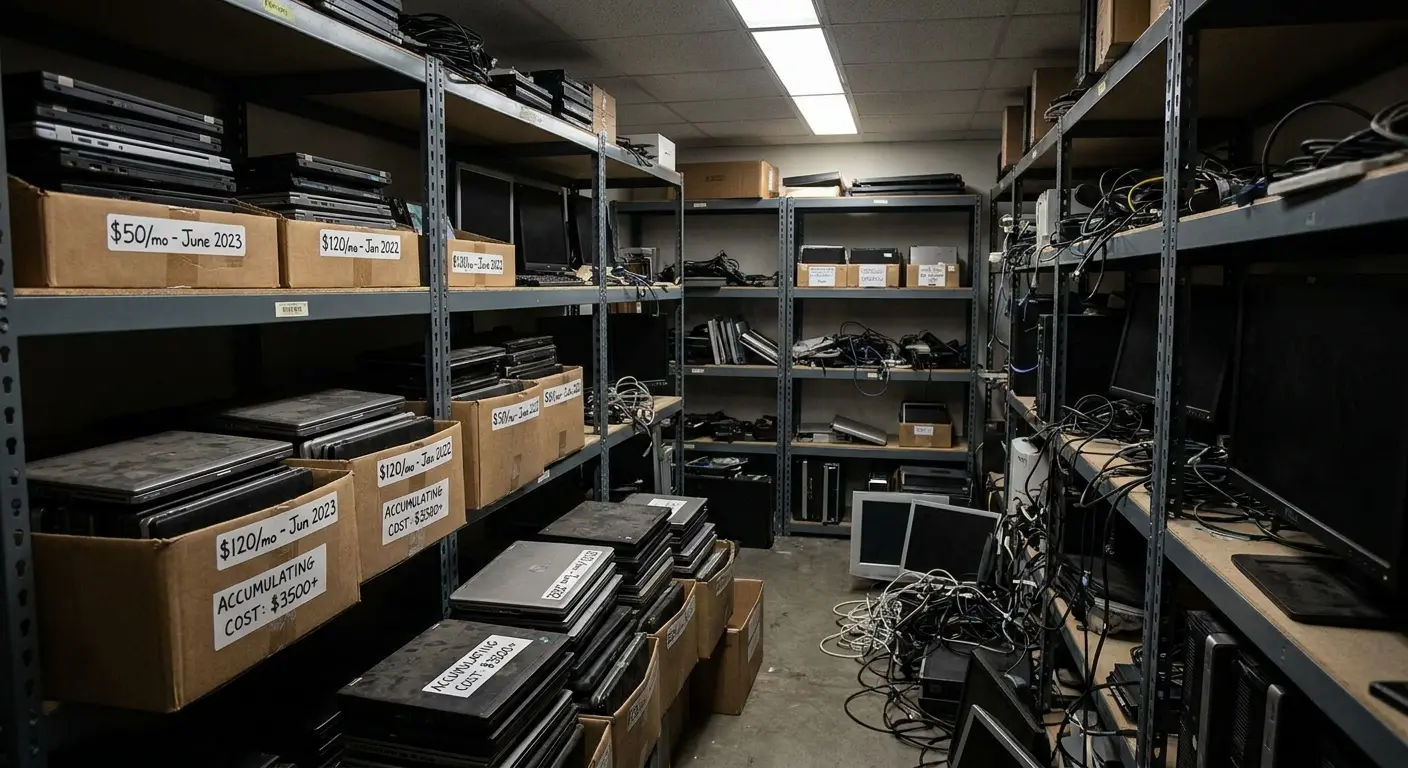
Your DaaS provider should be giving you real-time inventory visibility with automated alerts for devices that haven't been active in 30 days. Most don't, because it's not in their financial interest to help you reduce the number of devices under contract.
Device as a service benefits should include cost optimization through better visibility, not just convenience.
Refresh Cycles: Too Early, Too Late, Never Planned
Device refresh timing is one of those things everyone knows matters but nobody manages well.
Replace too early, and you're throwing away usable life and paying for upgrades people don't need. Replace too late, and you're dealing with performance complaints, security vulnerabilities from unsupported hardware, and emergency replacements that cost more than planned upgrades.
I've seen three approaches to refresh cycles. The "wait til it breaks" crowd who love living dangerously. The "every three years like clockwork" people who waste money on early replacements. And the rare unicorns doing condition-based refresh who actually know what they're doing.
The right approach is condition-based refresh planning. Track device performance metrics, support ticket frequency, and security patch compatibility. Replace devices when data indicates they're becoming a liability, not when a calendar says so.
This requires infrastructure that most DaaS providers don't offer. They're happy to sell you a new device whenever you ask, but they're not proactively managing your fleet health to optimize refresh timing.
Refurbishment and Redeployment: The Opportunity You're Missing
When a device comes back (from an employee departure or role change), what happens next?
In most organizations: nothing, for weeks or months. It sits in a pile somewhere while IT deals with more urgent issues.
That's money sitting idle. A properly refurbished device can be redeployed to a new hire, saving you the cost of a new device. But refurbishment requires process: data sanitization, hardware inspection, software reconfiguration, quality assurance.
Very few companies have the internal capacity to do this efficiently. Even fewer DaaS providers offer it as a core service (as opposed to a manual, slow process you have to request).
The result? You keep ordering new devices while perfectly good used ones gather dust. Your cost per device stays artificially high because you're not capturing the value of returned hardware.
When discussing refurbishment processes and asset recovery, reference our IT asset recovery process to show how companies can recapture value from returned devices.
The Hidden Compliance Burden Nobody Warns You About
Compliance isn't sexy, so it gets ignored in device as a service DaaS sales conversations until it becomes a crisis.
What nobody mentions in the sales pitch: every device creates compliance obligations. Different by country, industry, data type.
Can you prove your devices meet security standards?
Can you prove your devices meet security standards? Can you demonstrate encryption? Can you remotely wipe a stolen laptop in Singapore at 2am?
If you're not sure, you've got a problem.
You need documented processes for data sanitization when devices are retired or reassigned. You need audit trails showing who had access to what data and when.
Most DaaS providers will tell you they're "compliant," but that usually means they have some certifications, not that they're helping you meet your specific compliance obligations. The burden still falls on you to configure policies, enforce standards, document processes, and produce evidence during audits.
If your provider operates across multiple regions, you're dealing with GDPR in Europe, LGPD in Brazil, various data localization requirements in Asia, and sector-specific regulations if you're in healthcare or finance. One misconfigured device in the wrong location can trigger violations that cost six or seven figures.
Your device as a service solution should be reducing compliance burden, not just adding another vendor you have to audit.
Data Sanitization: The Liability Hiding in Your Returns Process
Every device that comes back from an employee contains data. Emails, cached files, browser history, application data, potentially customer information or intellectual property.
That device cannot be redeployed, sold, or recycled until that data is completely and verifiably destroyed. Not just deleted. Sanitized using methods that meet regulatory standards (NIST 800-88 guidelines, for example).
Most companies have a policy for this. Very few consistently execute it.
Devices get wiped using consumer-grade tools, or they get wiped by someone who didn't follow the documented process, or they don't get wiped at all because IT is overwhelmed.
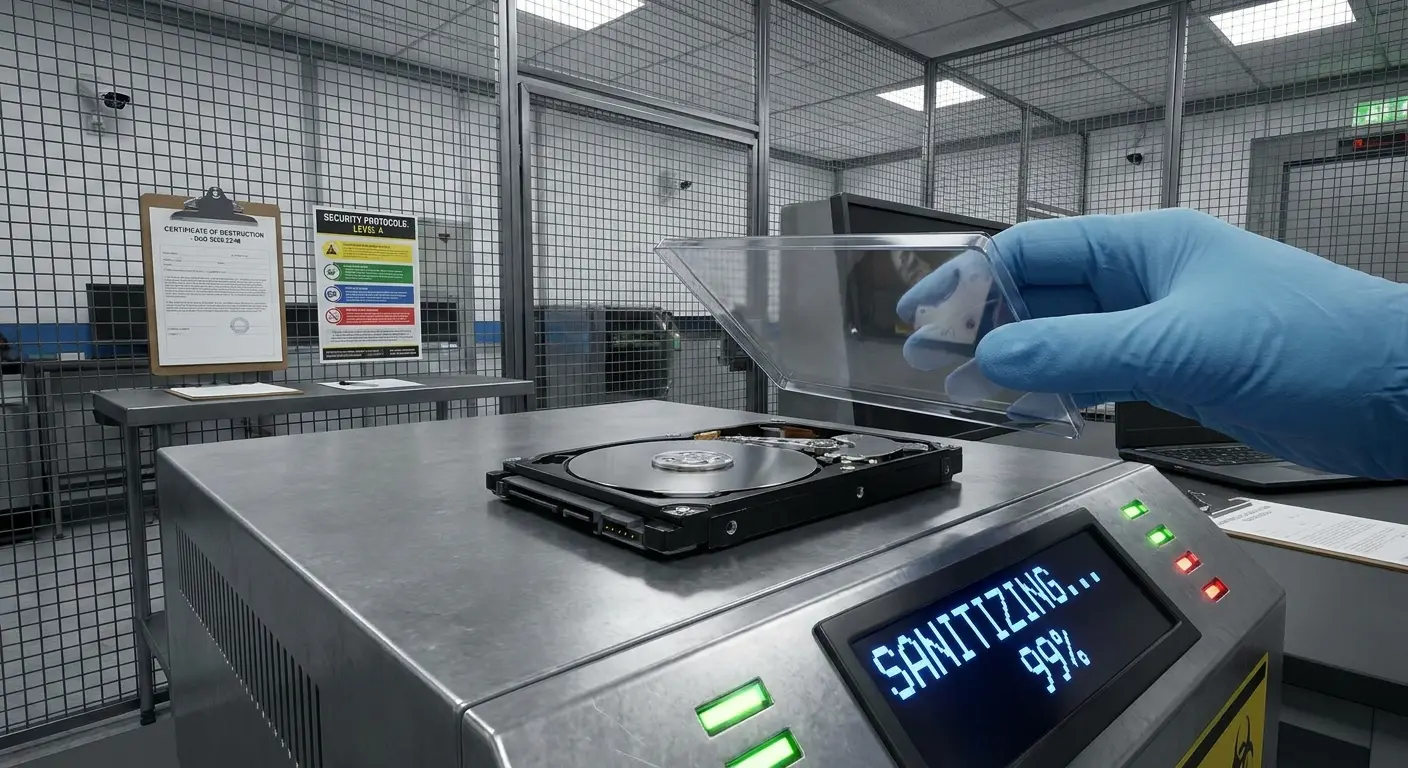
Every one of those scenarios is a compliance violation waiting to be discovered. If you're subject to GDPR, a single improperly sanitized device that gets resold with customer data still on it can trigger fines up to 4% of global revenue.
Your DaaS provider should be handling sanitization as a standard part of device retrieval, with documented proof of sanitization for every device. If they're not offering this, you're still carrying the compliance risk.
Healthcare tech company. Layoffs. Forty laptops go back to their DaaS provider.
The provider does their standard wipe. Single pass, good enough for most stuff. Except these laptops had accessed patient records. HIPAA requires cryptographic multi-pass wipes. The provider didn't know. The company didn't check.
Six months later, one laptop ends up on eBay. New owner finds cached patient records in a recovery partition.
$180K in legal fees. $250K HHS settlement. The DaaS provider's contract? Limited their liability to the cost of the laptop. About $800.
When discussing data sanitization standards and processes, reference our guide on creating an IT asset disposal workflow to help readers establish proper protocols for secure device retirement.
Configuration Standards That Actually Get Enforced
You probably have security policies documented somewhere. Full disk encryption required. Automatic screen lock after five minutes. VPN required for network access. Endpoint detection and response tools installed and active.
How do you know those policies are actually enforced on every device, in every country, for every employee?
Manual configuration is unreliable. People skip steps. Settings get changed. Software doesn't get updated. You end up with a fleet of devices that are theoretically compliant but actually all over the place.
This becomes especially problematic when your DaaS provider is sourcing devices from different suppliers in different regions. Configuration standards vary. What gets deployed in Germany might be different from what gets deployed in India, even though your policy requirements are identical.
You need automated configuration management with continuous compliance monitoring. Devices should be provisioned using templates that enforce your policies, and those policies should be continuously validated. Any drift should trigger alerts.
Most DaaS providers can't do this across their entire service footprint because they don't control the full stack. They're coordinating multiple partners, each with their own processes.
What is device as a service worth if it can't maintain consistent security standards globally?
Audit Trails You'll Actually Need (But Probably Don't Have)
Compliance audits always come at the worst possible time. You get a request for documentation proving your device management practices meet regulatory requirements, and you have 30 days to produce it.
What do you need to show? Device inventory with serial numbers. Deployment dates and recipient names. Configuration policies applied to each device. Software versions and patch status. Access logs showing who had administrative rights. Retrieval dates and sanitization certificates for returned devices.
If you're scrambling to compile this information from multiple spreadsheets, email threads, and tribal knowledge, you're already in trouble.
Your DaaS solution should maintain this audit trail automatically. Every action (deployment, configuration change, retrieval, sanitization) should be logged with timestamps and responsible parties. Reports should be available on demand.
This isn't just about passing audits. It's about being able to answer basic questions like "which devices have access to customer data?" or "how quickly can we remotely wipe devices if someone reports a theft?"
When discussing audit trail requirements and compliance documentation, reference our IT compliance standards guide to provide a framework for meeting regulatory requirements.
Why Your DaaS Provider Might Be Making Your Security Worse
Security is the part of device as a service that sounds great in sales decks and falls apart in execution.
Centralized device management should improve security by enforcing consistent policies and enabling rapid response to threats. But that only works if your provider actually has the technical capability and operational discipline to deliver it.
In reality, many DaaS providers create new security vulnerabilities by introducing inconsistent configurations, delayed patching, inadequate monitoring, and poor incident response. If your provider is using different device sources across regions, you're getting different firmware versions, different preinstalled software, and different security baselines. That inconsistency makes it nearly impossible to maintain a coherent security posture.
Patching is another disaster area. Consumer-grade device management might push OS updates, but what about firmware updates, driver updates, and third-party application patches? Most DaaS providers don't manage the full update stack, which means you're exposed to known vulnerabilities that should have been patched months ago.
Monitoring is often superficial. You might get alerts for obvious problems (device offline for a week), but you're not getting behavioral analysis that detects compromised devices or policy violations.
When an incident does happen, response speed matters enormously, and most device as a service providers don't have 24/7 security operations capability. You're back to relying on your own IT team, which defeats the purpose.
The Patching Gap That Everyone Ignores
Operating system updates get the headlines. A new iOS or Windows version drops, and everyone talks about whether to upgrade immediately or wait for stability.
But OS updates are only part of your attack surface. What about firmware updates for your device hardware? Driver updates for components? Security patches for preinstalled software? Updates for endpoint security tools?
Each of these represents potential vulnerabilities. Attackers actively target outdated firmware and drivers because they know most organizations don't patch them consistently.
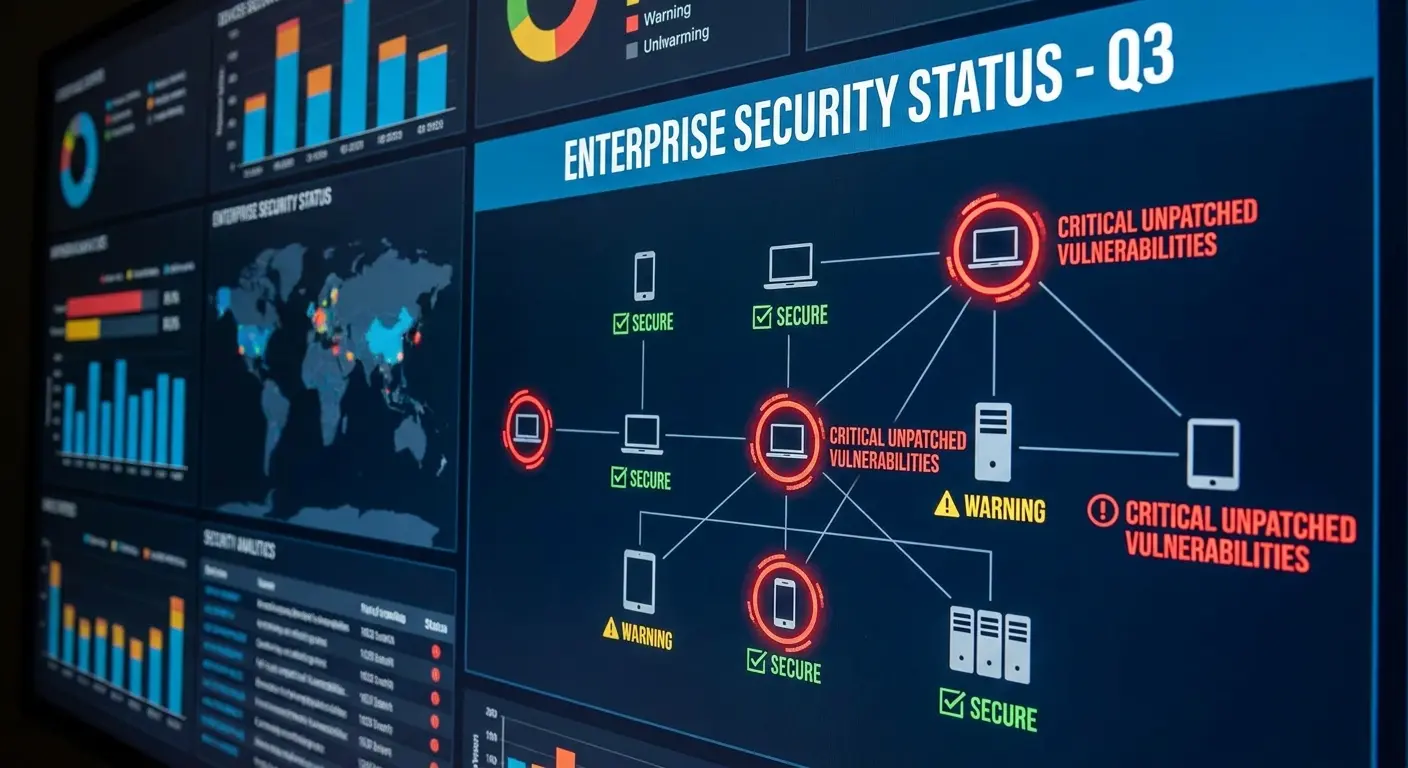
Your DaaS provider should be managing the entire update stack, not just pushing OS updates when they feel like it. That requires deep integration with device management platforms and proactive monitoring of security bulletins.
Most providers don't do this because it's operationally complex and doesn't directly generate revenue. You end up with devices that are technically "up to date" on the OS but running vulnerable firmware from two years ago.
Device service shouldn't mean partial security. It means protection across every layer of your device stack.
Inconsistent Configurations Create Attack Opportunities
Security works when it's uniform. Every device follows the same hardening standards. Every device runs the same security tools. Every device enforces the same access controls.
Inconsistency creates gaps that attackers exploit. If 95% of your devices require VPN for network access but 5% don't (because they were configured differently or someone made an exception), attackers will target that 5%.
DaaS providers that source devices from multiple partners in multiple regions struggle with consistency. A device deployed in Tokyo might have different security configurations than one deployed in Toronto, even though your policy requirements are identical.
This isn't theoretical. I've seen organizations discover during security audits that devices deployed in certain countries had completely different security baselines because the local provider used different imaging processes.
Your DaaS solution should enforce configuration consistency globally. Every device, regardless of where it's deployed, should be provisioned using the same templates and validated against the same compliance checks.
Financial services company. 800 employees across 15 countries. Penetration test discovers 47 devices deployed in Southeast Asia are missing their endpoint detection and response (EDR) software entirely. The DaaS provider's regional partner in that market used a different provisioning process that didn't include the EDR installation step.
Those devices had been operating without threat detection for an average of eight months. The penetration testers gained initial access through one of these unmonitored devices and were able to move laterally through the network for three days before being detected.
Security remediation project: $320,000. Emergency redeployment of all devices in the affected region.
All preventable.
Monitoring That Detects Threats, Not Just Downtime
Most device monitoring focuses on operational metrics. Is the device online? Is it checking in? Is the battery healthy?
That's useful for IT operations, but it doesn't help with security. You need behavioral monitoring that detects anomalies indicating compromise or policy violations.
Is a device suddenly accessing unusual network locations? Is it transferring large amounts of data at odd hours? Has security software been disabled? Are unauthorized applications installed?
These signals indicate problems that need immediate investigation. But most DaaS providers don't offer this level of monitoring because it requires security expertise and 24/7 operations capability.
You're left relying on your own security tools, which means you're paying for device management that doesn't actually manage the security aspects you care most about.
When discussing security monitoring and threat detection capabilities, reference our remote device management guide to show how monitoring should work for distributed teams.
Retrieval and Offboarding: The Chaos You're Not Measuring
Offboarding is where your device as a service solution either proves its value or reveals itself as theater.
Everyone focuses on getting devices to new hires quickly, but getting devices back from departing employees is exponentially harder and almost nobody does it well.
The problem compounds when you're distributed globally. An employee in Mexico gives two weeks notice. Your IT team needs to coordinate device retrieval, but who's handling the logistics? Who's paying for shipping? What happens if the employee ghosts and keeps the device?
You're now dealing with unreturned assets, potential data breaches, and ongoing costs for devices you can't redeploy.
Most DaaS providers treat retrieval as the customer's problem. They'll help if you ask nicely and pay extra, but it's not a core service with guaranteed SLAs. The result is that companies have abysmal retrieval rates. Industry averages hover around 60-70% for distributed teams, which means 30-40% of your device investment just vanishes.
Each unretrieved device represents hardware cost, ongoing service fees, compliance risk from uncontrolled company data, and lost opportunity to redeploy that device to someone else.
You need retrieval to be as reliable as deployment, with clear ownership, defined timelines, and consequences for failure. Without it, your DaaS program is just subsidizing your employees' personal device upgrades.
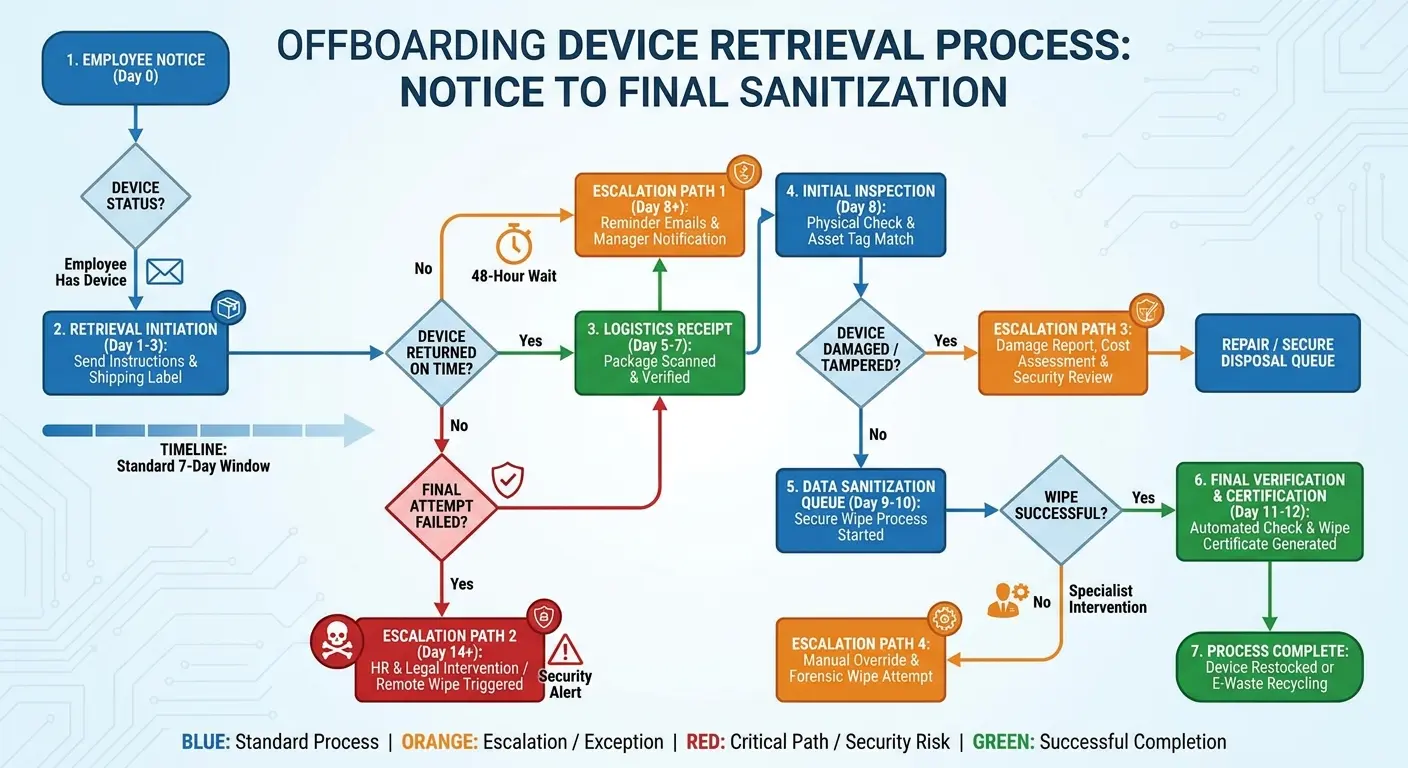
Offboarding Device Retrieval Protocol
Implement this process to improve retrieval rates and reduce asset loss:
Immediate Actions (Day of Notice):
- Create retrieval ticket in device management system with employee name, location, device serial number, and separation date
- Notify DaaS provider or logistics partner with pickup request (target: scheduled within 48 hours)
- Send employee initial communication with retrieval expectations, timeline, and consequences for non-return
- Disable device's ability to enroll new biometrics or change system passwords (prevent lockout scenarios)
Pre-Departure (1 Week Before Final Day):
- Send reminder communication with specific pickup date, time window, and packaging instructions
- Verify shipping label or courier details are confirmed and communicated to employee
- Coordinate with HR to confirm device return is documented in offboarding checklist
- Prepare remote wipe capability (but don't execute until retrieval fails)
Final Day:
- Revoke system access to corporate resources
- Confirm device pickup occurred or reschedule immediately
- If device not returned, escalate to HR and legal for payroll deduction process (where permitted)
Post-Departure (Days 1-30):
- Track device receipt at processing facility within 5 business days
- Execute remote wipe once physical possession confirmed
- Verify sanitization documentation received from provider
- Update asset inventory to reflect device status (returned, sanitized, available for redeployment)
- For unreturned devices: final notice at day 15, payroll deduction at day 30, report as lost/stolen at day 45
The Geography Problem
Retrieving a device from someone in your headquarters city is straightforward. Send them a prepaid shipping label, or have them drop it off.
Retrieving a device from someone in a country where you have no physical presence? That's a completely different challenge.
Who arranges the courier? Who handles customs paperwork if the device crosses borders? Who pays for shipping (which can cost $100+ for international returns)? What happens if the local courier service is unreliable?
Most companies discover these problems only after an employee in a remote location leaves. IT scrambles to figure out logistics while the device sits in the former employee's apartment for weeks or months.
Some employees are cooperative and make an effort. Others are not, especially if they left on bad terms or are simply overwhelmed with their own transition.
Your DaaS provider should own retrieval logistics globally. They deployed the device, they should retrieve it, with the same reliability and speed. If they can't do that, you're not actually outsourcing device management. You're just outsourcing the easy part.
When discussing international retrieval challenges and logistics coordination, reference our guide on how to retrieve remote company equipment after termination to provide strategies for global device recovery.
The Real Cost of Unreturned Devices
You paid $1,500 for a laptop. An employee leaves and doesn't
You paid $1,500 for a laptop. An employee leaves and doesn't return it. You write off $1,500 and move on.
Except that's not the actual cost.
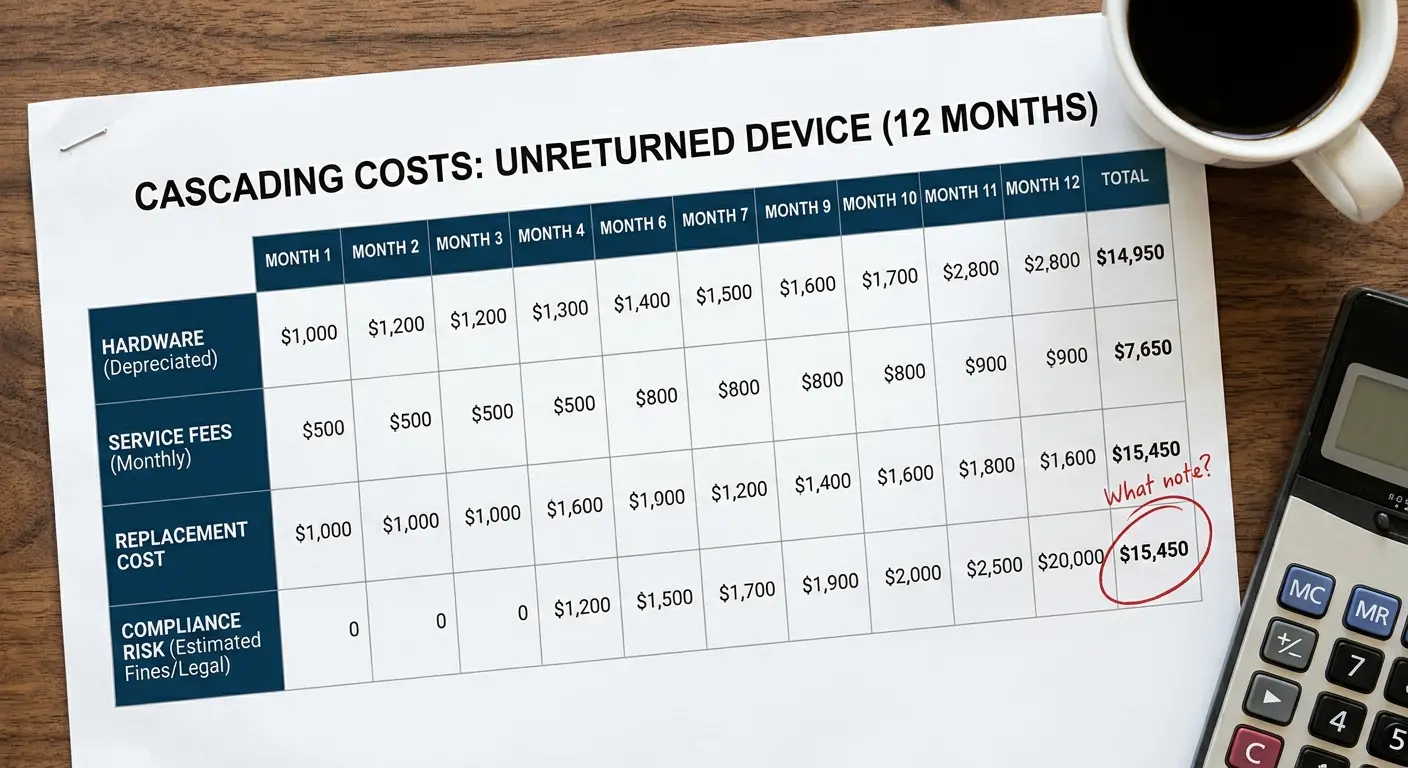
You're also losing the $50/month you were paying in DaaS fees until you formally report it unreturned (which might take months). You're losing the opportunity to redeploy that device to a new hire, forcing you to order a new device instead. You're carrying compliance risk because company data exists on a device you don't control.
Multiply this across dozens of unreturned devices per year, and you're looking at tens of thousands in direct costs plus uncalculated opportunity costs and risk exposure.
The companies that track retrieval rates seriously (most don't) typically see 30-40% of devices go unreturned in distributed environments. That's not a rounding error. That's a structural failure in your device management program.
You need a DaaS provider that treats retrieval as seriously as deployment, with defined SLAs, proactive follow-up, and consequences for non-return (like payroll deductions, which require legal frameworks your provider should help establish).
Device as a service HP and Dell offer enterprise programs, but even major vendors struggle with retrieval logistics for globally distributed teams.
Data Security During the Retrieval Window
From the moment an employee gives notice until the device is retrieved and sanitized, you have a data security problem.
The employee still has access to email, files, applications, and potentially customer data. You can revoke system access, but cached data remains on the device. A disgruntled employee could exfiltrate information. A careless employee could lose the device.
The longer the retrieval window, the greater the risk. If it takes three weeks to get a device back, that's three weeks of exposure.
Remote wipe capabilities help, but they're not perfect. They require the device to be online and connected. A sophisticated bad actor can prevent remote wipe by keeping the device offline.
The only real solution is fast, reliable retrieval. Devices should be picked up within 48-72 hours of employment termination, regardless of location. That requires logistics infrastructure that most DaaS providers simply don't have.
When discussing offboarding security and data protection during employee transitions, reference our secure offboarding automation guide to show how automated processes reduce security risks during the retrieval window.
What Happens When Your Vendor Can't Scale With You
Vendor scalability sounds like a boring operational detail until you're hiring 50 people in a new country and your device as a service provider can't deliver.
Scalability isn't just about volume (can they handle 1,000 devices instead of 100). It's about geographic expansion, service consistency, and response time under pressure.
You're growing into Southeast Asia. Can your vendor actually deploy devices in Vietnam, Thailand, and the Philippines with the same speed and quality as they do in the US and Europe? Most can't, because they don't have established logistics and partnerships in those markets. They'll tell you they can figure it out, which means your new hires become guinea pigs while the vendor learns.
Service quality degradation is the other scalability failure mode. A vendor that's great when you have 200 devices might fall apart at 2,000 because they don't have the operational infrastructure to maintain quality at scale. Response times slow down. Configuration errors increase. Support tickets go unanswered.
You're locked into a contract with a vendor that can't keep up with your growth, and switching vendors mid-stream is painful and expensive.
The worst part is that scalability failures are hard to predict because vendors don't advertise their limitations. They'll take your business and hope they can figure it out, leaving you to deal with the consequences when they can't.
Sourcing and shipping hardware across borders is a discipline of its own, which we cover in the state of global IT hardware procurement.
Geographic Expansion: Where Promises Meet Reality
Your company decides to hire aggressively in Latin America. You tell your DaaS provider you need to deploy 30 devices across Brazil, Mexico, Argentina, and Colombia over the next quarter.
They say "no problem," because saying "we can't do that" would mean losing your business.
What actually happens? Devices arrive late because the vendor doesn't have local inventory. Configurations are inconsistent because they're using different local partners in each country. Support is terrible because they don't have Portuguese or Spanish-speaking staff. Customs issues delay deployments by weeks.
You're now in a position where your hiring plans are constrained by your vendor's operational limitations. You can't move as fast as your business needs because your infrastructure partner can't keep up.
This is especially problematic for high-growth companies expanding into emerging markets. The vendors with the best infrastructure in North America and Europe often have minimal presence in Asia, Africa, or Latin America.
You need to validate geographic capabilities before you commit, not after you've signed a contract. Ask for references from customers operating in the specific countries you care about. Ask about local inventory, logistics partners, and support coverage.
When discussing Latin American expansion challenges and device procurement in emerging markets, reference our guide on how to procure equipment for new hires in Latin America to understand region-specific logistics considerations.
Volume Scaling and the Quality Degradation Curve
A vendor that delivers excellent service for 100 devices might struggle at 500 and completely fall apart at 2,000.
Why? Because scaling requires systems, not just effort. You need automated workflows, robust inventory management, structured support processes, and adequate staffing.
Many DaaS providers are operationally lean (which keeps costs down) but lack the infrastructure to scale gracefully. As volume increases, cracks appear. Deployment timelines slip. Configuration errors multiply. Support response times stretch from hours to days.
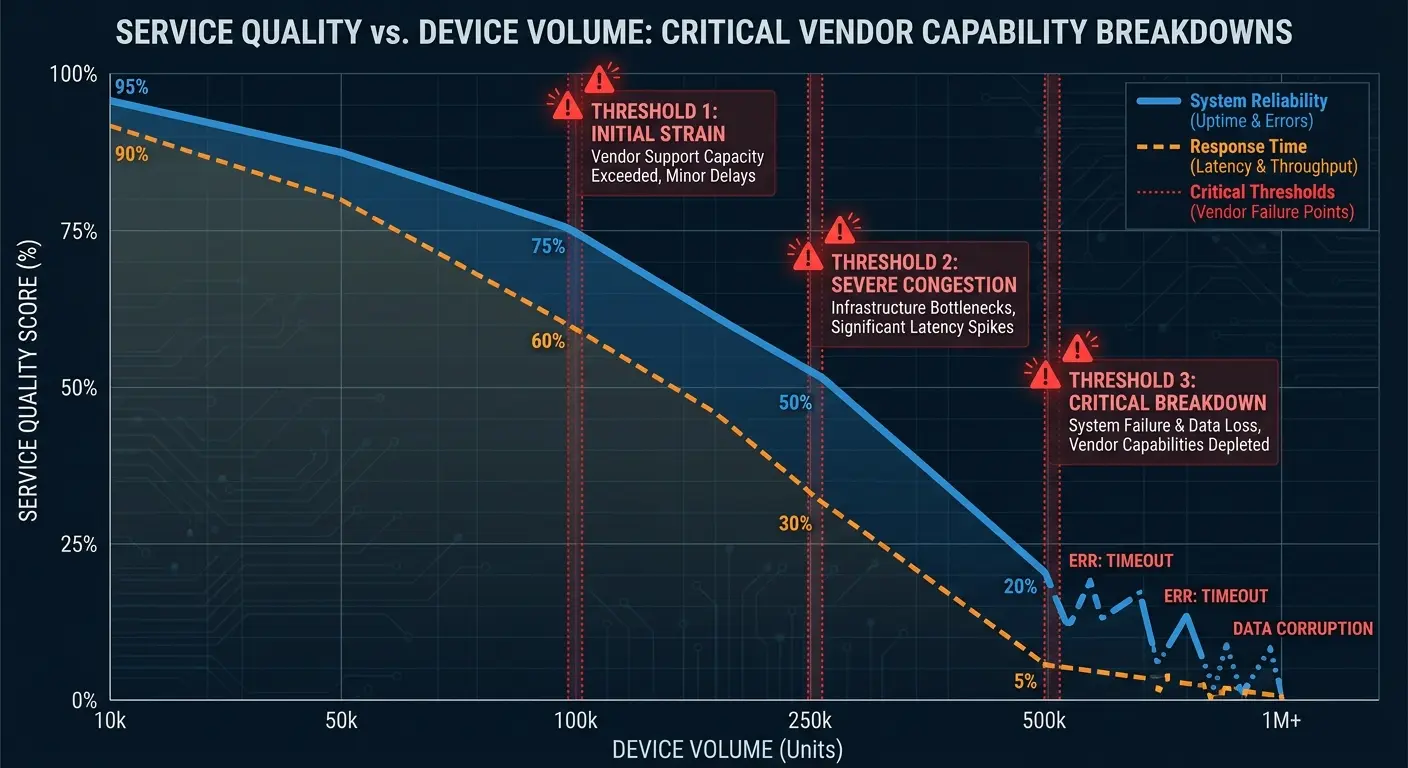
You don't discover this until you're already scaled up and experiencing the problems. By then, switching vendors is a major project that will disrupt your operations for months.
The warning signs appear early if you know what to look for. Are deployment timelines getting longer? Are you seeing more support tickets? Are the same issues recurring because they're not being fixed at the root?
These indicate a vendor that's struggling to scale. Address it early, before it becomes a crisis that forces a painful vendor transition.
The device-as-a-service market is growing rapidly, but not all providers are building infrastructure that scales with demand.
Support Degradation: The Canary in the Coal Mine
Support quality is the most visible indicator of vendor health. When a vendor is scaling beyond their capacity, support is the first thing that breaks.
Tickets that used to get resolved in hours now take days. You're getting generic responses instead of solutions. The same issues keep happening because nobody's fixing root causes.
This isn't just annoying. It directly impacts your team's productivity. An employee with a broken device who can't get support is an employee who can't work.
You need SLA-backed support with defined response times and escalation processes. If your vendor can't commit to specific support standards, they're telling you that support is not a priority.
Watch your support metrics closely. Track ticket volume, resolution time, and recurring issues. If these metrics are degrading, you have a vendor problem that will only get worse as you scale.
Building Flexibility Into Contracts Nobody Reads
DaaS contracts are designed to lock you in, not protect your interests. Vendors want long-term commitments with minimum device counts and limited exit options.
You need flexibility because your business changes faster than contract terms.
Your headcount projections might be wrong. You might decide to shift from full-time employees to contractors who provide their own devices. You might get acquired and need to integrate with a different device management system. You might expand into regions your vendor can't serve.
Standard device as a service contracts don't account for any of this. You're committed to paying for a minimum number of devices regardless of whether you need them. You're locked in for two or three years regardless of whether the vendor is meeting your needs. Early termination penalties are punitive.
The flexibility you need has to be negotiated upfront, before you sign. That means understanding which terms are actually negotiable (most are, despite what the sales rep implies) and which scenarios you need to protect against.
You need clear off-ramps if the vendor fails to meet SLAs. You need the ability to scale down if your headcount decreases. You need geographic flexibility if you expand into markets the vendor can't serve. You need data portability if you switch vendors.
Most companies don't negotiate these terms because they're focused on price and features, then they discover the contract limitations when it's too late to fix them.
Minimum Commitments That Become Anchors
DaaS contracts typically include minimum device commitments. You agree to pay for at least 200 devices per month, regardless of whether you actually need 200 devices.
This makes sense from the vendor's perspective. They need predictable revenue. But it creates risk for you.
What happens if you have a round of layoffs and your headcount drops? You're still paying for devices you're not using. What happens if you shift strategy and decide to hire more contractors who provide their own equipment? You're locked into paying for devices you don't need.
The time to negotiate flexibility is before you sign. You need provisions that allow you to scale down if headcount decreases by more than X%, or if you shift to a different workforce model.
Vendors will resist this because it reduces their revenue predictability. But if they're confident in their service quality, they should be willing to let you scale down if your needs change. If they're not willing, they're telling you they don't expect you to be happy enough to stay voluntarily.
What is device as a service if not a flexible solution that adapts to your business needs?
SLA Enforcement and Actual Consequences
Your contract probably includes service level agreements. Devices will be deployed within five business days. Support tickets will be responded to within four hours. Retrieval will happen within 10 business days.
Great. What happens when the vendor misses these SLAs?
In most contracts: nothing. Or maybe you get a small service credit that doesn't come close to compensating for the actual impact of the failure.
You need SLAs with teeth. If the vendor consistently misses deployment timelines, you should have the right to source devices elsewhere and charge the vendor for the incremental cost. If support is consistently terrible, you should have the right to terminate without penalty.
Vendors will tell you these terms are unreasonable. They're not. You're paying for a service with defined quality standards. If the vendor can't meet those standards, you should have recourse beyond complaining.
The companies with the best DaaS outcomes are the ones that negotiated strong SLA enforcement upfront. They're not hostages to underperforming vendors because they have contractual off-ramps.
When discussing vendor management and contract negotiations, reference our IT vendor management best practices guide to establish effective oversight and accountability frameworks.
Data Portability and Exit Rights
What happens when you decide to switch vendors or bring device management in-house?
You need your data. Device inventory with serial numbers and specifications. Deployment history. Configuration documentation. Support ticket history. User assignments.
Standard contracts don't guarantee data portability. The vendor might give you some of this information, or they might make it difficult and time-consuming to extract.
You need explicit contract terms requiring the vendor to provide complete data exports in standard formats within a defined timeframe. You also need the right to terminate the contract if you're not satisfied with service quality, without paying punitive early termination fees.
Vendors resist these terms because they reduce switching costs, making it easier for you to leave. But that's exactly why you need them. The threat of losing your business is the only real leverage you have to ensure ongoing service quality.
The Real ROI Calculation You're Probably Missing
Most device as a service ROI calculations compare monthly service fees to the cost of buying devices outright. This dramatically understates the actual value (or cost) of your DaaS program.
You're not just buying devices. You're buying (or failing to buy) speed, reliability, compliance assurance, and IT team capacity.
The real ROI calculation needs to include IT hours saved (or wasted), opportunity costs from delayed onboarding, compliance risk reduction, retrieval success rates, and device lifecycle optimization.
A cheap DaaS provider that deploys devices slowly and retrieves them inconsistently might look good on a per-device cost basis but terrible when you calculate the total cost of ownership. Your IT team spends 20 hours per month dealing with device issues that the vendor should be handling. That's $50,000+ annually in fully-loaded labor costs.
New hires wait an extra week for devices, which delays productivity and creates poor first impressions. That's impossible to quantify precisely but clearly has value.
You're paying compliance penalties or audit costs because the vendor doesn't maintain proper documentation. That's real money. Unreturned devices represent both direct hardware costs and ongoing service fees. That adds up fast.
The DaaS providers that deliver actual value are rarely the cheapest on a per-device basis. They're the ones that eliminate hidden costs and create value in areas that don't show up in simple cost comparisons.
Device as a service benefits extend far beyond the sticker price when you account for the full operational impact.
IT Hours: The Cost Nobody Tracks
Your IT team's time is expensive. A mid-level IT administrator costs $80,000 to $120,000 annually in salary plus benefits. That's $40 to $60 per hour in fully-loaded costs.
How many hours per month does your IT team spend on device-related tasks that your DaaS provider should be handling? Tracking shipments. Troubleshooting configuration issues. Coordinating retrievals. Managing inventory. Dealing with vendor support tickets that don't get resolved.
If your team is spending 20 hours per month on this (a conservative estimate for most organizations), that's $9,600 to $14,400 annually per IT person involved.

A more expensive DaaS provider that actually handles these tasks end-to-end might cost $10 more per device per month. For 200 devices, that's $24,000 annually. But if it saves 20 hours per month of IT time, it's cost-neutral or even cost-positive, while freeing your IT team to work on strategic projects instead of logistics.
Most companies never do this calculation. They focus purely on per-device costs and miss the labor cost implications entirely.
Opportunity Cost of Delayed Onboarding
A new hire who waits two weeks for a device is two weeks behind on productivity, relationship building, and integration into your culture.
What's that worth? It depends on the role, but for a senior engineer making $150,000 annually, two weeks of salary is roughly $5,800. That's the direct cost.
The indirect costs are harder to measure but potentially larger. Delayed onboarding increases early-stage turnover risk. It creates negative word-of-mouth (new hires tell candidates they're interviewing with about their experience). It delays project timelines if the new hire was supposed to contribute to something time-sensitive.
A DaaS provider that consistently delivers devices within 48 hours
A DaaS provider that consistently delivers devices within 48 hours instead of two weeks is creating value that doesn't show up in per-device pricing but absolutely shows up in business outcomes.
This is especially important for high-growth companies where hiring velocity directly impacts revenue growth. Every week of delay in getting new hires productive is a week of delayed output.
What is device as a service worth when it eliminates these delays entirely?
Compliance Risk Reduction as ROI
Compliance violations are low-probability, high-impact events. You might go years without an issue, then face a six-figure penalty or lawsuit.
Traditional ROI calculations don't account for risk reduction because it's hard to quantify. But that doesn't mean it lacks value.
A DaaS provider that maintains proper audit trails, enforces configuration standards, handles data sanitization correctly, and manages compliance documentation is reducing your risk exposure. That has real economic value, even if you never face an actual compliance incident.
Insurance works the same way. You pay premiums to protect against unlikely but catastrophic events. Proper compliance management through your DaaS provider is similar. You're paying for risk reduction.
The challenge is that this value is invisible until something goes wrong. The companies that understand this are willing to pay more for providers that take compliance seriously, because they recognize they're buying insurance, not just device management.
Retrieval Success Rate Impact
We covered retrieval challenges earlier. The financial impact:
If you have 500 devices deployed and 20% annual turnover, you should be retrieving 100 devices per year. If your retrieval success rate is 70% (typical for distributed teams with poor retrieval processes), you're losing 30 devices annually.
At $1,500 per device, that's $45,000 in direct hardware costs. Add the DaaS service fees you paid until those devices were written off (average of three months at $50/month equals $4,500). Add the cost of replacement devices you had to order because you couldn't redeploy the unreturned ones (another $45,000 in hardware, though this might be partially offset if you were growing anyway).
You're looking at $90,000+ in annual costs directly attributable to poor retrieval rates. A DaaS provider that achieves 95% retrieval rates through systematic logistics and follow-up is saving you $75,000+ annually on a 500-device fleet.
This never shows up in per-device cost comparisons, but it absolutely affects your total cost of ownership.
Device services that include comprehensive retrieval capabilities deliver measurable ROI that generic providers can't match.
How GroWrk Solves What Traditional DaaS Ignores
Full disclosure: I'm telling you all this because we built GroWrk. After watching the fifth company lose a hire over laptop logistics, I couldn't just consult anymore. Someone had to fix this.
Here's what we did differently and why it matters.
The core insight was that distributed teams need different infrastructure than traditional DaaS was designed for. You can't just take an enterprise device management model built for office-based workforces and apply it to teams spread across 50 countries. The logistics don't work. The support model doesn't work. The compliance frameworks don't work.
GroWrk handles device deployment in 150+ countries with local inventory and logistics partnerships that enable 48-72 hour delivery timelines. We own the retrieval process end-to-end with systematic follow-up and 90%+ retrieval rates because we treat it as core service, not an afterthought.
For a real-world example, see how Upwork centralized device logistics across 30+ countries with GroWrk.
We maintain compliance documentation and audit trails automatically because we know you'll need them eventually. We provide real-time inventory visibility and lifecycle management because flying blind is expensive.
We scale with you into new markets without degradation in service quality because we've built infrastructure specifically for global operations. This isn't about being better than traditional device as a service providers at what they do. It's about solving problems they weren't designed to solve in the first place.
Is it perfect? No. Logistics in some African countries still take 5-7 days instead of 48 hours. We're working on it. The compliance documentation piece took us 18 months to get right. It's boring infrastructure work that nobody wants to build.
Built for Distributed Teams From Day One
Traditional DaaS providers evolved from enterprise IT models designed for office-based workforces. They're optimized for bulk deployments to headquarters locations, not one-off deployments to 50 different countries.
GroWrk started with distributed teams as the core use case. Every process, every partnership, every system was designed around the challenges of managing devices for employees who are everywhere.
That means local inventory in key markets so we can deliver quickly without international shipping delays. It means logistics partnerships in 150+ countries so retrieval actually works. It means support coverage across time zones so your employee in Sydney gets help during their business day, not yours.
When you're deploying a device to someone in Vietnam or Nigeria or Colombia, you're not an edge case we're trying to accommodate. You're exactly the scenario we built for.
When discussing distributed team infrastructure and global device management, reference our guide on how to manage a distributed team to provide broader strategies for supporting remote workforces.
Retrieval That Actually Works
We guarantee 90%+ retrieval rates because we've built systematic processes that don't rely on employee cooperation alone.
When an employee gives notice, retrieval starts immediately. We coordinate pickup directly with the employee using local courier services. We follow up proactively if devices aren't returned on schedule. We work with your HR and legal teams to establish frameworks for payroll deduction if devices aren't returned (where legally permissible).
This isn't magic. It's operational discipline and infrastructure that most DaaS providers don't have because retrieval doesn't generate revenue for them.
For us, retrieval is core to the service model. High retrieval rates reduce your costs (fewer replacement devices needed) and our costs (we can refurbish and redeploy returned devices). The incentives are aligned.
Device as a service Dell and similar enterprise programs often struggle with retrieval logistics for globally distributed teams, which is where purpose-built solutions make a difference.
Compliance as a Feature, Not a Burden
Every device deployed through GroWrk is automatically documented with full audit trails. Deployment date, recipient, configuration applied, software versions, access permissions. When a device is retrieved, sanitization is documented with certificates proving data destruction met regulatory standards.
You can pull compliance reports at any time showing your complete device inventory, configuration compliance status, and lifecycle documentation. When auditors ask questions, you have answers immediately instead of scrambling through spreadsheets.
We also help you establish and enforce configuration policies globally. Your security requirements get translated into device templates that are applied consistently regardless of where a device is deployed. Compliance monitoring is continuous, with alerts if any device drifts from policy.
This level of compliance infrastructure is typically only available to large enterprises with dedicated IT security teams. We make it available to companies of any size because it's built into our platform.
Real-Time Visibility Into Your Device Fleet
You should always know exactly how many devices you have, where they are, who has them, what condition they're in, and when they need to be refreshed.
GroWrk provides a dashboard with real-time inventory visibility. You can see devices by location, by employee, by age, by status. You can identify unused devices that should be retrieved. You can plan refresh cycles based on actual device health data instead of arbitrary timelines.
This visibility enables better decision-making. You can forecast device needs accurately instead of guessing. You can identify cost optimization opportunities (unused devices, premature refreshes, inefficient configurations). You can respond quickly to issues (a spike in support tickets for a particular device model indicates a problem that needs attention).
Most DaaS providers treat this level of visibility as a premium feature. We treat it as basic functionality because managing devices without data is just guessing.
When discussing real-time inventory visibility and asset tracking capabilities, reference our guide on how to track your IT assets globally with GroWrk to show the specific platform features that enable comprehensive device oversight.
Final Thoughts
DaaS should make your life easier. It should eliminate the operational burden of device management so your IT team can focus on strategic work. It should enable fast, reliable onboarding regardless of where you're hiring. It should reduce compliance risk instead of creating new gaps.
Most DaaS providers don't deliver this because they're optimized for the wrong things. They're optimized for cost per device instead of total cost of ownership. They're optimized for deployment instead of full lifecycle management. They're optimized for office-based workforces instead of distributed teams.
The result is that companies end up with DaaS programs that look good on paper but create constant operational friction in practice. You're still tracking down unreturned devices. You're still dealing with compliance gaps. You're still watching new hires wait weeks for equipment.
The shift to distributed work requires infrastructure built specifically for that reality. Device management for a team spread across 50 countries is completely different from device management for a team in one office building. The logistics are different. The compliance requirements are different. The support needs are different.
When you're evaluating DaaS providers, don't just compare per-device costs. Ask about retrieval rates. Ask about geographic coverage and deployment timelines in the specific countries you care about. Ask about compliance documentation and audit trail capabilities. Ask about what happens when they miss SLAs.
The answers will tell you whether you're buying actual device management or just subsidized hardware procurement.
Ask those questions. Push for real answers, not sales answers.
Because right now? You're probably paying for device management and getting subsidized hardware procurement.
And that three-week delay before your next hire gets a laptop? That's the cost of not knowing the difference.